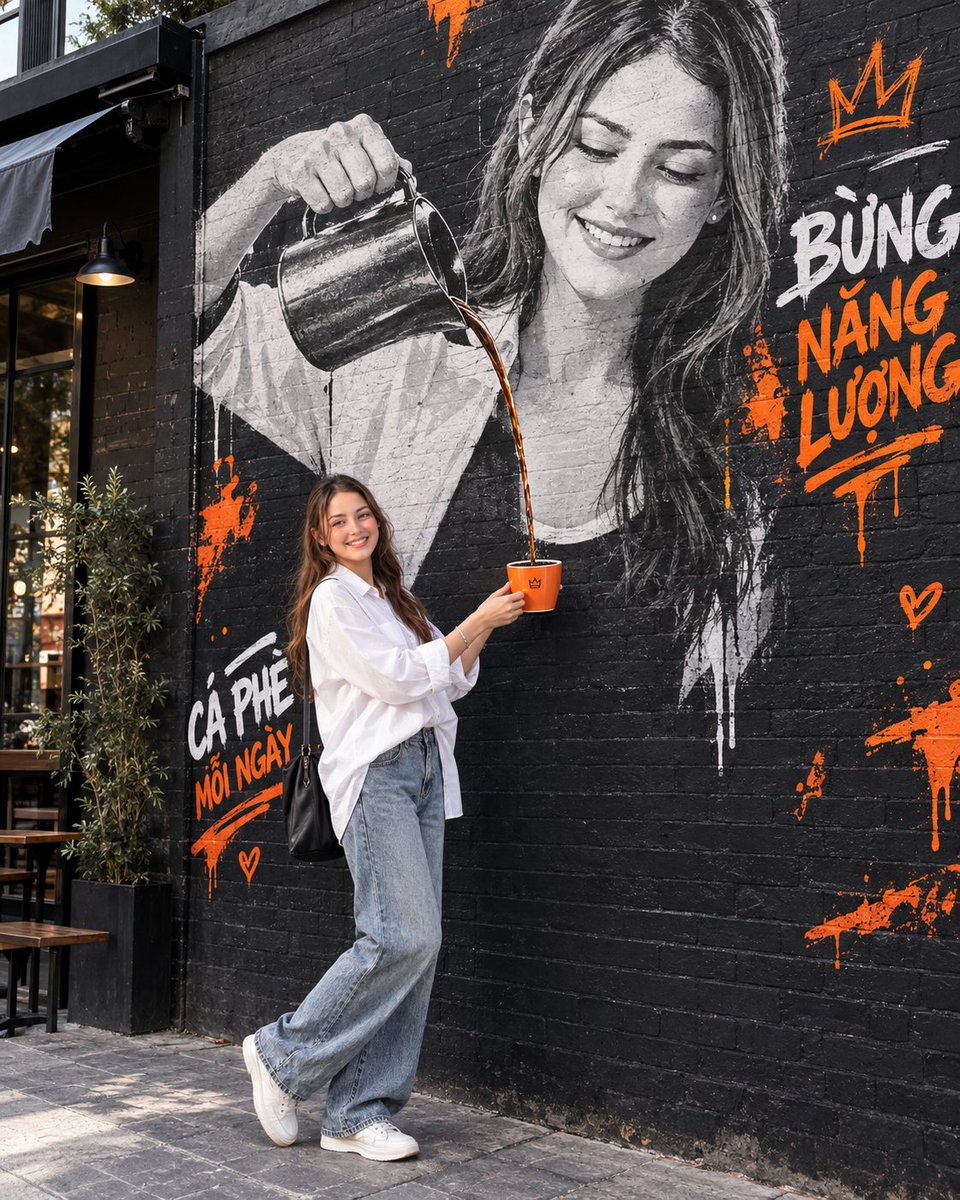
Interactive Mural Coffee Photo
A prompt for GPT Image 2 to create a street-editorial photo where a person interacts with a large mural of themselves pouring coffee.
This is a GPT Image 2 prompt case for Portrait & Character. Use the copy-ready prompt below to generate similar visuals, and review Awesome GPT Image 2 Prompts attribution plus commercial-use rights before reuse.
Free 1K preview
Generate one preview image instantly, no sign-up required.
Free text preview doesn’t preserve reference-image consistency.
Prompt
Copy-ready prompt
Use the person in the reference image as the main character, suitable for both male and female subjects. Preserve the exact facial identity, facial structure, age, skin tone, and natural expression. Do not change the person’s identity or create an artificial/plastic-looking face.

Create a 4:5 vertical street-editorial photograph set in a stylish urban café alley with a large black brick wall. On the wall, create a huge black-and-white realistic mural depicting the same person from the reference image, holding a metallic coffee pot and pouring coffee downward.

The real person stands directly below the mural, holding a coffee cup positioned perfectly under the stream of coffee coming from the mural, creating a fun, artistic, interactive, and viral visual effect.

For a female subject:
Wear an oversized white shirt with a relaxed, slightly loose fit, youthful and modern styling, naturally tucked in, paired with jeans or dark-colored trousers and clean sneakers. Avoid a stiff corporate look or tight-fitting clothing.

For a male subject:
Use a modern urban-casual outfit that looks youthful, clean, stylish, and contemporary.

The mural should have a realistic street-art aesthetic, featuring black and white tones with bold orange accents, expressive brush strokes, paint drips, and short graffiti typography such as “BỪNG NĂNG LƯỢNG” or “CÀ PHÊ MỖI NGÀY.”

Use neutral daylight with natural skin tones and no excessive yellow color cast. Camera angle should be slightly low and editorial, showing the subject full-body with a relaxed, natural pose. Do not use a chin-on-hand pose.

Ultra-photorealistic, cinematic depth of field, realistic hands, accurate coffee stream, natural body proportions, authentic skin texture, highly detailed, 8K quality.

Do not copy the exact composition of the reference/sample image. Keep only the core concept of a real person interacting with a giant mural while creating a fresh, original, visually striking composition.
Best for
- - Portrait & Character visual exploration
- - Image generation and reference-image edits
- - Reusable briefs that keep source attribution visible
Change these parts
- - Subject, product, character, or scene
- - Aspect ratio, camera, lighting, and background
- - Brand, text, color, and output constraints
Recommended model and settings
- - Model: gpt-image-2
- - Input mode: Image to Image
- - Aspect ratio: source
- - Commercial status: review original source
How to use this prompt
- 1. Copy the prompt and preserve its structure for the first test.
- 2. Replace the subject, context, and publishing channel.
- 3. Change one camera, lighting, or style variable per iteration.
- 4. Inspect the output, source, text, and rights before reuse.
Limitations, source, and reuse cautions
- - Generated output is an editable draft, not factual, legal, or rights evidence.
- - Review the linked source, people, brands, logos, text, and third-party media before commercial use.
More cases in this category
Prioritized by category, input mode compatibility, quality, and lower risk.
Reuse and source notes
Use this prompt safely after previewing the case.
- 1.Copy the prompt or open it directly in Dovoo with the generation button.
- 2.Adjust variables, aspect ratio, and reference images for your own use case.
- 3.Before publishing or paid usage, verify source rights, attribution requirements, and brand or likeness risks.
Can I use this prompt commercially?
Commercial-use status is allowed. Review the original source, license, brand constraints, and legal requirements before paid usage.
Where does this case come from?
This case is imported from Awesome GPT Image 2 Prompts; keep attribution visible and check the source URL before reuse.