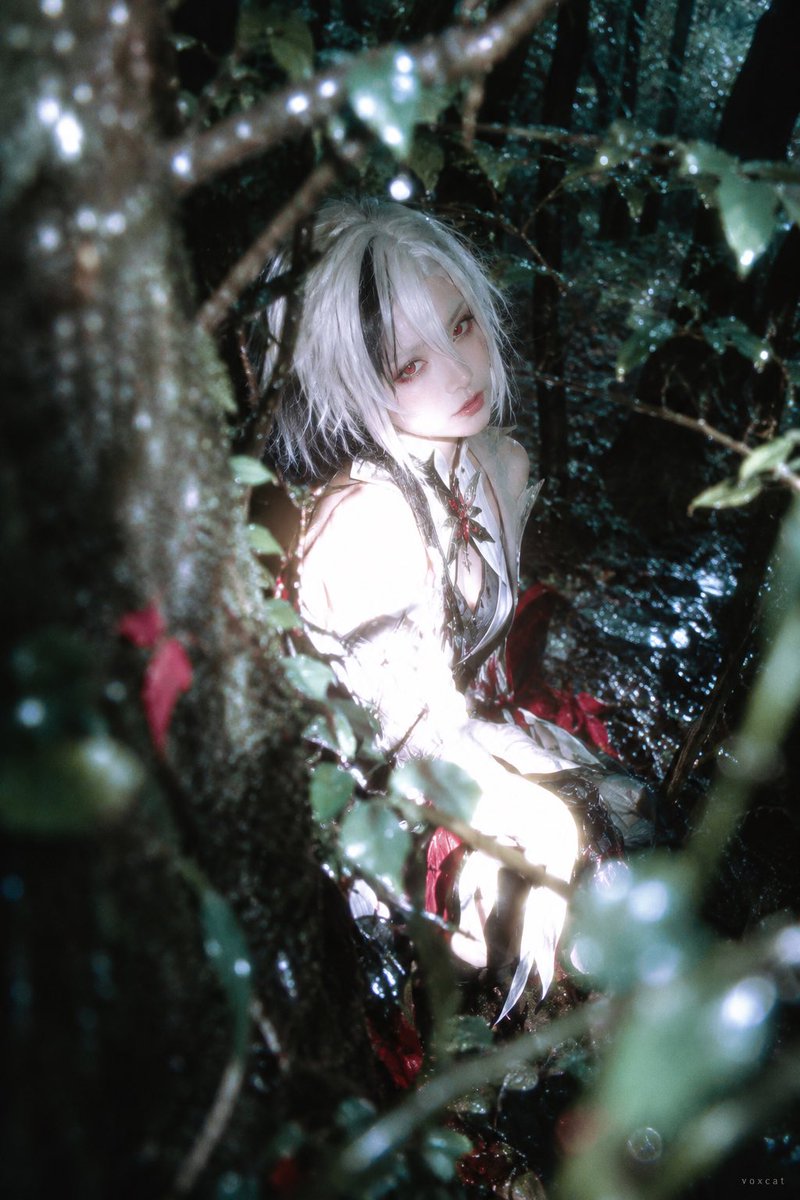
Forest Flash Photography Portrait
Prompt for a portrait in a deep green forest with flash exposure techniques.
This is a GPT Image 2 prompt case for Portrait & Character. Use the copy-ready prompt below to generate similar visuals, and review Awesome GPT Image 2 Prompts attribution plus commercial-use rights before reuse.
Free 1K preview
Generate one preview image instantly, no sign-up required.
Free text preview doesn’t preserve reference-image consistency.
Prompt
Copy-ready prompt
{argument name="character" default="[Character]"}, clearly adult photorealistic, Ilfochrome / dye-transfer high color density photography x liminal forest x private photography x partial overexposure fade-out.

Retain core character identity: hairstyle outline, hair color, eyes, clothing main color and iconic accessories.

Character placed in humid dark forest, body sideways, looking back at camera. Close-range tree trunks and branches/leaves invade from screen edges, forming foreground/background occlusion, face clearly revealed through foliage.

Partial direct flash makes face, arms and light-colored clothing approach glowing white volumes, some fabric details blending into highlights. Background maintains deep green-black and cool cyan shadows, small amount of red identity elements as high-purity color anchors. Wet leaves create fine reflections, foreground branches/leaves slightly out of focus, combined with colorful bokeh and partial motion blur, presenting private record feel of accidental night capture.

2:3 vertical format, text element is tiny "voxcat" signature in bottom right corner.
Prompt variables
Editable argument placeholders found in the prompt, with their default values.
Best for
- - Portrait & Character visual exploration
- - Image generation and reference-image edits
- - Reusable briefs that keep source attribution visible
Change these parts
- - Subject, product, character, or scene
- - Aspect ratio, camera, lighting, and background
- - Brand, text, color, and output constraints
Recommended model and settings
- - Model: gpt-image-2
- - Input mode: Image to Image
- - Aspect ratio: source
- - Commercial status: review original source
How to use this prompt
- 1. Copy the prompt and preserve its structure for the first test.
- 2. Replace the subject, context, and publishing channel.
- 3. Change one camera, lighting, or style variable per iteration.
- 4. Inspect the output, source, text, and rights before reuse.
Limitations, source, and reuse cautions
- - Generated output is an editable draft, not factual, legal, or rights evidence.
- - Review the linked source, people, brands, logos, text, and third-party media before commercial use.
More cases in this category
Prioritized by category, input mode compatibility, quality, and lower risk.


Reuse and source notes
Use this prompt safely after previewing the case.
- 1.Copy the prompt or open it directly in Dovoo with the generation button.
- 2.Adjust variables, aspect ratio, and reference images for your own use case.
- 3.Before publishing or paid usage, verify source rights, attribution requirements, and brand or likeness risks.
Can I use this prompt commercially?
Commercial-use status is allowed. Review the original source, license, brand constraints, and legal requirements before paid usage.
Where does this case come from?
This case is imported from Awesome GPT Image 2 Prompts; keep attribution visible and check the source URL before reuse.