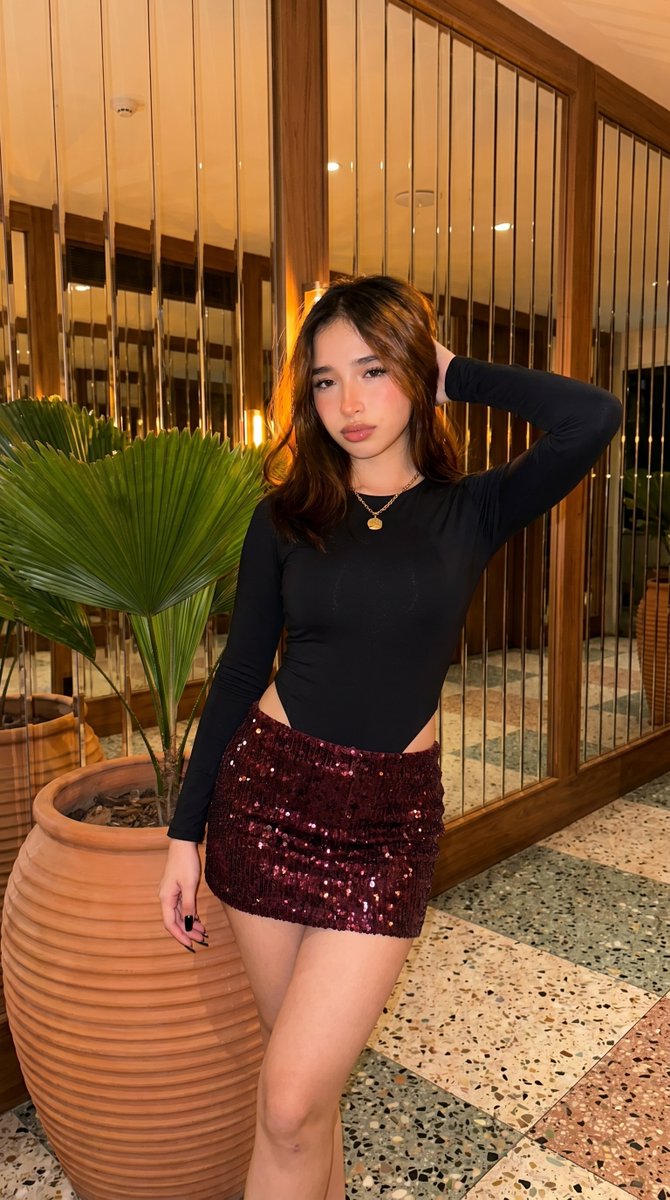
High-Fidelity Fashion Photography Prompt
A prompt for realistic, high-fidelity fashion photography that places a subject in an upscale hotel lobby with specific camera settings and identity preservation.
This is a GPT Image 2 prompt case for Fashion & Beauty. Use the copy-ready prompt below to generate similar visuals, and review Awesome GPT Image 2 Prompts attribution plus commercial-use rights before reuse.
Free 1K preview
Generate one preview image instantly, no sign-up required.
Prompt
Copy-ready prompt
(9:16) Raw high-fidelity photo, eye-level, medium shot, {argument name="camera" default="iPhone 17 Pro sim"}, 35mm, f/4, sharp subject, natural depth, authentic grain. Framing: Subject ~60%, ~2m, centered, mirrored wall + plants, terrazzo floor. Identity Lock: Preserve ALL facial features; natural skin clarity, soft glow, refined highlights, salon hair, bio-fidelity (pores, vellus hair, hydration). Expression: {argument name="expression" default="Confident, direct gaze"}, neutral lips, slight head tilt (~10° left). Hair: Straight center part, slightly lifted, warm highlights. Makeup: Mauve lip, light base, defined lashes. Accessories: Gold charm necklace, black glossy nails. Outfit: {argument name="outfit" default="Black bodysuit + burgundy sequined mini skirt"}, tight fit, high shine, S-curve. Pose: Torso ~20° right, hips forward, leaning on pot, left hand in hair. Mood: Elegant, warm (black, burgundy, terracotta), ~3200K, moderate-high contrast. Environment: Upscale lounge, mirrored wall, terracotta pots, terrazzo floor, warm light.Prompt variables
Editable argument placeholders found in the prompt, with their default values.
Best for
- - Fashion & Beauty visual exploration
- - Image generation and reference-image edits
- - Reusable briefs that keep source attribution visible
Change these parts
- - Subject, product, character, or scene
- - Aspect ratio, camera, lighting, and background
- - Brand, text, color, and output constraints
Recommended model and settings
- - Model: gpt-image-2
- - Input mode: Text to Image
- - Aspect ratio: source
- - Commercial status: review original source
How to use this prompt
- 1. Copy the prompt and preserve its structure for the first test.
- 2. Replace the subject, context, and publishing channel.
- 3. Change one camera, lighting, or style variable per iteration.
- 4. Inspect the output, source, text, and rights before reuse.
Limitations, source, and reuse cautions
- - Generated output is an editable draft, not factual, legal, or rights evidence.
- - Review the linked source, people, brands, logos, text, and third-party media before commercial use.
More cases in this category
Prioritized by category, input mode compatibility, quality, and lower risk.
Reuse and source notes
Use this prompt safely after previewing the case.
- 1.Copy the prompt or open it directly in Dovoo with the generation button.
- 2.Adjust variables, aspect ratio, and reference images for your own use case.
- 3.Before publishing or paid usage, verify source rights, attribution requirements, and brand or likeness risks.
Can I use this prompt commercially?
Commercial-use status is allowed. Review the original source, license, brand constraints, and legal requirements before paid usage.
Where does this case come from?
This case is imported from Awesome GPT Image 2 Prompts; keep attribution visible and check the source URL before reuse.