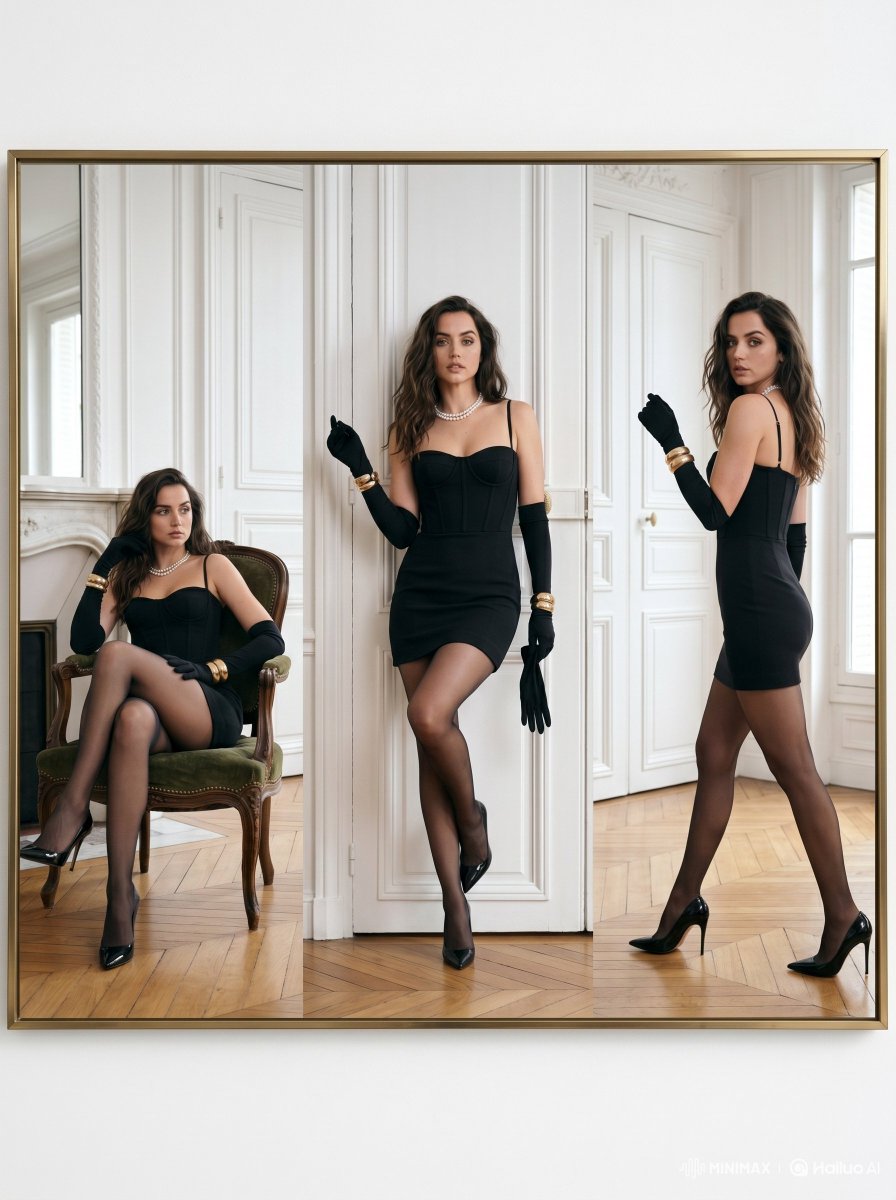
High Fashion Triple Panel Editorial
A sophisticated high-fashion editorial prompt for creating triple-panel vertical compositions, featuring elegant styling and a luxurious Parisian apartment setting.
This is a GPT Image 2 prompt case for Fashion & Beauty. Use the copy-ready prompt below to generate similar visuals, and review Awesome GPT Image 2 Prompts attribution plus commercial-use rights before reuse.
Free 1K preview
Generate one preview image instantly, no sign-up required.
Prompt
Copy-ready prompt
Ultra-luxury fashion editorial portrait of a {argument name="subject" default="glamorous woman inspired by Ana de Armas"}, displayed in a sophisticated triple-panel composition inside an elegant gold frame. Scene set in a bright Parisian apartment with tall white paneled walls, natural daylight, herringbone wooden floor, and {argument name="interior architecture" default="refined French"} interior architecture. The woman wears a fitted black mini cocktail dress with thin straps, sheer black stockings, long black opera gloves, glossy black stilettos, layered pearl necklace, and gold bracelets. {argument name="poses" default="Three cinematic poses across vertical split panels"}: seated elegantly on a vintage green velvet chair, standing confidently against the wall, and walking gracefully while looking back. High-fashion Vogue aesthetic, timeless femininity, soft luxury mood, clean composition, realistic skin texture, cinematic lighting, subtle shadows, premium editorial photography, Leica medium format look, ultra-detailed, photorealistic, luxury campaign style.Prompt variables
Editable argument placeholders found in the prompt, with their default values.
Best for
- - Fashion & Beauty visual exploration
- - Image generation and reference-image edits
- - Reusable briefs that keep source attribution visible
Change these parts
- - Subject, product, character, or scene
- - Aspect ratio, camera, lighting, and background
- - Brand, text, color, and output constraints
Recommended model and settings
- - Model: gpt-image-2
- - Input mode: Text to Image
- - Aspect ratio: source
- - Commercial status: review original source
How to use this prompt
- 1. Copy the prompt and preserve its structure for the first test.
- 2. Replace the subject, context, and publishing channel.
- 3. Change one camera, lighting, or style variable per iteration.
- 4. Inspect the output, source, text, and rights before reuse.
Limitations, source, and reuse cautions
- - Generated output is an editable draft, not factual, legal, or rights evidence.
- - Review the linked source, people, brands, logos, text, and third-party media before commercial use.
More cases in this category
Prioritized by category, input mode compatibility, quality, and lower risk.

Reuse and source notes
Use this prompt safely after previewing the case.
- 1.Copy the prompt or open it directly in Dovoo with the generation button.
- 2.Adjust variables, aspect ratio, and reference images for your own use case.
- 3.Before publishing or paid usage, verify source rights, attribution requirements, and brand or likeness risks.
Can I use this prompt commercially?
Commercial-use status is allowed. Review the original source, license, brand constraints, and legal requirements before paid usage.
Where does this case come from?
This case is imported from Awesome GPT Image 2 Prompts; keep attribution visible and check the source URL before reuse.