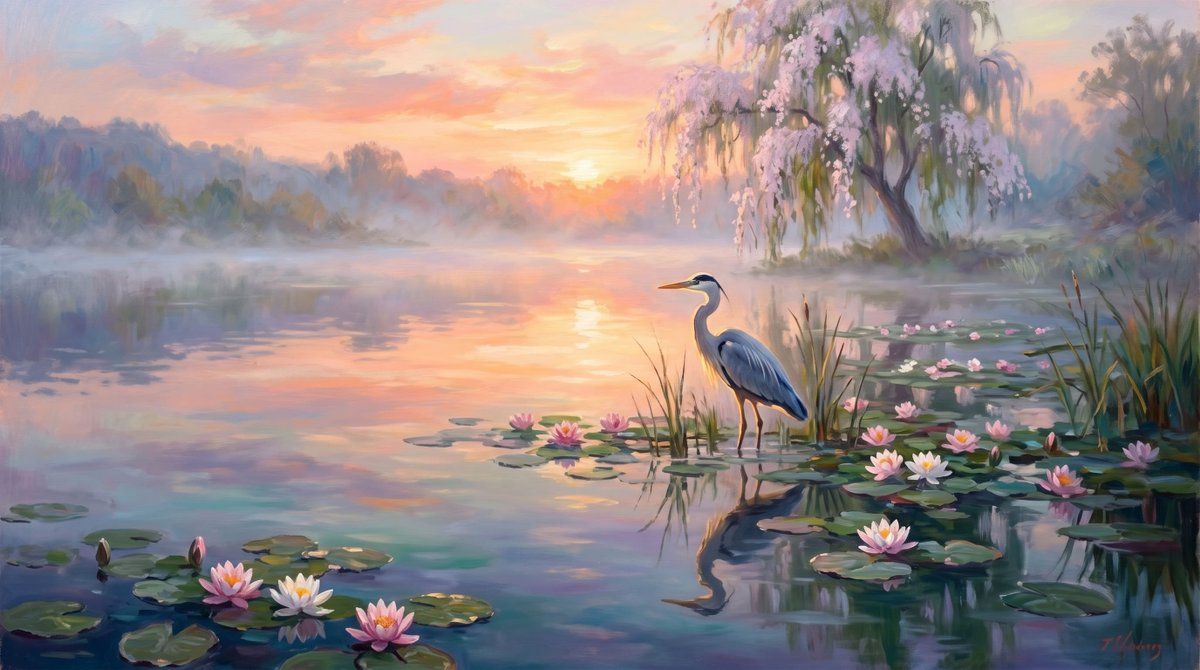
Misty Lotus Pond Heron Sunrise
A tranquil impressionist landscape prompt for creating a pastel sunrise pond scene with a heron, water lilies, reflections, mist, and blooming willow trees.
This is a GPT Image 2 prompt case for Landscape & Nature. Use the copy-ready prompt below to generate similar visuals, and review Awesome GPT Image 2 Prompts attribution plus commercial-use rights before reuse.
Free 1K preview
Generate one preview image instantly, no sign-up required.
Prompt
Copy-ready prompt
Create a serene impressionist oil painting of a misty lotus pond at sunrise, with a {argument name="bird species" default="great blue heron"} standing in shallow water slightly right of center among tall reeds and lily pads. The wide horizontal composition shows calm reflective water filling the foreground and middle ground, with exactly 14 visible water lilies: 3 large blossoms clustered at the lower left, 1 bud near them, 3 small pink blossoms near the center, 1 white blossom and 1 pink blossom beside the heron, 4 blossoms scattered across the right-side lily pads, and 1 small blossom near the far right reeds. Add many round green lily pads, soft ripples, and a clear reflected silhouette of the heron in the water. In the background, place a hazy tree line and a graceful willow-like tree on the right bank covered in pale pink blossoms and drooping branches. The sun sits low near the horizon in the center-left, glowing through peach, coral, lavender, and pale blue clouds, with warm golden light reflecting as a vertical path across the pond. Use a dreamy pastel palette, loose visible brushstrokes, atmospheric mist, romantic tranquil mood, painterly realism, soft edges, no text, no people, no buildings, no harsh contrast. Customize the scene with {argument name="time of day" default="sunrise"}, {argument name="flower color" default="pink and white"}, {argument name="sky palette" default="peach, coral, lavender, and pale blue"}, and {argument name="art style" default="impressionist oil painting"}.Prompt variables
Editable argument placeholders found in the prompt, with their default values.
Best for
- - Landscape & Nature visual exploration
- - Image generation and reference-image edits
- - Reusable briefs that keep source attribution visible
Change these parts
- - Subject, product, character, or scene
- - Aspect ratio, camera, lighting, and background
- - Brand, text, color, and output constraints
Recommended model and settings
- - Model: gpt-image-2
- - Input mode: Text to Image
- - Aspect ratio: source
- - Commercial status: review original source
How to use this prompt
- 1. Copy the prompt and preserve its structure for the first test.
- 2. Replace the subject, context, and publishing channel.
- 3. Change one camera, lighting, or style variable per iteration.
- 4. Inspect the output, source, text, and rights before reuse.
Limitations, source, and reuse cautions
- - Generated output is an editable draft, not factual, legal, or rights evidence.
- - Review the linked source, people, brands, logos, text, and third-party media before commercial use.
More cases in this category
Prioritized by category, input mode compatibility, quality, and lower risk.

Reuse and source notes
Use this prompt safely after previewing the case.
- 1.Copy the prompt or open it directly in Dovoo with the generation button.
- 2.Adjust variables, aspect ratio, and reference images for your own use case.
- 3.Before publishing or paid usage, verify source rights, attribution requirements, and brand or likeness risks.
Can I use this prompt commercially?
Commercial-use status is allowed. Review the original source, license, brand constraints, and legal requirements before paid usage.
Where does this case come from?
This case is imported from Awesome GPT Image 2 Prompts; keep attribution visible and check the source URL before reuse.