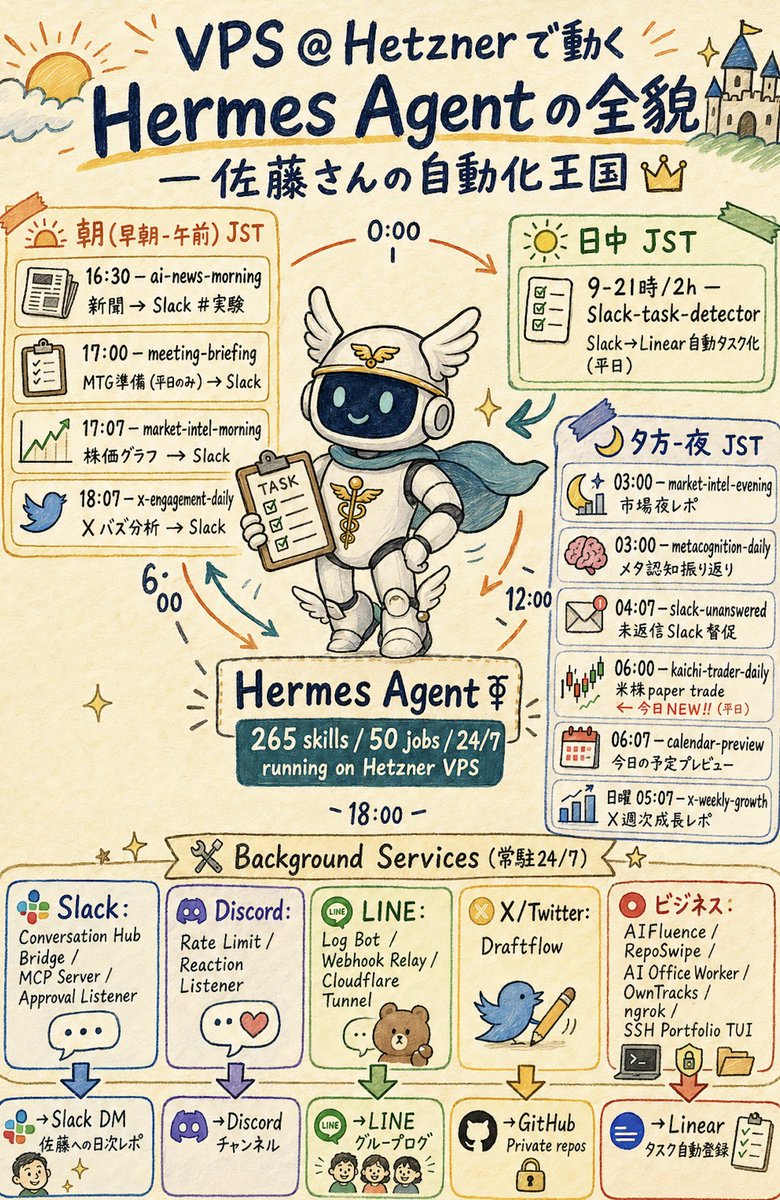
Hermes Agent Sketchnote Infographic
A Japanese hand-drawn sketchnote poster visualizing a Hetzner VPS automation agent, its daily scheduled jobs, and background services.
This is a GPT Image 2 prompt case for 平面海报. Use the copy-ready prompt below to generate similar visuals, and review Awesome GPT Image 2 Prompts attribution plus commercial-use rights before reuse.
Prompt
Copy-ready prompt
目标:创作一张竖版手绘风格的日文信息图,主题为 {argument name="main topic" default="VPS @ Hetzner 上运行的 Hermes Agent 全貌"},采用友好的“自动化王国”主题,并以一个中心机器人作为吉祥物。

画布:2:3 比例竖版海报,暖色米色纸张背景,水彩马克笔质感,深蓝色手写字体,随性的草图线条,柔和的强调色,点缀小星星、箭头、涂鸦以及不规则的手绘方框。

页眉:在最上方,左侧绘制日出/云朵涂鸦,右侧绘制山丘上的小城堡。大标题文字为“VPS @ Hetzner 上运行的 Hermes Agent 全貌”。下方添加副标题“— 佐藤先生的自动化王国”,并配有一个小皇冠图标。

中心主体:在中间绘制一个可爱的 Hermes 主题机器人吉祥物,戴着带翅膀的头盔、耳机、白色圆润盔甲,靴子上有小翅膀装饰,披着青色斗篷。机器人通过深色玻璃面罩微笑,手中拿着写有“TASK”字样的剪贴板。周围放置环形时间箭头,并标注“0:00”、“6:00”、“12:00”和“18:00”。在机器人下方,添加一个写有“Hermes Agent ⚚”的铭牌,以及一个深青色的数据牌,上面写着“265 技能 / 50 个任务 / 24/7 运行于 Hetzner VPS”。

主要日程布局:在吉祥物周围使用 3 个大型日程面板。左侧面板为橙色,标题为“朝(早朝・午前)JST”;包含 4 行任务,每行配有图标:1) 报纸图标,“16:30 — ai-news-morning / 新闻 → Slack #实验”;2) 剪贴板图标,“17:00 — meeting-briefing / 会议准备(仅限工作日)→ Slack”;3) 上升趋势图图标,“17:07 — market-intel-morning / 股价图表 → Slack”;4) 蓝鸟图标,“18:07 — x-engagement-daily / X 热门分析 → Slack”。右上角面板为绿色,标题为“日中 JST”;包含 1 个带有复选框图标的任务卡片:“9–21 时 / 2 小时 — Slack-task-detector / Slack→Linear 自动任务化(工作日)”。右侧面板为蓝色,标题为“夕方・夜 JST”;包含 6 行任务,每行配有图标:1) 月亮与图表,“03:00 — market-intel-evening / 市场夜间报告”;2) 粉色大脑,“03:00 — metacognition-daily / 元认知回顾”;3) 信封提醒,“04:07 — slack-unanswered / 未回复 Slack 催办”;4) K 线图,“06:00 — kaichi-trader-daily / 美股模拟交易 / ← 今日新增!!(工作日)”;5) 日历,“06:07 — calendar-preview / 今日日程预览”;6) 条形图,“周日 05:07 — x-weekly-growth / X 周度增长报告”。

后台服务部分:在下三分之一处,添加一个丝带标题“Background Services(常驻 24/7)”,配有交叉工具图标和星星。在下方创建 5 个垂直服务卡片,每张卡片包含一个 Logo 风格图标、服务列表、向下箭头和目标框。卡片 1:“Slack:”配有多色 Slack 风格圆点,服务内容“Conversation Hub / Bridge / MCP Server / Approval Listener”,目标“→Slack DM / 给佐藤的日报”,配有一个小脸涂鸦。卡片 2:“Discord:”配有紫色游戏手柄 Logo,服务内容“Rate Limit / Reaction Listener”,目标“→Discord / 频道”。卡片 3:“LINE:”配有绿色 LINE 图标和小熊/家庭涂鸦,服务内容“Log Bot / Webhook Relay / Cloudflare Tunnel”,目标“→LINE / 群组日志”。卡片 4:“X/Twitter:”配有黄色 X 徽章,拿着铅笔的蓝鸟,服务内容“Draftflow”,目标“→GitHub / 私有仓库”,配有一个锁图标。卡片 5:“商务:”配有红色目标图标,服务内容“AIFluence / RepoSwipe / AI Office Worker / OwnTracks / ngrok / SSH Portfolio TUI”,目标“→Linear / 任务自动注册”,配有复选框图标。

视觉风格:日式速记风格,模拟马克笔和彩色铅笔质感,生动且信息密度高,清晰易读,具有迷人的不完美字体,米色背景,深蓝色墨水,橙/绿/蓝/紫/红色的轮廓框,装饰性的小箭头和星星。所有可见文字保持手写感,并严格保留指定的日文/英文混合标签。

约束条件:使用 3 个主要日程面板,总计 11 行定时任务,5 个后台服务卡片,以及 5 个目标框。不要添加额外的品牌、水印、二维码、照片级真实感或打字机风格的 UI 设计。
Prompt variables
Editable argument placeholders found in the prompt, with their default values.
More cases in this category
Prioritized by category, input mode compatibility, quality, and lower risk.


Reuse and source notes
Use this prompt safely after previewing the case.
- 1.Copy the prompt or open it directly in Dovoo with the generation button.
- 2.Adjust variables, aspect ratio, and reference images for your own use case.
- 3.Before publishing or paid usage, verify source rights, attribution requirements, and brand or likeness risks.
Can I use this prompt commercially?
Commercial-use status is allowed. Review the original source, license, brand constraints, and legal requirements before paid usage.
Where does this case come from?
This case is imported from Awesome GPT Image 2 Prompts; keep attribution visible and check the source URL before reuse.