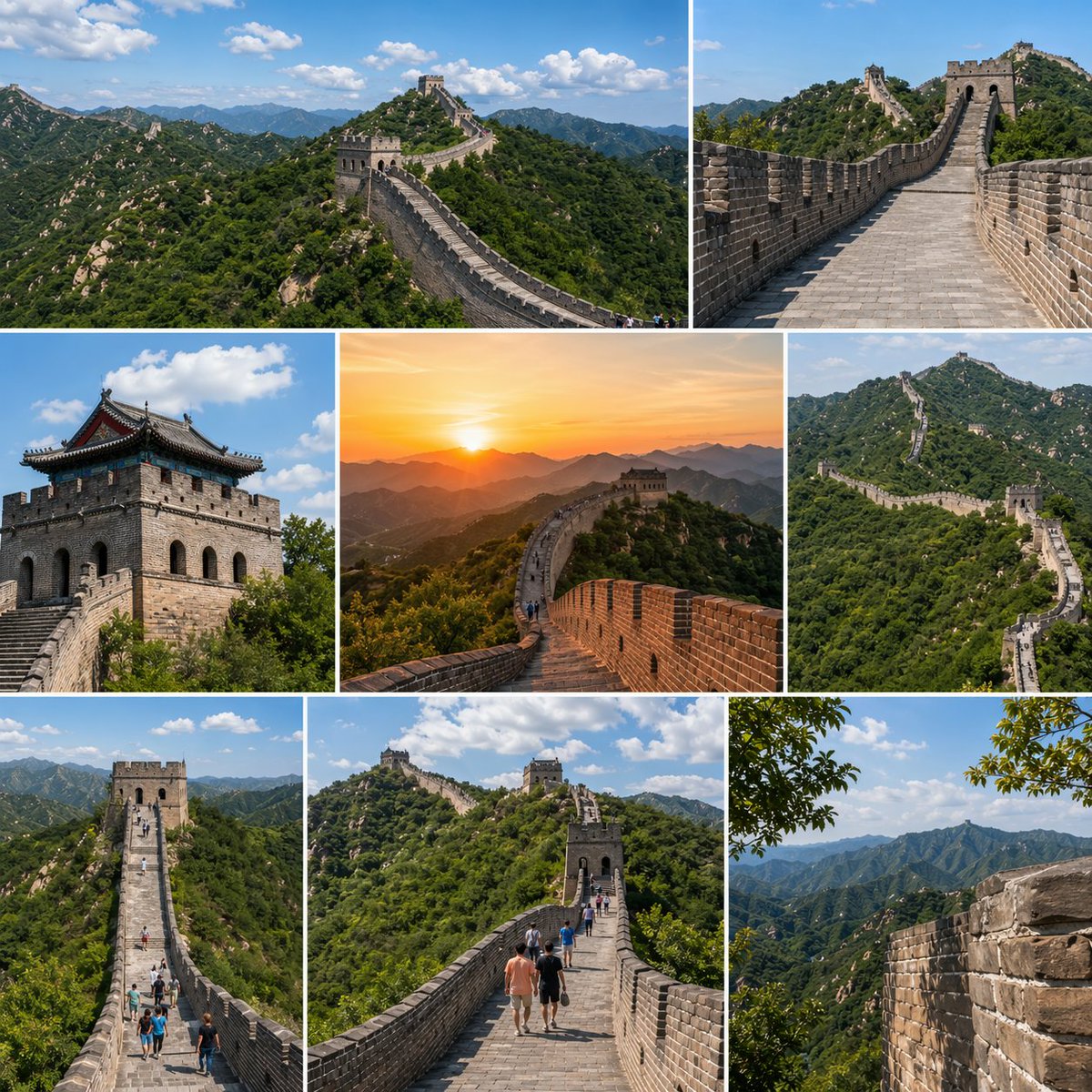
Great Wall Travel Collage
A square multi-photo collage showcasing the Great Wall of China from scenic, architectural, and sunset viewpoints, ideal for travel posts or destination promotion.
This is a GPT Image 2 prompt case for Landscape & Nature. Use the copy-ready prompt below to generate similar visuals, and review Awesome GPT Image 2 Prompts attribution plus commercial-use rights before reuse.
Free 1K preview
Generate one preview image instantly, no sign-up required.
Prompt
Copy-ready prompt
{
  "type": "travel photo collage",
  "subject": "The Great Wall of China",
  "style": "high-resolution realistic travel photography, crisp daylight clarity, vivid natural colors, editorial tourism brochure look",
  "composition": {
    "format": "square collage",
    "grid": {
      "columns": 3,
      "rows": 3,
      "count": 8
    },
    "borders": "thin white dividers between all images",
    "image_count": 8
  },
  "scenes": [
    {
      "position": "top-left wide panel",
      "description": "a sweeping aerial-style landscape view of the Great Wall winding across densely forested green mountains under a bright blue sky with scattered white clouds"
    },
    {
      "position": "top-right wide panel",
      "description": "a straight-on perspective from atop the stone walkway of the Great Wall, leading toward a watchtower, with brick parapets on both sides and mountain ridges in the distance"
    },
    {
      "position": "middle-left panel",
      "description": "a close architectural view of a stone watchtower with dark traditional roof eaves, seen from below against a blue sky with fluffy clouds"
    },
    {
      "position": "middle-center panel",
      "description": "a golden sunset scene on the Great Wall, warm orange sun low over layered mountain silhouettes, the wall curving dramatically toward a watchtower"
    },
    {
      "position": "middle-right panel",
      "description": "a telephoto scenic view of the Great Wall zigzagging over steep green ridges, emphasizing its long serpentine form"
    },
    {
      "position": "bottom-left panel",
      "description": "an elevated frontal view down a long stretch of the wall with several small tourists walking along the central path toward a tower"
    },
    {
      "position": "bottom-center panel",
      "description": "a human-scale walkway view with a small group of tourists in casual summer clothing walking away from the camera along the Great Wall toward multiple watchtowers on lush hills"
    },
    {
      "position": "bottom-right panel",
      "description": "a scenic mountain panorama framed by a close-up section of the wall on the right and leafy tree branches at the upper edge, showing layered blue-green ridges fading into the distance"
    }
  ],
  "environment": {
    "season": "summer",
    "vegetation": "dense green mountain foliage",
    "sky": "clear blue with scattered cumulus clouds, except one warm sunset panel",
    "lighting": "mostly bright midday sun with one golden-hour sunset image"
  },
  "details": {
    "architecture": "aged gray stone and brick wall, crenellations, stair-stepped pathways, multiple watchtowers",
    "people": "exactly 2 panels contain clearly visible tourists, plus tiny distant walkers in 1 additional panel",
    "mood": "majestic, adventurous, iconic world heritage destination"
  }
}
Best for
- - Landscape & Nature visual exploration
- - Image generation and reference-image edits
- - Reusable briefs that keep source attribution visible
Change these parts
- - Subject, product, character, or scene
- - Aspect ratio, camera, lighting, and background
- - Brand, text, color, and output constraints
Recommended model and settings
- - Model: gpt-image-2
- - Input mode: Text to Image
- - Aspect ratio: source
- - Commercial status: review original source
How to use this prompt
- 1. Copy the prompt and preserve its structure for the first test.
- 2. Replace the subject, context, and publishing channel.
- 3. Change one camera, lighting, or style variable per iteration.
- 4. Inspect the output, source, text, and rights before reuse.
Limitations, source, and reuse cautions
- - Generated output is an editable draft, not factual, legal, or rights evidence.
- - Review the linked source, people, brands, logos, text, and third-party media before commercial use.
More cases in this category
Prioritized by category, input mode compatibility, quality, and lower risk.
Reuse and source notes
Use this prompt safely after previewing the case.
- 1.Copy the prompt or open it directly in Dovoo with the generation button.
- 2.Adjust variables, aspect ratio, and reference images for your own use case.
- 3.Before publishing or paid usage, verify source rights, attribution requirements, and brand or likeness risks.
Can I use this prompt commercially?
Commercial-use status is allowed. Review the original source, license, brand constraints, and legal requirements before paid usage.
Where does this case come from?
This case is imported from Awesome GPT Image 2 Prompts; keep attribution visible and check the source URL before reuse.