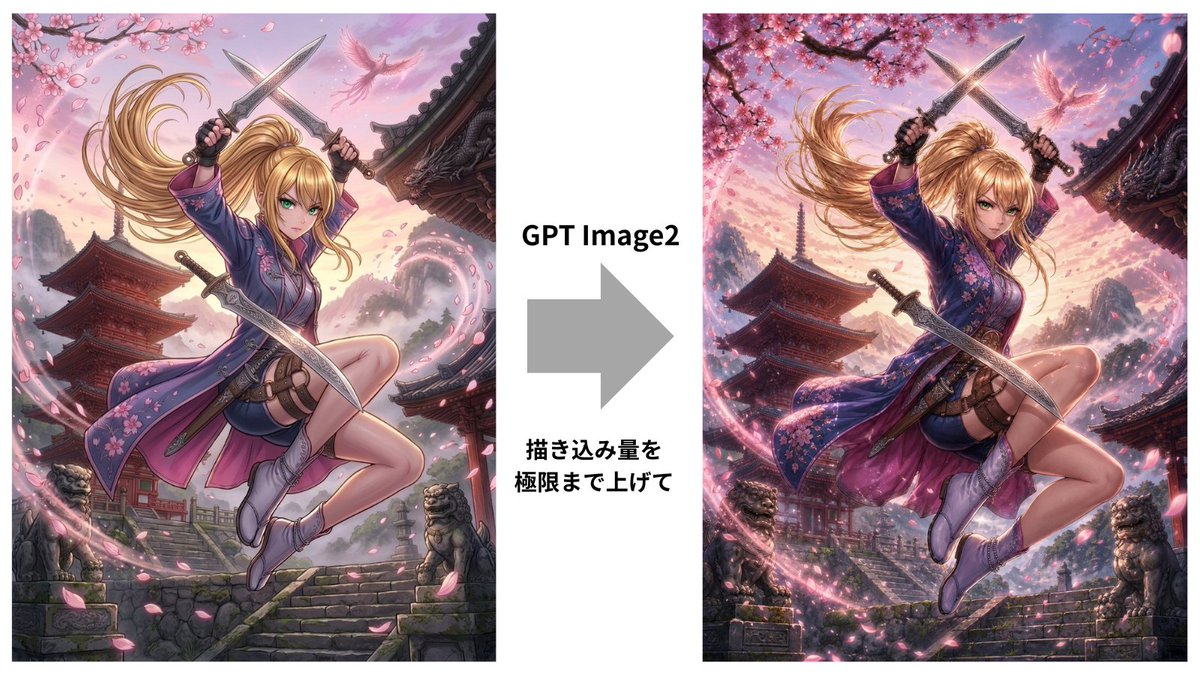
GPT Image 2 Kunoichi Comparison
Creates a wide before-and-after comparison graphic of a cinematic anime kunoichi scene enhanced with GPT Image 2 detail.
This is a GPT Image 2 prompt case for 平面海报. Use the copy-ready prompt below to generate similar visuals, and review Awesome GPT Image 2 Prompts attribution plus commercial-use rights before reuse.
Need the full prompt set? Use the 平面海报 topic hub for more related examples, or open the GPT Image 2 prompt library for the full example index, reusable structures, and source attribution.
Prompt
Copy-ready prompt
目标:创建一张并排对比图,展示经由 GPT Image 2 优化后的动漫女忍者插画,重点突出细节的提升与电影级的渲染效果。

画布:16:9 宽幅白色背景,简洁的对比布局。并排放置两个高大的垂直动漫插画面板:左侧一个,右侧一个,中间由白色列隔开。

布局:使用 5 个主要可见元素:1 个左侧插画面板,1 个右侧插画面板,1 个位于中心指向右侧的大型灰色箭头,1 个位于箭头上方、加粗黑色的“GPT Image2”文本标签,以及 1 个位于箭头下方、加粗黑色的日语标题“描き込み量を\n極限まで上げて”。左侧面板占据画布左侧三分之一,右侧面板占据右侧三分之一,中间列包含文本和箭头。

主体细节:在两个面板中,描绘同一位高质量动态动漫风格的女忍者,{argument name="character name" default="Ai-chan"},以戏剧性的动作姿态在空中跳跃。她留着飘逸的 {argument name="hair color" default="gold"} 高马尾,面部被方形棕色模糊遮挡,戴着黑色露指手套,身穿紫色花卉和服风格的女忍者装束,配有粉色樱花图案、短裙、大腿绑带、腰包和柔软的忍者靴。她手持 3 件清晰可见的武器:双手在头顶交叉握着 2 把短剑,腰间斜挎着 1 把弯刀。她的姿势是一条腿高高抬起,另一条腿向后弯曲,展现出强烈的动感和被风吹拂的头发。

左侧面板:一幅细节丰富但略显柔和的动漫插画,背景为日落时分的日本寺庙建筑群。包含石阶、红塔、弯曲的寺庙屋檐、石狮子雕像、远处的朦胧山脉、粉色天空、樱花树枝、飘落的花瓣,以及角色周围淡淡的粉色魔法能量螺旋。

右侧面板:同一场景更精致、更锐利、细节更高、更具电影感的版本,具有更丰富的对比度、更密集的樱花、更华丽的屋顶雕刻、更强烈的灯光、更饱和的日落色彩、更多的花瓣、更清晰的石材纹理、更明亮的粉色能量旋涡以及额外的环境细节。保持与左侧面板相同的角色姿势和服装,但渲染效果要明显更精致。

视觉风格:超高质量电影级动漫艺术,极细致的线条,柔和的阴影,高细节,戏剧性的边缘光,刀刃上的光泽高光,樱花粉色的氛围,奇幻动作构图,复杂的日本建筑,仅在花瓣和头发上有动态运动模糊,角色焦点清晰。

文本内容:中心文本必须包含 2 个文本块:箭头上方为“GPT Image2”,箭头下方为两行日语标题,第一行为“描き込み量を”,第二行为“極限まで上げて”。

约束:保留中间的白色空隙和外部白色边距。不要添加任何标志、水印、社交媒体 UI、额外的说明文字或额外的面板。两个面板中的面部均需保持被方形模糊遮挡的状态。
Prompt variables
Editable argument placeholders found in the prompt, with their default values.
Variable
character name
Default
Ai-chan
Variable
hair color
Default
gold
More cases in this category
Prioritized by category, input mode compatibility, quality, and lower risk.




Reuse and source notes
Use this prompt safely after previewing the case.
- 1.Copy the prompt or open it directly in Dovoo with the generation button.
- 2.Adjust variables, aspect ratio, and reference images for your own use case.
- 3.Before publishing or paid usage, verify source rights, attribution requirements, and brand or likeness risks.
Can I use this prompt commercially?
Commercial-use status is allowed. Review the original source, license, brand constraints, and legal requirements before paid usage.
Where does this case come from?
This case is imported from Awesome GPT Image 2 Prompts; keep attribution visible and check the source URL before reuse.