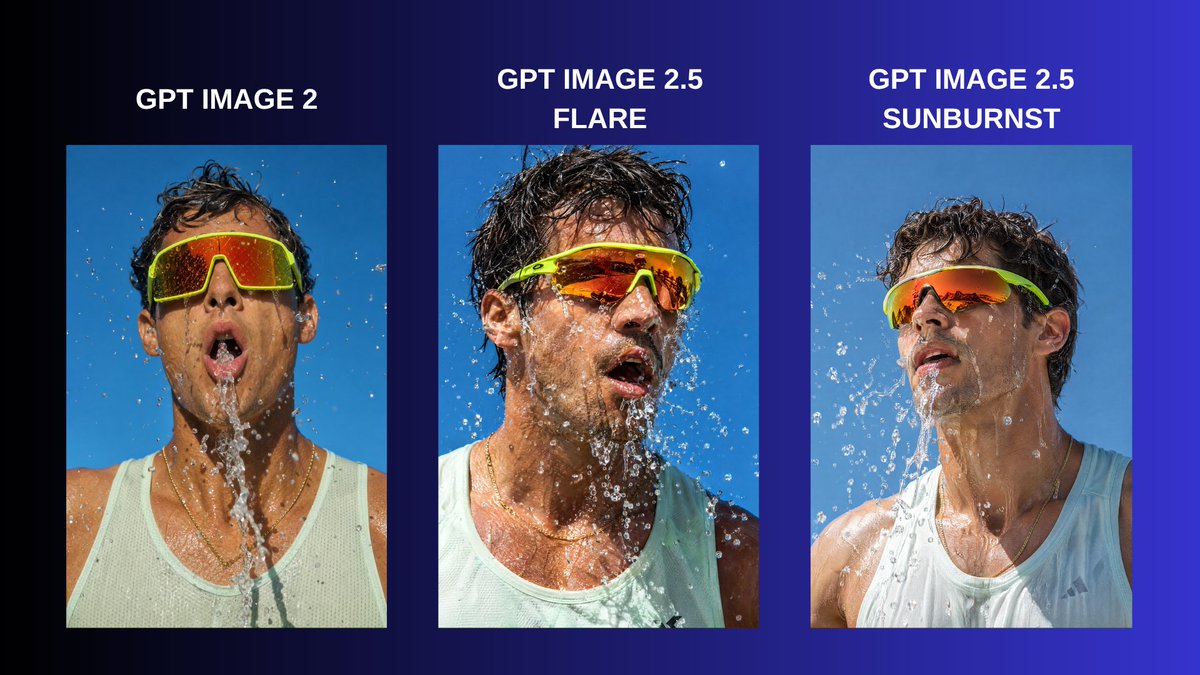
Three-Panel GPT Image Model Comparison
Creates a social media comparison graphic with three labeled photorealistic sports portraits showing water splash realism across image models.
This is a GPT Image 2 prompt case for Graphic & Poster. Use the copy-ready prompt below to generate similar visuals, and review Awesome GPT Image 2 Prompts attribution plus commercial-use rights before reuse.
Free 1K preview
Generate one preview image instantly, no sign-up required.
Prompt
Copy-ready prompt
Goal: Create a horizontal social media comparison graphic showing the same photorealistic action portrait rendered by three AI image models, emphasizing improved realism, water detail, lighting, and skin texture.

Canvas: 16:9 landscape layout, approximately 1200×675 px, with a dark navy-to-electric-blue gradient background that is nearly black on the far left and vivid cobalt blue on the far right.

Layout: Place exactly 3 vertical portrait image panels in a row with even spacing and generous margins. Each panel is a rectangular photo with no border, aligned along the same baseline. Above each panel, add a bold white uppercase label centered over the image.

Text content: Use exactly 3 labels: left label “{argument name="left model label" default="GPT IMAGE 2"}”, center label “{argument name="center model label" default="GPT IMAGE 2.5 FLARE"}” split across two lines, and right label “{argument name="right model label" default="GPT IMAGE 2.5 SUNBURST"}” split across two lines. Use a clean bold sans-serif font, all caps, white, with strong legibility.

Subject in all 3 panels: A close-up outdoor sports portrait of the same athletic adult man with tan wet skin, messy dark wet hair, neon lime wraparound sport sunglasses with orange mirrored lenses, and a pale mint-white sleeveless athletic tank top. He is being splashed with water against a clear bright blue sky. Show droplets, streams, wet fabric, wet hair, highlights on skin, and reflective eyewear. The expression is open-mouthed and breathless, like mid-workout or after splashing water on his face.

Panel details: Left panel: frontal portrait, more static and less refined, water streaming straight down from his mouth and chin, sunglasses large and centered, shoulders visible. Center panel: more energetic and dynamic, head turned slightly to viewer’s right, dense suspended water droplets around face, stronger contrast, sharper texture, more dramatic wet hair and skin. Right panel: cleaner and more controlled realism, head turned slightly upward and to viewer’s left, smooth natural lighting, water splashing diagonally across the chest and face, refined reflections and skin detail.

Visual style: Photorealistic editorial comparison, high-resolution sports photography, bright daylight, crisp water interaction, realistic wet skin texture, high shutter speed droplets, saturated blue sky, vivid neon eyewear.

Constraints: Include exactly 3 labeled image panels and no additional logos, captions, icons, arrows, or watermarks. Keep the background outside the panels as a simple gradient. The three panels should clearly depict the same core prompt but with subtly different realism and composition.
Prompt variables
Editable argument placeholders found in the prompt, with their default values.
Best for
- - Graphic & Poster visual exploration
- - Image generation and reference-image edits
- - Reusable briefs that keep source attribution visible
Change these parts
- - Subject, product, character, or scene
- - Aspect ratio, camera, lighting, and background
- - Brand, text, color, and output constraints
Recommended model and settings
- - Model: gpt-image-2
- - Input mode: Text to Image
- - Aspect ratio: source
- - Commercial status: review original source
How to use this prompt
- 1. Copy the prompt and preserve its structure for the first test.
- 2. Replace the subject, context, and publishing channel.
- 3. Change one camera, lighting, or style variable per iteration.
- 4. Inspect the output, source, text, and rights before reuse.
Limitations, source, and reuse cautions
- - Generated output is an editable draft, not factual, legal, or rights evidence.
- - Review the linked source, people, brands, logos, text, and third-party media before commercial use.
More cases in this category
Prioritized by category, input mode compatibility, quality, and lower risk.


Reuse and source notes
Use this prompt safely after previewing the case.
- 1.Copy the prompt or open it directly in Dovoo with the generation button.
- 2.Adjust variables, aspect ratio, and reference images for your own use case.
- 3.Before publishing or paid usage, verify source rights, attribution requirements, and brand or likeness risks.
Can I use this prompt commercially?
Commercial-use status is allowed. Review the original source, license, brand constraints, and legal requirements before paid usage.
Where does this case come from?
This case is imported from Awesome GPT Image 2 Prompts; keep attribution visible and check the source URL before reuse.