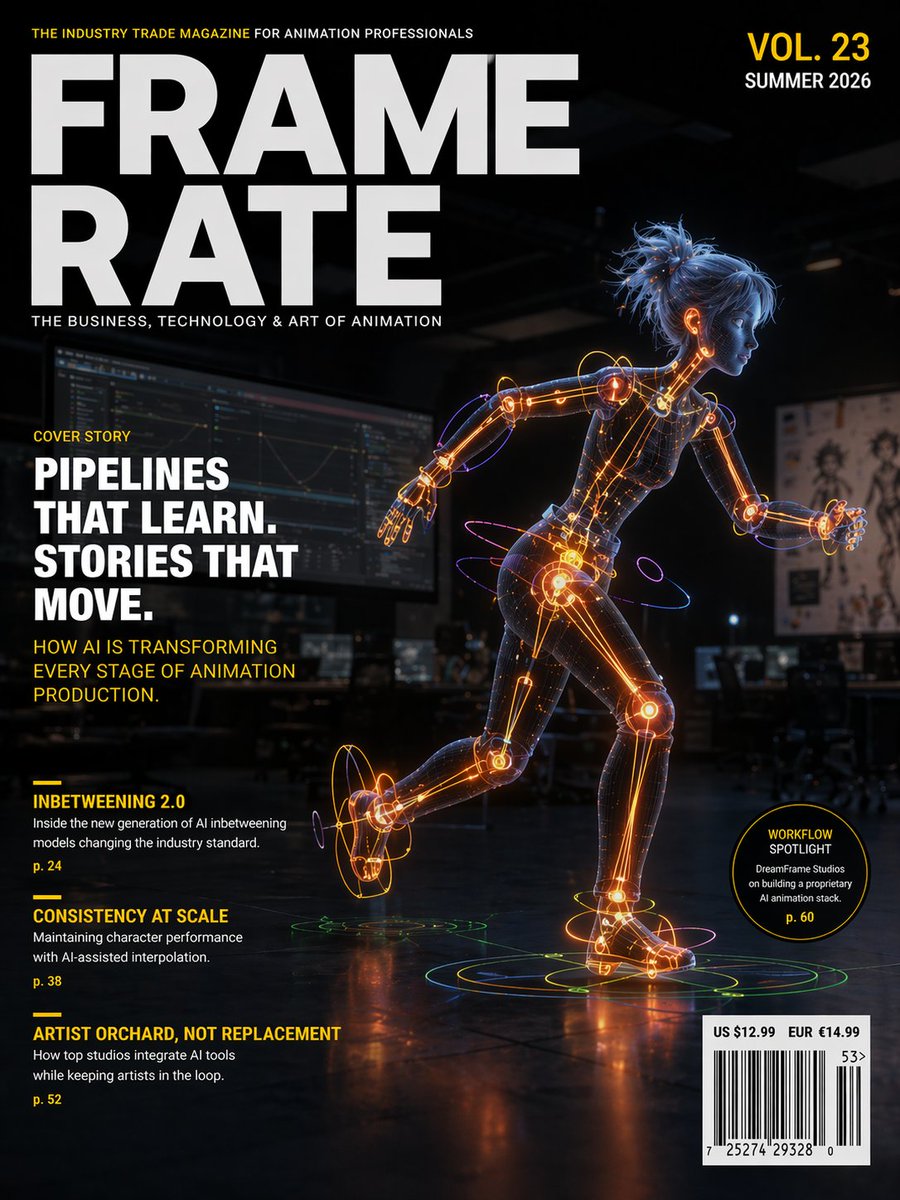
Futuristic Animation Trade Magazine Cover
This prompt generates a polished editorial magazine cover featuring a glowing humanoid animation robot and realistic cover lines for a professional AI-and-animation publication.
This is a GPT Image 2 prompt case for Graphic & Poster. Use the copy-ready prompt below to generate similar visuals, and review Awesome GPT Image 2 Prompts attribution plus commercial-use rights before reuse.
Free 1K preview
Generate one preview image instantly, no sign-up required.
Prompt
Copy-ready prompt
Create a futuristic professional magazine cover for the animation industry, portrait orientation, high-end editorial design, cinematic and polished. The masthead dominates the upper left in huge bold white sans-serif letters split across two lines: {argument name="magazine title" default="FRAME RATE"}. Above it, a small yellow all-caps tagline reads: THE INDUSTRY TRADE MAGAZINE FOR ANIMATION PROFESSIONALS. Below the masthead, a smaller white subtitle reads: THE BUSINESS, TECHNOLOGY & ART OF ANIMATION. In the upper right, place issue text in stacked bold type: VOL. 23 in yellow and SUMMER 2026 in white. The cover image shows a stylized humanoid female-coded robot or digital mannequin in a dynamic running pose, facing right, shown full body, with one leg lifted behind and one arm extended. Her body is semi-transparent dark mesh with glowing orange internal joints, spine, and limb mechanisms, accented by blue and purple neon tracing lines and circular motion rings around wrists, ankles, hips, and feet. She has messy tied-up blue hair and a smooth simplified face with minimal features, like a CG character prototype. Set her in a dark animation studio interior with blurred monitors, desks, and concept art pinned in the background, lit with low moody ambient light so the neon figure becomes the focal point. Add reflective flooring beneath her with concentric holographic rings under both feet in green, yellow, and orange. On the left side, arrange editorial cover lines in a clean magazine layout. A small yellow label says COVER STORY. Below it, a large bold white stacked headline reads: {argument name="cover headline" default="PIPELINES THAT LEARN. STORIES THAT MOVE."}. Beneath that, a yellow subhead reads: HOW AI IS TRANSFORMING EVERY STAGE OF ANIMATION PRODUCTION. In the lower left, include 3 secondary article listings, each with a short yellow rule above it: 1) INBETWEENING 2.0, with small white teaser text: Inside the new generation of AI Inbetweening models changing the industry standard., and page number p. 24 in yellow. 2) CONSISTENCY AT SCALE, with small white teaser text: Maintaining character performance with AI-assisted interpolation., and page number p. 38 in yellow. 3) ARTIST ORCHARD, NOT REPLACEMENT, with small white teaser text: How top studios integrate AI tools while keeping artists in the loop., and page number p. 52 in yellow. Near the lower right, add a black circular badge outlined in yellow containing yellow and white text: WORKFLOW SPOTLIGHT on top, DreamFrame Studios on building a proprietary AI animation stack beneath, and p. 60 at the bottom in yellow. In the bottom right corner, place a white barcode box with pricing above it reading: US $12.99 EUR €14.99, plus small issue code numbers. Use a color palette of black, charcoal, white, vivid yellow, electric orange, blue, and violet. The overall feeling should be premium, forward-looking, tech-savvy, and credible, like a real trade magazine cover about AI-driven animation pipelines.Prompt variables
Editable argument placeholders found in the prompt, with their default values.
Best for
- - Graphic & Poster visual exploration
- - Image generation and reference-image edits
- - Reusable briefs that keep source attribution visible
Change these parts
- - Subject, product, character, or scene
- - Aspect ratio, camera, lighting, and background
- - Brand, text, color, and output constraints
Recommended model and settings
- - Model: gpt-image-2
- - Input mode: Text to Image
- - Aspect ratio: source
- - Commercial status: review original source
How to use this prompt
- 1. Copy the prompt and preserve its structure for the first test.
- 2. Replace the subject, context, and publishing channel.
- 3. Change one camera, lighting, or style variable per iteration.
- 4. Inspect the output, source, text, and rights before reuse.
Limitations, source, and reuse cautions
- - Generated output is an editable draft, not factual, legal, or rights evidence.
- - Review the linked source, people, brands, logos, text, and third-party media before commercial use.
More cases in this category
Prioritized by category, input mode compatibility, quality, and lower risk.






Reuse and source notes
Use this prompt safely after previewing the case.
- 1.Copy the prompt or open it directly in Dovoo with the generation button.
- 2.Adjust variables, aspect ratio, and reference images for your own use case.
- 3.Before publishing or paid usage, verify source rights, attribution requirements, and brand or likeness risks.
Can I use this prompt commercially?
Commercial-use status is allowed. Review the original source, license, brand constraints, and legal requirements before paid usage.
Where does this case come from?
This case is imported from Awesome GPT Image 2 Prompts; keep attribution visible and check the source URL before reuse.