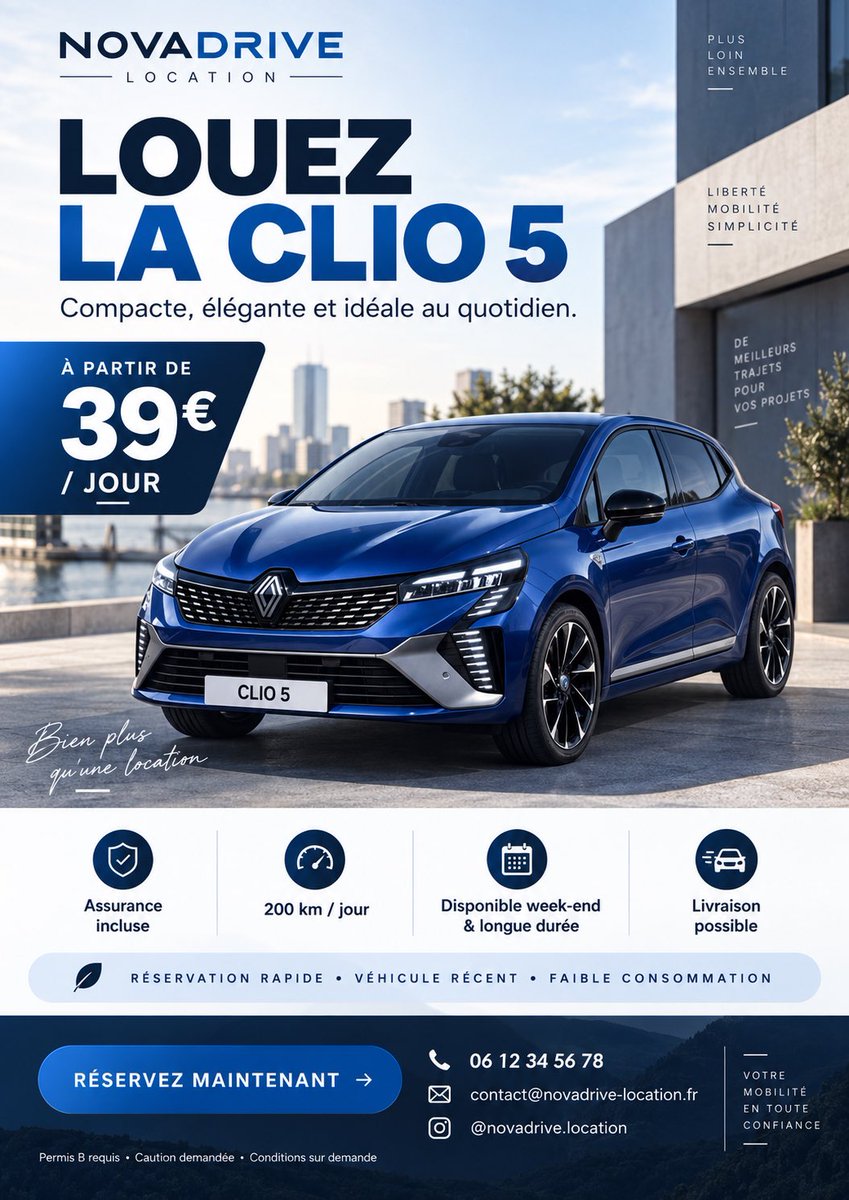
French Clio 5 Rental Flyer
A polished vertical French car rental advertisement featuring a blue compact car, pricing, benefits, and reservation contact details.
This is a GPT Image 2 prompt case for Graphic & Poster. Use the copy-ready prompt below to generate similar visuals, and review Awesome GPT Image 2 Prompts attribution plus commercial-use rights before reuse.
Free 1K preview
Generate one preview image instantly, no sign-up required.
Prompt
Copy-ready prompt
Goal: Create a premium French car rental advertising flyer for {argument name="brand name" default="NOVADRIVE"}, promoting {argument name="car model" default="CLIO 5"} with a modern blue-and-white corporate style, realistic automotive photography, and clean graphic design.

Canvas: Vertical portrait flyer, 4:5 ratio, high-resolution, designed like a polished social media ad or printed rental flyer. Use a bright urban waterfront setting with modern architecture, blue sky, soft daylight, and a realistic glossy blue compact hatchback parked front three-quarter view in the lower center.

Layout: Top-left logo area with the brand name “NOVADRIVE” in bold navy uppercase, with “LOCATION” spaced below between thin horizontal lines. Main headline below: very large bold French text “LOUEZ” in dark navy, then “LA CLIO 5” in vivid blue. Under it, smaller subtitle: “Compacte, élégante et idéale au quotidien.” Place a dark navy rounded angled price tag on the left side overlapping the car scene, reading “À PARTIR DE” above a huge “39€” and “/ JOUR” below. Add a small handwritten white script near the lower-left of the car image: “Bien plus qu’une location”.

Main subject: A realistic Renault-style blue compact car with black grille, sharp LED headlights, black-and-silver wheels, license plate reading “CLIO 5”, strong reflections on the bodywork, parked on a clean concrete plaza beside water and modern buildings. Keep the car dominant and photorealistic.

Right-side building text: Add exactly 3 small vertical typographic blocks on the modern building facade: 1) “PLUS LOIN ENSEMBLE”, 2) “LIBERTÉ MOBILITÉ SIMPLICITÉ”, 3) “DE MEILLEURS TRAJETS POUR VOS PROJETS”, each in small uppercase white or navy with thin decorative lines.

Benefits section: Under the car image, create a white horizontal strip containing exactly 4 evenly spaced icon-and-label columns separated by thin vertical dividers: 1) shield icon, “Assurance incluse”; 2) speedometer icon, “200 km / jour”; 3) calendar icon, “Disponible week-end & longue durée”; 4) fast car delivery icon, “Livraison possible”. Below these, add a pale blue rounded pill with a small leaf icon and uppercase text: “RÉSERVATION RAPIDE • VÉHICULE RÉCENT • FAIBLE CONSOMMATION”.

Bottom call-to-action band: Use a dark navy footer with a subtle mountain or road landscape texture. On the left, place a large rounded blue button reading {argument name="call to action" default="RÉSERVEZ MAINTENANT →"}. In the center-right, show exactly 3 contact rows with white line icons: phone “06 12 34 56 78”, email “[email protected]”, Instagram “@novadrive.location”. At the very bottom-left in tiny white text: “Permis B requis • Caution demandée • Conditions sur demande”. On the far right, a narrow boxed slogan: “VOTRE MOBILITÉ EN TOUTE CONFIANCE” with thin decorative lines.

Visual style: Sleek French rental advertisement, bold geometric sans-serif typography, deep navy and electric blue palette, high contrast, generous spacing, professional agency-grade layout, crisp icons, realistic photo-composite lighting, no clutter, no random decorative circles, no extra information beyond the specified text.
Prompt variables
Editable argument placeholders found in the prompt, with their default values.
Best for
- - Graphic & Poster visual exploration
- - Image generation and reference-image edits
- - Reusable briefs that keep source attribution visible
Change these parts
- - Subject, product, character, or scene
- - Aspect ratio, camera, lighting, and background
- - Brand, text, color, and output constraints
Recommended model and settings
- - Model: gpt-image-2
- - Input mode: Text to Image
- - Aspect ratio: source
- - Commercial status: review original source
How to use this prompt
- 1. Copy the prompt and preserve its structure for the first test.
- 2. Replace the subject, context, and publishing channel.
- 3. Change one camera, lighting, or style variable per iteration.
- 4. Inspect the output, source, text, and rights before reuse.
Limitations, source, and reuse cautions
- - Generated output is an editable draft, not factual, legal, or rights evidence.
- - Review the linked source, people, brands, logos, text, and third-party media before commercial use.
More cases in this category
Prioritized by category, input mode compatibility, quality, and lower risk.


Reuse and source notes
Use this prompt safely after previewing the case.
- 1.Copy the prompt or open it directly in Dovoo with the generation button.
- 2.Adjust variables, aspect ratio, and reference images for your own use case.
- 3.Before publishing or paid usage, verify source rights, attribution requirements, and brand or likeness risks.
Can I use this prompt commercially?
Commercial-use status is allowed. Review the original source, license, brand constraints, and legal requirements before paid usage.
Where does this case come from?
This case is imported from Awesome GPT Image 2 Prompts; keep attribution visible and check the source URL before reuse.