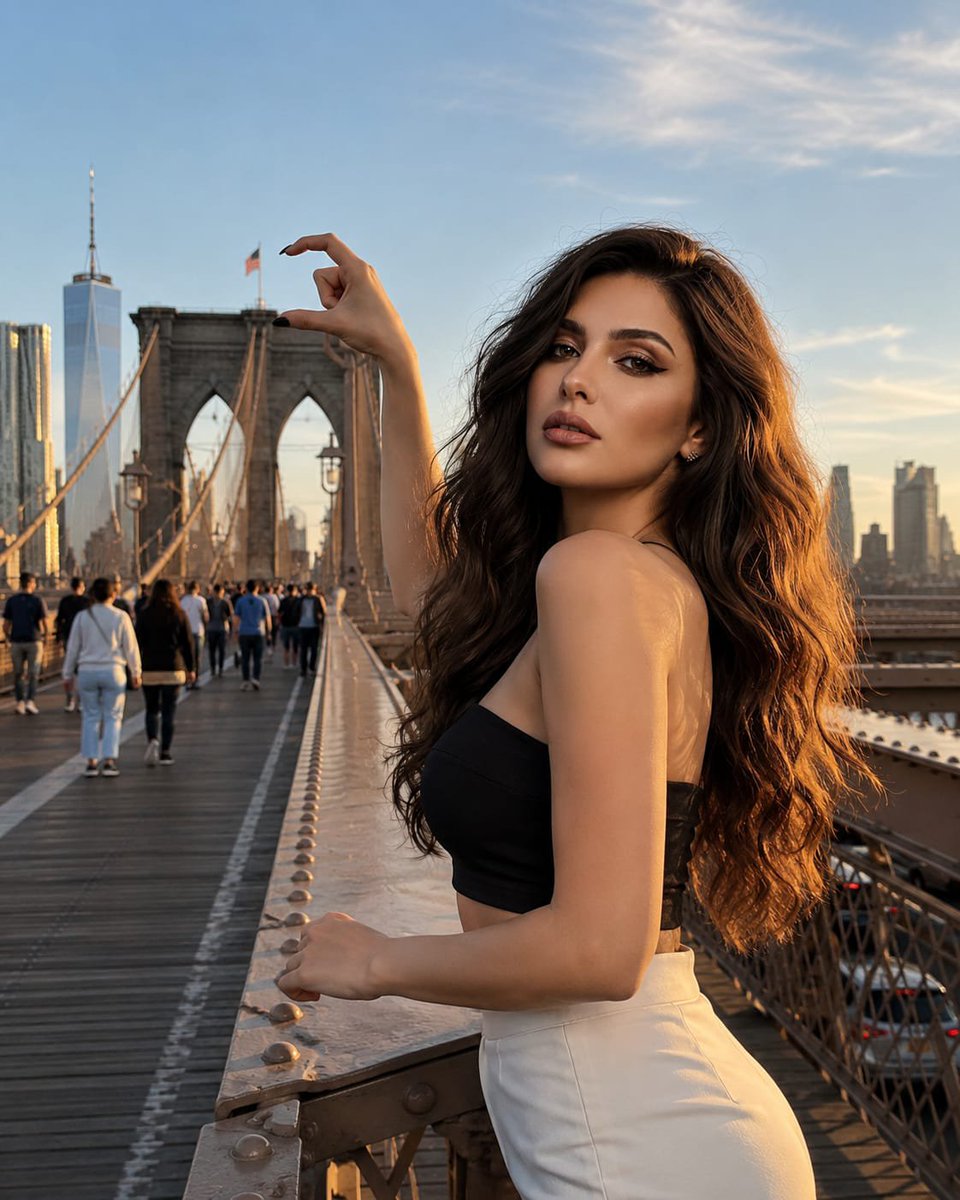
Forced Perspective Brooklyn Bridge Portrait
A complex prompt for GPT Image 2 that creates a forced-perspective optical illusion of pinching the Brooklyn Bridge while locking the subject's facial identity from a reference photo.
This is a GPT Image 2 prompt case for Portrait & Character. Use the copy-ready prompt below to generate similar visuals, and review Awesome GPT Image 2 Prompts attribution plus commercial-use rights before reuse.
Free 1K preview
Generate one preview image instantly, no sign-up required.
Free text preview doesn’t preserve reference-image consistency.
Prompt
Copy-ready prompt
Use the provided reference image. STRICT FACE & IDENTITY LOCK: Preserve the woman's face, facial proportions, skin tone, hairstyle, and overall identity exactly as in the reference image. Do not alter her appearance. Ultra-realistic DSLR travel photograph of the same {argument name="subject" default="stylish young American woman"} standing confidently in front of the {argument name="landmark" default="Brooklyn Bridge"}, creating a flawless forced-perspective illusion where she appears to {argument name="action" default="gently pinch one of the bridge's stone towers between her thumb and index finger"}. The perspective alignment is perfectly accurate, making the illusion look naturally captured in-camera rather than edited. Pedestrians, cyclists, and distant vehicles remain realistically scaled, enhancing the authenticity of the scene. Warm golden-hour sunlight casts soft, natural shadows across the bridge and the woman's outfit. Captured with premium DSLR optics, realistic depth of field, subtle lens compression, crisp textures, editorial travel photography style, authentic New York atmosphere, luxurious Pinterest aesthetic, cinematic realism, ultra-high detail, viral optical illusion, natural body posture, candid confidence, and flawless photorealistic quality.Prompt variables
Editable argument placeholders found in the prompt, with their default values.
Best for
- - Portrait & Character visual exploration
- - Image generation and reference-image edits
- - Reusable briefs that keep source attribution visible
Change these parts
- - Subject, product, character, or scene
- - Aspect ratio, camera, lighting, and background
- - Brand, text, color, and output constraints
Recommended model and settings
- - Model: gpt-image-2
- - Input mode: Image to Image
- - Aspect ratio: source
- - Commercial status: review original source
How to use this prompt
- 1. Copy the prompt and preserve its structure for the first test.
- 2. Replace the subject, context, and publishing channel.
- 3. Change one camera, lighting, or style variable per iteration.
- 4. Inspect the output, source, text, and rights before reuse.
Limitations, source, and reuse cautions
- - Generated output is an editable draft, not factual, legal, or rights evidence.
- - Review the linked source, people, brands, logos, text, and third-party media before commercial use.
More cases in this category
Prioritized by category, input mode compatibility, quality, and lower risk.


Reuse and source notes
Use this prompt safely after previewing the case.
- 1.Copy the prompt or open it directly in Dovoo with the generation button.
- 2.Adjust variables, aspect ratio, and reference images for your own use case.
- 3.Before publishing or paid usage, verify source rights, attribution requirements, and brand or likeness risks.
Can I use this prompt commercially?
Commercial-use status is allowed. Review the original source, license, brand constraints, and legal requirements before paid usage.
Where does this case come from?
This case is imported from Awesome GPT Image 2 Prompts; keep attribution visible and check the source URL before reuse.