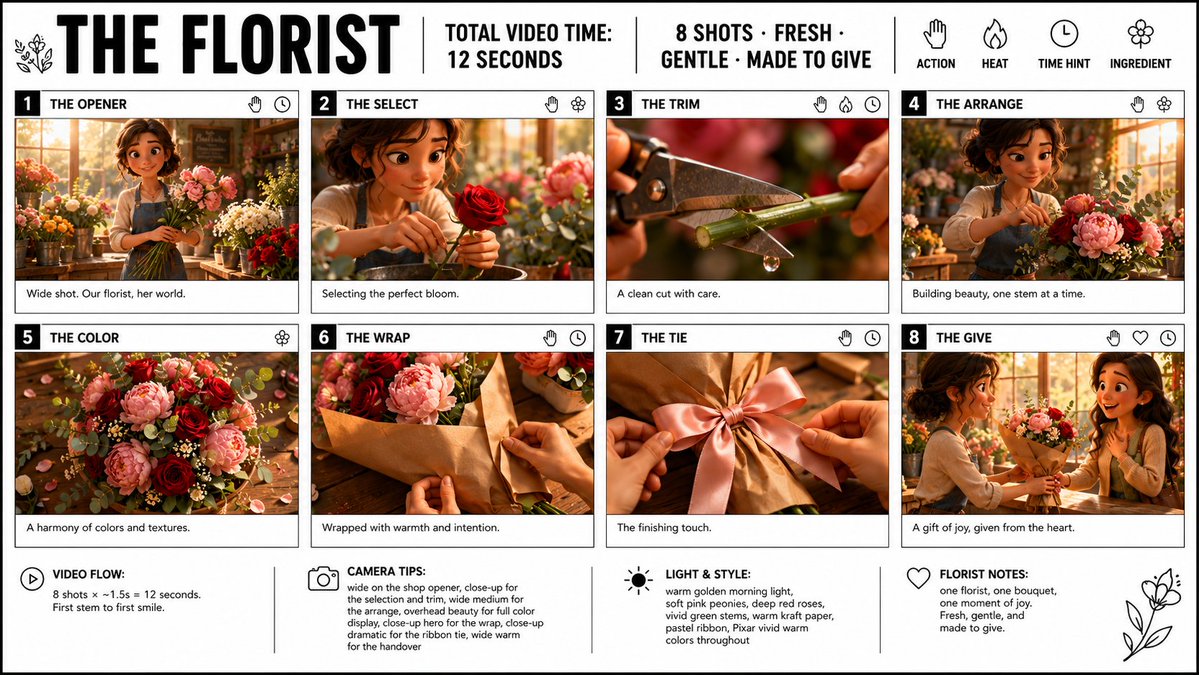
Florist Storyboard Poster
Generates a clean 16:9 storyboard infographic for an 8-shot animated florist bouquet video concept.
This is a GPT Image 2 prompt case for Graphic & Poster. Use the copy-ready prompt below to generate similar visuals, and review Awesome GPT Image 2 Prompts attribution plus commercial-use rights before reuse.
Free 1K preview
Generate one preview image instantly, no sign-up required.
Prompt
Copy-ready prompt
Goal: Create a crisp, clean infographic storyboard poster for {argument name="film title" default="THE FLORIST"}, showing a short premium 3D animated video concept about a florist making and giving a bouquet.

Canvas: Wide 16:9 poster on a white background with thin black outer border and black grid lines. Use bold black typography, a clean editorial storyboard layout, and premium Pixar-like 3D stylized rendering inside each frame. Bright vivid colors, warm golden morning light, soft pink peonies, deep red roses, vivid green stems, eucalyptus leaves, kraft paper, and a warm cozy flower-shop atmosphere.

Header layout: Large bold title on the top left: {argument name="film title" default="THE FLORIST"}. Add a small simple floral line icon beside it. Across the top center, separated by vertical black divider lines, include: “TOTAL VIDEO TIME: 12 SECONDS” and “8 SHOTS · FRESH · GENTLE · MADE TO GIVE”. On the top right, show four simple black line icons with labels underneath: a hand labeled “ACTION”, a flame labeled “HEAT”, a clock labeled “TIME HINT”, and a flower labeled “INGREDIENT”.

Main storyboard layout: Use exactly 8 numbered shot cards arranged in a 4-column by 2-row grid. Each card has a black number block at top left, a bold uppercase shot title, small black line icons at the top right, a cinematic 3D image panel, and a short caption strip below. Keep all borders black and clean.

Shot 1: Number “1”, title “THE OPENER”. Image: wide shot of a cheerful young female florist in a sunlit flower shop, holding stems among buckets of flowers. Caption: “Wide shot. Our florist, her world.” Icons: hand and clock.

Shot 2: Number “2”, title “THE SELECT”. Image: close-up of the florist gently choosing a perfect deep red rose, soft bokeh flowers behind her. Caption: “Selecting the perfect bloom.” Icons: hand and flower.

Shot 3: Number “3”, title “THE TRIM”. Image: extreme close-up of pruning shears cutting a green flower stem, with a small water droplet falling from the cut. Caption: “A clean cut with care.” Icons: hand, flame, and clock.

Shot 4: Number “4”, title “THE ARRANGE”. Image: the florist arranging pink peonies, red roses, greenery, and small white filler flowers on a worktable in the warm shop. Caption: “Building beauty, one stem at a time.” Icons: hand and flower.

Shot 5: Number “5”, title “THE COLOR”. Image: overhead beauty shot of the bouquet ingredients spread on a wooden table: pink peonies, deep red roses, eucalyptus, tiny white flowers, petals, and warm highlights. Caption: “A harmony of colors and textures.” Icon: flower.

Shot 6: Number “6”, title “THE WRAP”. Image: hands wrapping the bouquet in warm brown kraft paper on a wooden counter. Caption: “Wrapped with warmth and intention.” Icons: hand and clock.

Shot 7: Number “7”, title “THE TIE”. Image: close-up of hands tying a soft satin ribbon bow around the kraft-wrapped bouquet, with a pink ribbon as the focal point. Caption: “The finishing touch.” Icons: hand and clock.

Shot 8: Number “8”, title “THE GIVE”. Image: the florist handing the finished bouquet to a delighted smiling recipient in the flower shop, warm emotional moment. Caption: “A gift of joy, given from the heart.” Icons: hand, heart, and clock.

Bottom information bar: Add four note sections across the bottom, separated by vertical black lines, each with a simple black icon and bold label. Section 1 with play icon: “VIDEO FLOW:” then “8 shots × ~1.5s = 12 seconds. First stem to first smile.” Section 2 with camera icon: “CAMERA TIPS:” then “wide on the shop opener, close-up for the selection and trim, wide medium for the arrange, overhead beauty for full color display, close-up hero for the wrap, close-up dramatic for the ribbon tie, wide warm for the handover”. Section 3 with sun icon: “LIGHT & STYLE:” then “warm golden morning light, soft pink peonies, deep red roses, vivid green stems, warm kraft paper, pastel ribbon, Pixar vivid warm colors throughout”. Section 4 with heart icon: “FLORIST NOTES:” then “one florist, one bouquet, one moment of joy. Fresh, gentle, and made to give.” Add a simple floral line drawing in the lower right corner.

Constraints: Use exactly 8 storyboard cards and exactly the four bottom note sections. Keep text legible, black typography on white, no watermark, no extra logos, no extra panels. Maintain a polished storyboard poster look with clean borders and vivid cinematic 3D frames.
Prompt variables
Editable argument placeholders found in the prompt, with their default values.
Best for
- - Graphic & Poster visual exploration
- - Image generation and reference-image edits
- - Reusable briefs that keep source attribution visible
Change these parts
- - Subject, product, character, or scene
- - Aspect ratio, camera, lighting, and background
- - Brand, text, color, and output constraints
Recommended model and settings
- - Model: gpt-image-2
- - Input mode: Text to Image
- - Aspect ratio: source
- - Commercial status: review original source
How to use this prompt
- 1. Copy the prompt and preserve its structure for the first test.
- 2. Replace the subject, context, and publishing channel.
- 3. Change one camera, lighting, or style variable per iteration.
- 4. Inspect the output, source, text, and rights before reuse.
Limitations, source, and reuse cautions
- - Generated output is an editable draft, not factual, legal, or rights evidence.
- - Review the linked source, people, brands, logos, text, and third-party media before commercial use.
More cases in this category
Prioritized by category, input mode compatibility, quality, and lower risk.






Reuse and source notes
Use this prompt safely after previewing the case.
- 1.Copy the prompt or open it directly in Dovoo with the generation button.
- 2.Adjust variables, aspect ratio, and reference images for your own use case.
- 3.Before publishing or paid usage, verify source rights, attribution requirements, and brand or likeness risks.
Can I use this prompt commercially?
Commercial-use status is allowed. Review the original source, license, brand constraints, and legal requirements before paid usage.
Where does this case come from?
This case is imported from Awesome GPT Image 2 Prompts; keep attribution visible and check the source URL before reuse.