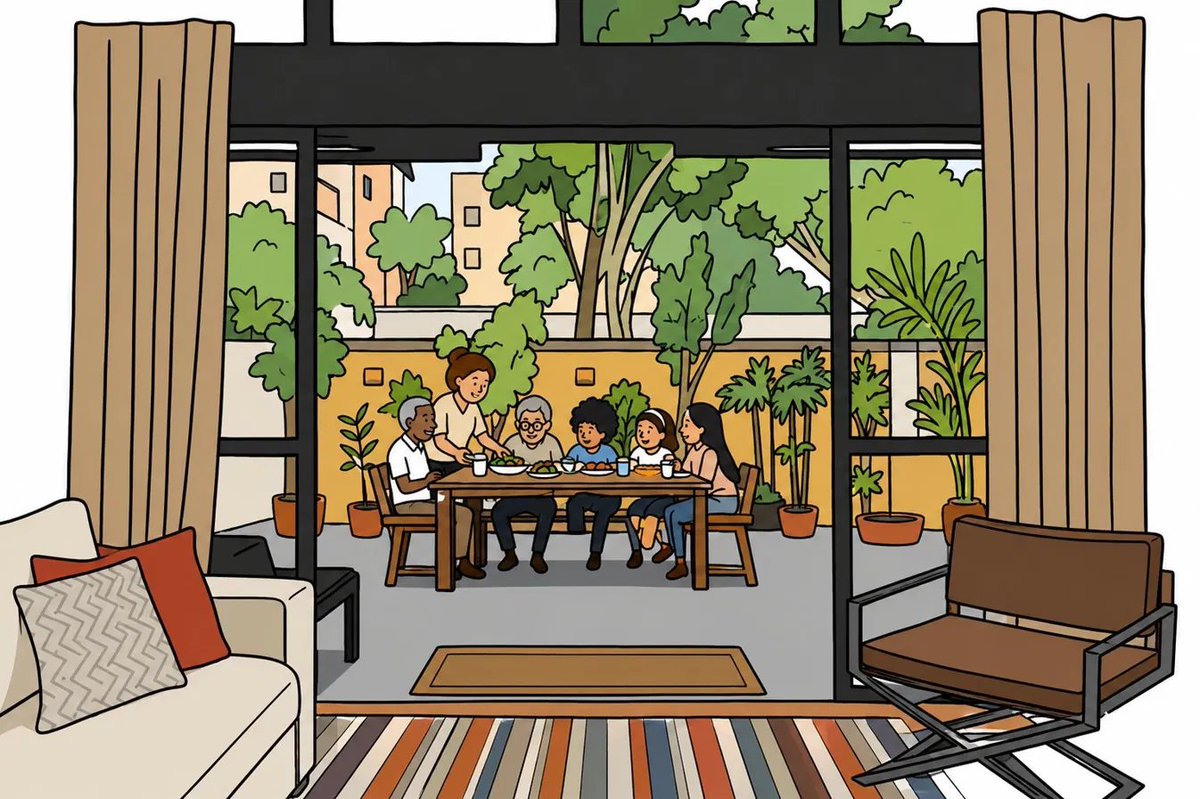
Flat Doodle Photo Transformation
Transforms a family patio photograph into a clean flat doodle illustration while preserving the original composition and subject placement.
This is a GPT Image 2 prompt case for Illustration & Art. Use the copy-ready prompt below to generate similar visuals, and review Awesome GPT Image 2 Prompts attribution plus commercial-use rights before reuse.
Free 1K preview
Generate one preview image instantly, no sign-up required.
Free text preview doesn’t preserve reference-image consistency.
Prompt
Copy-ready prompt
Using the provided reference image, transform it into a clean doodle / flat illustration. Preserve the original composition, camera angle, room layout, subject positions, indoor-outdoor framing, and overall scene exactly: the view from inside the living room through the large glass doors toward the patio dining table.

Style: Convert the photograph into a polished flat vector-like cartoon illustration with simple shapes, clean black outlines, medium-weight linework, flat colors, and zero realistic shading or gradients. Simplify textures and details while keeping all major objects recognizable.

People and layout: Keep exactly 6 people seated or standing around the outdoor table in the same relative positions as the reference: 1 older man at the left, 1 standing adult behind the table, 1 elderly person near the center, 1 child near center-right, 1 child to the right, and 1 adult woman at the far right. Keep the table, chairs, food, cups, patio plants, glass doors, curtains, sofa with pillows, rug, and lounge chair in their original locations.

Color treatment: Use warm, friendly flat colors inspired by the photo: beige curtains, cream sofa, red accent pillow, striped rug, black window frames, brown patio furniture, gray patio floor, yellow garden wall, and bright green plants and trees.

Constraints: No photorealism, no painterly brushwork, no shadows, no hatching, no extra people, no text, no watermark. The final image should look like a clean editorial flat illustration made from the reference photo.
Best for
- - Illustration & Art visual exploration
- - Image generation and reference-image edits
- - Reusable briefs that keep source attribution visible
Change these parts
- - Subject, product, character, or scene
- - Aspect ratio, camera, lighting, and background
- - Brand, text, color, and output constraints
Recommended model and settings
- - Model: gpt-image-2
- - Input mode: Image to Image
- - Aspect ratio: source
- - Commercial status: review original source
How to use this prompt
- 1. Copy the prompt and preserve its structure for the first test.
- 2. Replace the subject, context, and publishing channel.
- 3. Change one camera, lighting, or style variable per iteration.
- 4. Inspect the output, source, text, and rights before reuse.
Limitations, source, and reuse cautions
- - Generated output is an editable draft, not factual, legal, or rights evidence.
- - Review the linked source, people, brands, logos, text, and third-party media before commercial use.
More cases in this category
Prioritized by category, input mode compatibility, quality, and lower risk.



Reuse and source notes
Use this prompt safely after previewing the case.
- 1.Copy the prompt or open it directly in Dovoo with the generation button.
- 2.Adjust variables, aspect ratio, and reference images for your own use case.
- 3.Before publishing or paid usage, verify source rights, attribution requirements, and brand or likeness risks.
Can I use this prompt commercially?
Commercial-use status is allowed. Review the original source, license, brand constraints, and legal requirements before paid usage.
Where does this case come from?
This case is imported from Awesome GPT Image 2 Prompts; keep attribution visible and check the source URL before reuse.