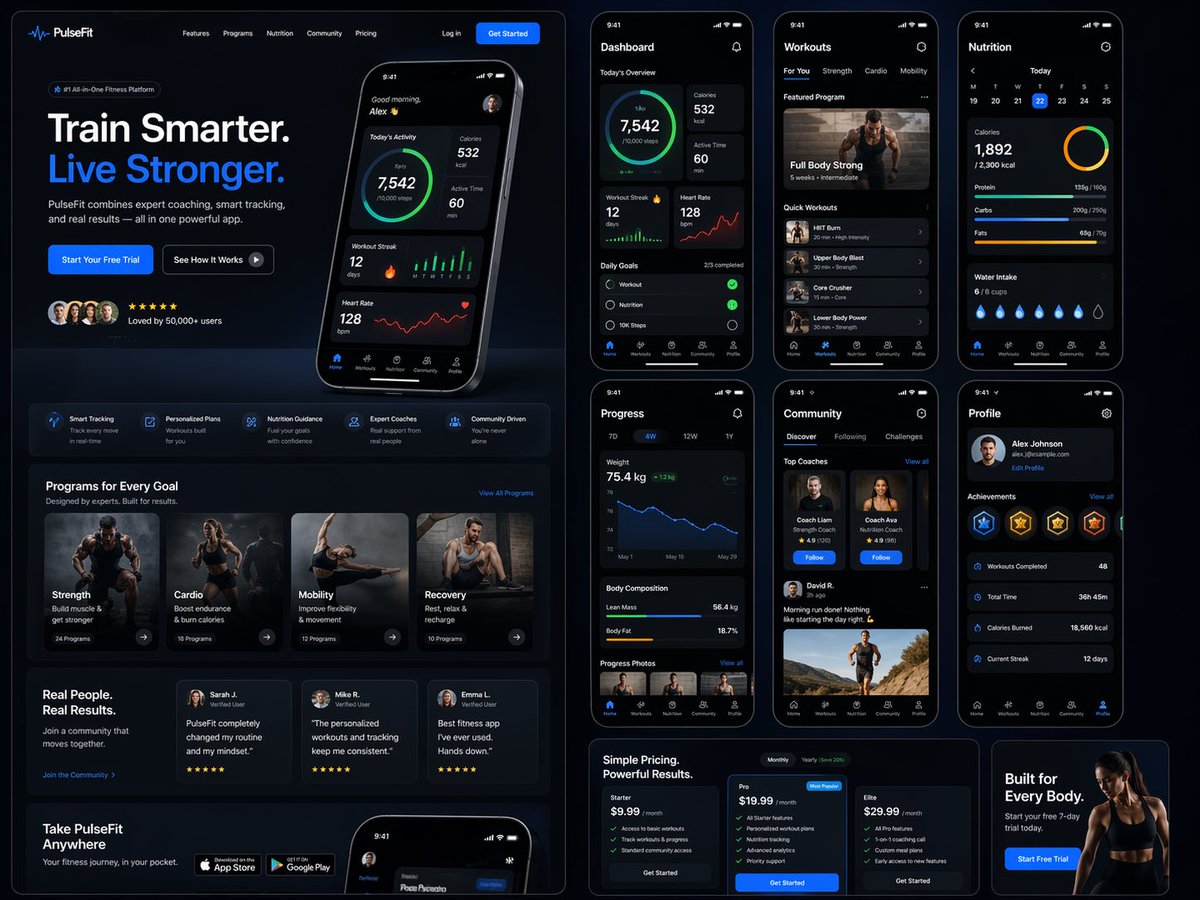
Fitness SaaS Landing Page UI
A massive, detailed prompt for generating a complete web and mobile UI/UX design for a premium fitness brand, including dashboards and various interface sections.
This is a GPT Image 2 prompt case for Graphic & Poster. Use the copy-ready prompt below to generate similar visuals, and review Awesome GPT Image 2 Prompts attribution plus commercial-use rights before reuse.
Free 1K preview
Generate one preview image instantly, no sign-up required.
Prompt
Copy-ready prompt
Design a modern, high-end {argument name="app type" default="fitness app"} landing page and product UI for a brand called {argument name="brand name" default="PulseFit"}.

Create a clean web design mockup that looks like a real SaaS fitness platform and mobile companion app. The design should feel premium, motivating, and easy to use, with a polished UI/UX style similar to top-tier health and wellness apps.

Include:
- A hero section with bold headline, short subheadline, strong call-to-action button, and app preview
- Dashboard UI showing daily activity, calories burned, workout streak, heart rate, step count, and progress rings
- Workout program cards for strength, cardio, mobility, and recovery
- Nutrition tracking section with macro breakdown and water intake
- Progress charts and analytics widgets
- Trainer/community section with profile cards and testimonials
- Pricing section and download/app store callout
- Mobile app screens shown alongside the web design for a cohesive product ecosystem

Style direction:
- Sleek, minimal, modern interface
- Premium fitness brand aesthetic
- Smooth spacing, strong hierarchy, rounded cards, soft shadows
- Dark mode UI with energetic accent colors like electric blue, neon green, or vibrant orange
- Crisp typography, realistic charts, polished buttons, beautiful onboarding feel
- Highly detailed, dribbble-worthy, startup-quality product design
- Realistic UX case study presentation, not a cartoon or illustration

Composition:
- Full website homepage mockup
- Multiple UI sections visible in one polished presentation
- Slight perspective or straight-on product showcase
- Clean background with subtle gradients and professional lighting
- Ultra-detailed, sharp text rendering, visually balanced layout

Output:
A stunning, realistic UI/UX design concept for a fitness app website and dashboard that looks ready for development.

Make it look like a real Figma product design presentation for a premium startup.
Prompt variables
Editable argument placeholders found in the prompt, with their default values.
Best for
- - Graphic & Poster visual exploration
- - Image generation and reference-image edits
- - Reusable briefs that keep source attribution visible
Change these parts
- - Subject, product, character, or scene
- - Aspect ratio, camera, lighting, and background
- - Brand, text, color, and output constraints
Recommended model and settings
- - Model: gpt-image-2
- - Input mode: Text to Image
- - Aspect ratio: source
- - Commercial status: review original source
How to use this prompt
- 1. Copy the prompt and preserve its structure for the first test.
- 2. Replace the subject, context, and publishing channel.
- 3. Change one camera, lighting, or style variable per iteration.
- 4. Inspect the output, source, text, and rights before reuse.
Limitations, source, and reuse cautions
- - Generated output is an editable draft, not factual, legal, or rights evidence.
- - Review the linked source, people, brands, logos, text, and third-party media before commercial use.
More cases in this category
Prioritized by category, input mode compatibility, quality, and lower risk.






Reuse and source notes
Use this prompt safely after previewing the case.
- 1.Copy the prompt or open it directly in Dovoo with the generation button.
- 2.Adjust variables, aspect ratio, and reference images for your own use case.
- 3.Before publishing or paid usage, verify source rights, attribution requirements, and brand or likeness risks.
Can I use this prompt commercially?
Commercial-use status is allowed. Review the original source, license, brand constraints, and legal requirements before paid usage.
Where does this case come from?
This case is imported from Awesome GPT Image 2 Prompts; keep attribution visible and check the source URL before reuse.