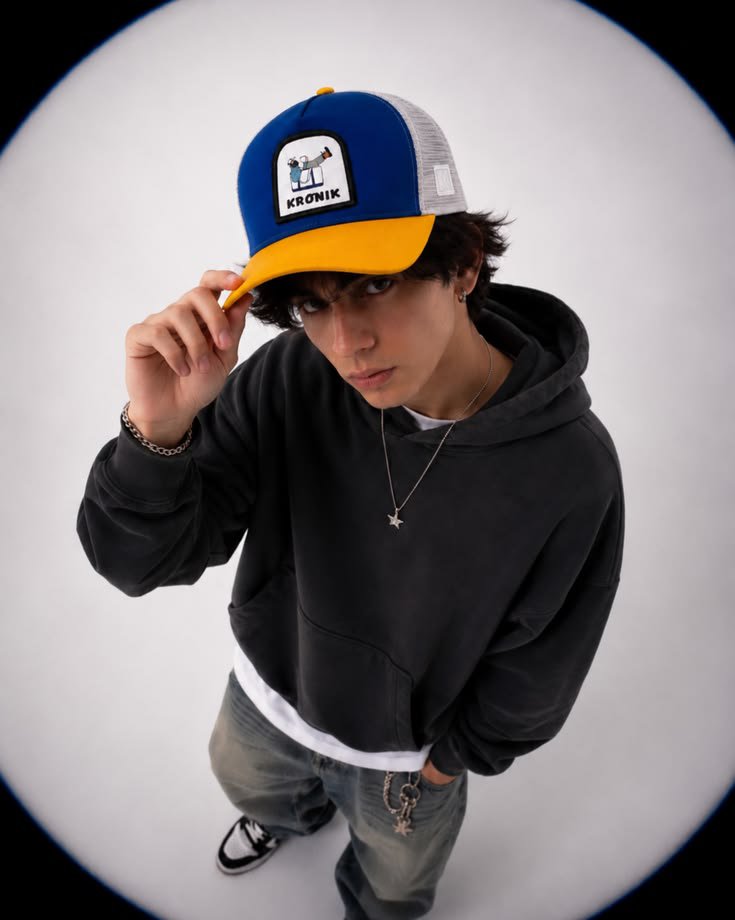
Fisheye Streetwear Fashion Portrait
A Gen Z high-fashion editorial prompt using an ultra-wide fisheye lens from a high angle to create a stylized streetwear look.
This is a GPT Image 2 prompt case for Fashion & Beauty. Use the copy-ready prompt below to generate similar visuals, and review Awesome GPT Image 2 Prompts attribution plus commercial-use rights before reuse.
Free 1K preview
Generate one preview image instantly, no sign-up required.
Prompt
Copy-ready prompt
Ultra realistic high fashion streetwear portrait of a young man photographed in a clean white studio using an ultra wide {argument name="headwear" default="fisheye lens"} from a high overhead angle. The subject is looking directly into the camera with a confident, slightly serious expression while lightly holding the brim of his trucker cap with one hand and keeping the other hand inside his hoodie pocket. He wears an {argument name="clothing" default="oversized charcoal black hoodie layered over a white T shirt, loose faded gray baggy jeans"} with a silver wallet chain, black and white sneakers, a thin silver chain necklace with a small star pendant, a silver bracelet, and a small hoop earring. The {argument name="lighting" default="trucker cap"} has a royal blue front panel, bright yellow curved brim, light gray mesh back, and a small embroidered patch logo on the front.
Messy medium length dark brown hair peeks out naturally from beneath the cap, framing the face. The lighting is soft, diffused studio lighting with subtle shadows, producing natural skin tones and gentle contrast. Minimalist seamless white backdrop with no props. Strong perspective distortion from the fisheye lens emphasizes the cap and upper body while slightly shrinking the legs and feet. The image features a circular fisheye vignette with dark edges surrounding the frame, giving an immersive lens effect.
Prompt variables
Editable argument placeholders found in the prompt, with their default values.
Best for
- - Fashion & Beauty visual exploration
- - Image generation and reference-image edits
- - Reusable briefs that keep source attribution visible
Change these parts
- - Subject, product, character, or scene
- - Aspect ratio, camera, lighting, and background
- - Brand, text, color, and output constraints
Recommended model and settings
- - Model: gpt-image-2
- - Input mode: Text to Image
- - Aspect ratio: source
- - Commercial status: review original source
How to use this prompt
- 1. Copy the prompt and preserve its structure for the first test.
- 2. Replace the subject, context, and publishing channel.
- 3. Change one camera, lighting, or style variable per iteration.
- 4. Inspect the output, source, text, and rights before reuse.
Limitations, source, and reuse cautions
- - Generated output is an editable draft, not factual, legal, or rights evidence.
- - Review the linked source, people, brands, logos, text, and third-party media before commercial use.
More cases in this category
Prioritized by category, input mode compatibility, quality, and lower risk.

Reuse and source notes
Use this prompt safely after previewing the case.
- 1.Copy the prompt or open it directly in Dovoo with the generation button.
- 2.Adjust variables, aspect ratio, and reference images for your own use case.
- 3.Before publishing or paid usage, verify source rights, attribution requirements, and brand or likeness risks.
Can I use this prompt commercially?
Commercial-use status is allowed. Review the original source, license, brand constraints, and legal requirements before paid usage.
Where does this case come from?
This case is imported from Awesome GPT Image 2 Prompts; keep attribution visible and check the source URL before reuse.