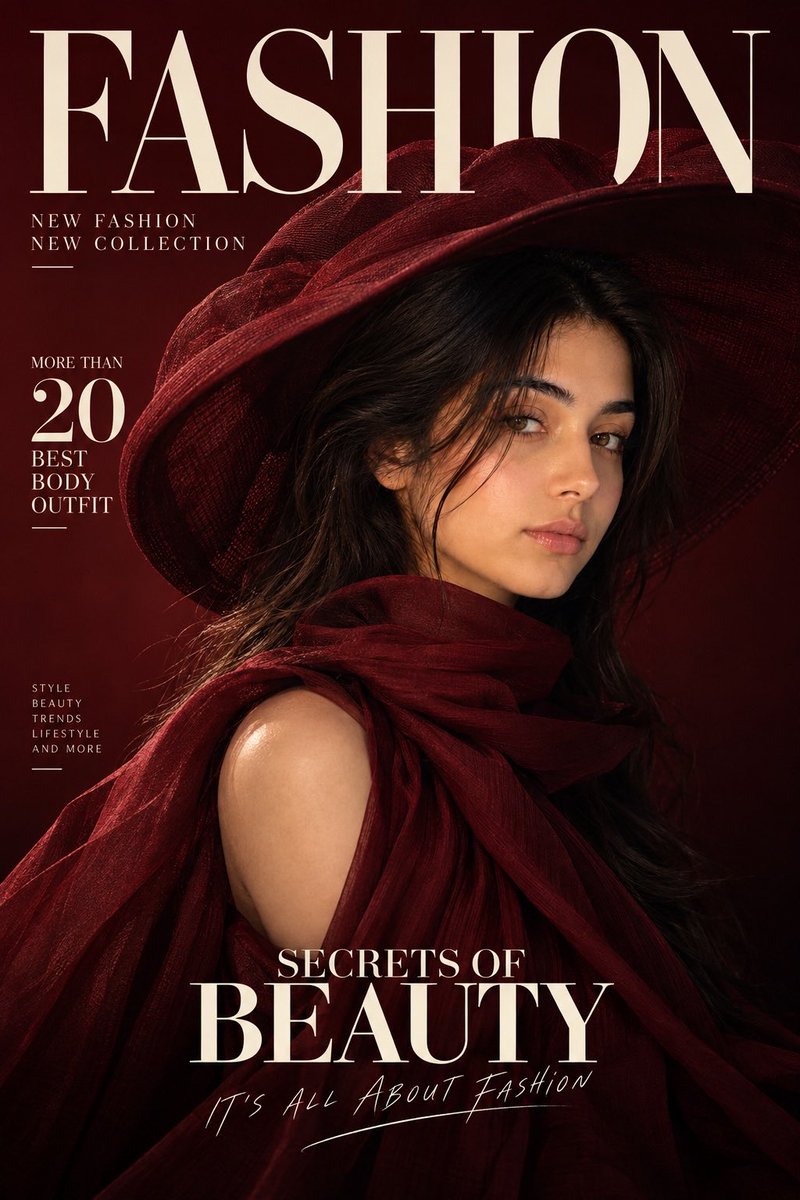
Luxury Fashion Magazine Cover Generator
A sophisticated prompt designed to generate hyper-realistic fashion magazine covers while preserving the facial identity of a reference image.
This is a GPT Image 2 prompt case for Graphic & Poster. Use the copy-ready prompt below to generate similar visuals, and review Awesome GPT Image 2 Prompts attribution plus commercial-use rights before reuse.
Free 1K preview
Generate one preview image instantly, no sign-up required.
Free text preview doesn’t preserve reference-image consistency.
Prompt
Copy-ready prompt
Create a high-end, hyperrealistic fashion editorial-style magazine cover, using my {argument name="identity reference" default="uploaded female face"} as the sole reference for the main female subject's identity. Accurately preserve my facial features and natural appearance – including facial structure, skin tone, eyes, eyebrows, nose, lips, cheekbones, jawline, facial proportions, natural skin texture, and overall similarity. Ensure I am highly recognizable. Do not beautify, reshape, feminize, age, de-age, or alter my facial features. Create an original design while maintaining the overall composition, fashion aesthetic, lighting, layout, and editorial atmosphere of the reference image. Pose and Styling: An elegant female fashion model in a sophisticated three-quarter side pose, looking slightly to the left. She is wearing an exaggerated, sculptural wide-brimmed hat and luxurious, flowing fashion clothing with a high-neck draped design around the neck. The clothing should convey avant-garde, elegance, and haute couture. Color Scheme: {argument name="colors" default="oversized wide-brim sculptural hat"}, with subtle tonal gradients. Use dramatic, cinematic lighting, with soft highlights on the face and strong shadows, creating a mysterious, luxurious fashion atmosphere. Background: A minimalist deep burgundy editorial background with a smooth gradient transitioning to near-black at the bottom. Clean, refined, high-end fashion magazine aesthetic. Layout: Create an elegant, large serif magazine title in the upper left corner, reading “{argument name="magazine name" default="FASHION"}”, with refined editorial typography. Add: “NEW FASHION,” “NEW COLLECTION.” Include a small editorial text box with the text: “MORE THAN 20 BEST BODY OUTFIT.” Add the title: “SECRETS OF,” “BEAUTY” below the center. Add a line of small, handwritten-style slogan at the bottom: “IT’S ALL ABOUT FASHION.” The layout should look professional, balanced, refined, and naturally integrated into the composition. Avoid garbled characters or spelling errors. Photography Style: Hyperrealistic professional fashion photography, luxurious magazine editorial style, cinematic studio lighting, realistic skin textures, delicate fabric details, subtle shadows, high dynamic range, refined composition, high-quality printing. Composition: Vertical magazine cover layout, with the subject on the right and ample negative space on the left for the layout. Ensure the face is clearly visible under the hat brim. Possess a strong visual hierarchy, presenting a level of refinement comparable to Vogue or Harper’s Bazaar.Prompt variables
Editable argument placeholders found in the prompt, with their default values.
Best for
- - Graphic & Poster visual exploration
- - Image generation and reference-image edits
- - Reusable briefs that keep source attribution visible
Change these parts
- - Subject, product, character, or scene
- - Aspect ratio, camera, lighting, and background
- - Brand, text, color, and output constraints
Recommended model and settings
- - Model: gpt-image-2
- - Input mode: Image to Image
- - Aspect ratio: source
- - Commercial status: review original source
How to use this prompt
- 1. Copy the prompt and preserve its structure for the first test.
- 2. Replace the subject, context, and publishing channel.
- 3. Change one camera, lighting, or style variable per iteration.
- 4. Inspect the output, source, text, and rights before reuse.
Limitations, source, and reuse cautions
- - Generated output is an editable draft, not factual, legal, or rights evidence.
- - Review the linked source, people, brands, logos, text, and third-party media before commercial use.
More cases in this category
Prioritized by category, input mode compatibility, quality, and lower risk.

Reuse and source notes
Use this prompt safely after previewing the case.
- 1.Copy the prompt or open it directly in Dovoo with the generation button.
- 2.Adjust variables, aspect ratio, and reference images for your own use case.
- 3.Before publishing or paid usage, verify source rights, attribution requirements, and brand or likeness risks.
Can I use this prompt commercially?
Commercial-use status is allowed. Review the original source, license, brand constraints, and legal requirements before paid usage.
Where does this case come from?
This case is imported from Awesome GPT Image 2 Prompts; keep attribution visible and check the source URL before reuse.