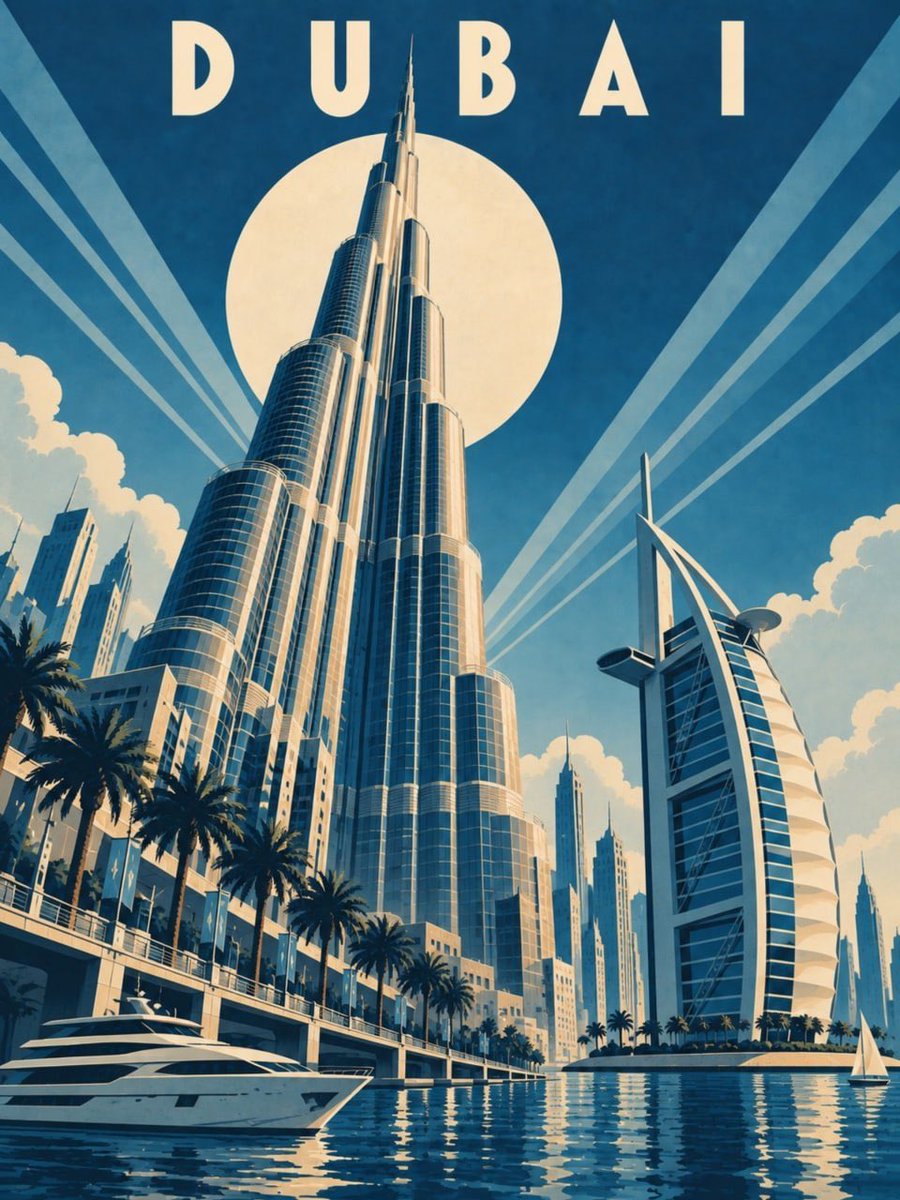
Art Deco Travel Poster Template
A structured prompt template for generating vintage 1930s Art Deco travel posters with specific composition locks, color palettes, and landmark-focused designs.
This is a GPT Image 2 prompt case for Graphic & Poster. Use the copy-ready prompt below to generate similar visuals, and review Awesome GPT Image 2 Prompts attribution plus commercial-use rights before reuse.
Free 1K preview
Generate one preview image instantly, no sign-up required.
Free text preview doesn’t preserve reference-image consistency.
Prompt
Copy-ready prompt
UPLOAD A REFERENCE IMAGE BEFORE GENERATING.

MAIN PROMPT

Create a dramatic vertical Art Deco travel poster featuring {argument name="city" default="[CITY NAME]"} in the style of a 1930s luxury ocean-liner travel advertisement. Make the landmark immediately recognizable, monumental and collectible, with elegant geometric Deco styling.

FORMAT LOCK

Vertical 3:4 composition. Bold theatrical poster design. Strong diagonal movement from lower left to upper right. Upper third reserved for open sky, the pale cream disc and city name.

STYLE TRANSFER

Landmark-led composition: 70% recognizable architecture, 30% Art Deco stylization. Show the primary landmark from a dramatic low viewpoint, towering upward with converging perspective. Use streamlined monumental forms, geometric arcs, straight verticals, stepped details, speed lines and concentric rays.

DETAIL & COLOR

Primary landmarks: {argument name="landmarks" default="[ONE OR TWO LANDMARKS — describe their distinctive shape and appearance from below]"}. Secondary elements: {argument name="secondary_elements" default="[THREE TO FIVE SUPPORTING ELEMENTS, including a bridge, river, canal, road or shoreline creating diagonal movement]"}. Use six to eight cool desaturated colours tuned to the city, always with deep desaturated navy as the single shadow tone. Blues and teals dominate sky, water and shadows; warm colors only as restrained accents on illuminated planes. Flat printed color planes, museum-print desaturation, subtle even paper grain.

COMPOSITION LOCK

Place a pale cream disc behind the main landmark with clean radiating rays. Keep the disc cool and quiet, never sunset-like. At the upper centre, place only “[CITY NAME]” in uppercase geometric sans-serif with wide letter spacing and a single solid color. Preserve strong diagonal energy and monumental scale.

STYLE

1930s luxury-line Art Deco travel poster, sophisticated geometric design, theatrical hard-edged lighting, flat ink printing, collectible museum-poster aesthetic, clean contemporary finish.

NEGATIVE PROMPT

Yellow, mustard, ochre, gold, amber, orange sky, warm sunset, warm overall cast, soft gradients, photorealism, 3D rendering, neon, cartoon style, fake aging, distressed paper, sepia, brown filters, clutter, extra text, incorrect spelling, additional typography, logos, watermark.

TEXT LOCK

Exact spelling: “[CITY NAME]”. No text other than the city name.

ASPECT RATIO

3:4
Prompt variables
Editable argument placeholders found in the prompt, with their default values.
Best for
- - Graphic & Poster visual exploration
- - Image generation and reference-image edits
- - Reusable briefs that keep source attribution visible
Change these parts
- - Subject, product, character, or scene
- - Aspect ratio, camera, lighting, and background
- - Brand, text, color, and output constraints
Recommended model and settings
- - Model: gpt-image-2
- - Input mode: Image to Image
- - Aspect ratio: source
- - Commercial status: review original source
How to use this prompt
- 1. Copy the prompt and preserve its structure for the first test.
- 2. Replace the subject, context, and publishing channel.
- 3. Change one camera, lighting, or style variable per iteration.
- 4. Inspect the output, source, text, and rights before reuse.
Limitations, source, and reuse cautions
- - Generated output is an editable draft, not factual, legal, or rights evidence.
- - Review the linked source, people, brands, logos, text, and third-party media before commercial use.
More cases in this category
Prioritized by category, input mode compatibility, quality, and lower risk.

Reuse and source notes
Use this prompt safely after previewing the case.
- 1.Copy the prompt or open it directly in Dovoo with the generation button.
- 2.Adjust variables, aspect ratio, and reference images for your own use case.
- 3.Before publishing or paid usage, verify source rights, attribution requirements, and brand or likeness risks.
Can I use this prompt commercially?
Commercial-use status is allowed. Review the original source, license, brand constraints, and legal requirements before paid usage.
Where does this case come from?
This case is imported from Awesome GPT Image 2 Prompts; keep attribution visible and check the source URL before reuse.