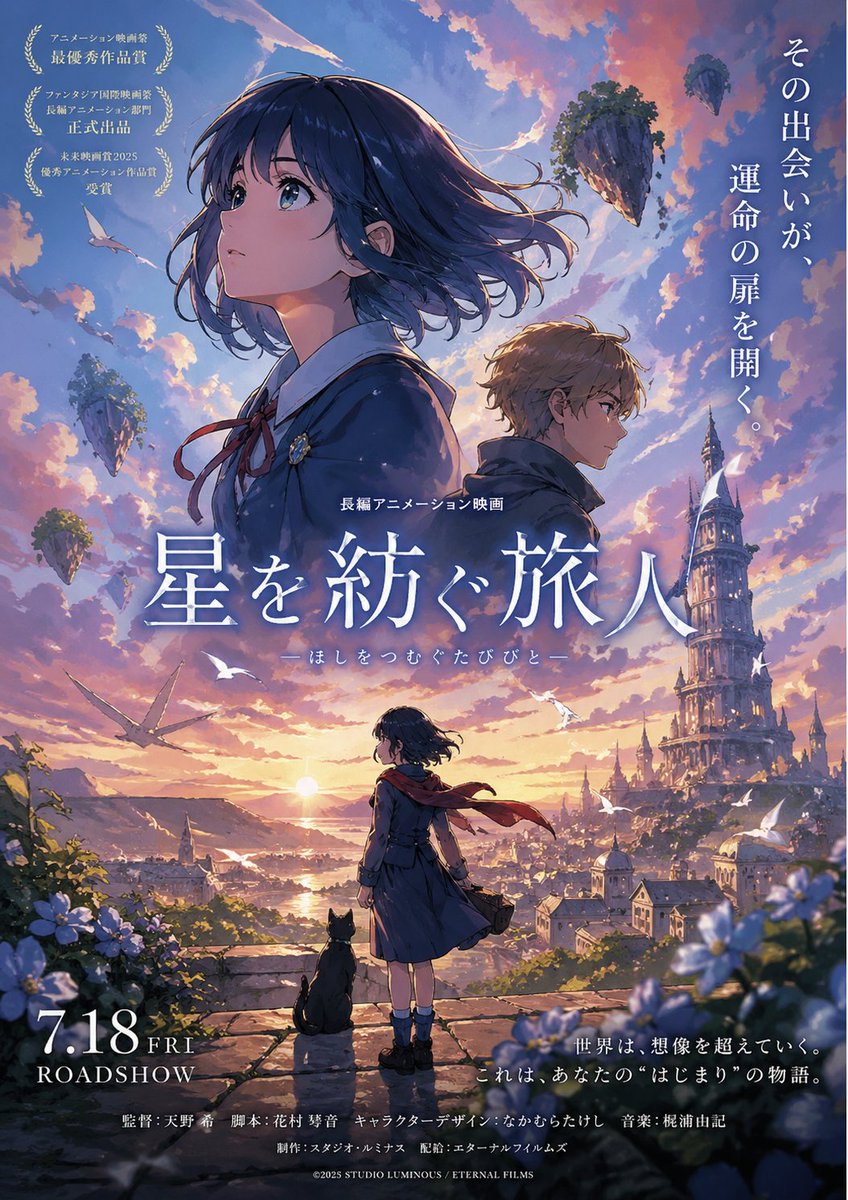
Fantasy Anime Movie Poster at Sunset
A cinematic Japanese-style animated film poster featuring two main characters, a girl with a cat overlooking a fantasy city, floating islands, and elegant promotional typography, ideal for fictional movie key art.
This is a GPT Image 2 prompt case for Anime & Game. Use the copy-ready prompt below to generate similar visuals, and review Awesome GPT Image 2 Prompts attribution plus commercial-use rights before reuse.
Free 1K preview
Generate one preview image instantly, no sign-up required.
Prompt
Copy-ready prompt
A breathtaking vertical Japanese anime film poster for a fantasy adventure movie, painted in a luminous cinematic style with dramatic sunset lighting, painterly clouds, and highly detailed background scenery. The composition features 4 human figures total: 2 large upper-body character portraits dominating the top half, and 1 small full-body girl in the foreground plus 1 tiny implied city crowd only as environmental scale. The main featured characters are a teenage girl and a teenage boy shown back-to-back in profile near the upper center, both facing opposite directions with calm, wistful, serious expressions. The girl has short windblown dark navy-blue hair with soft highlights, a school uniform-style outfit in deep blue with a white collar and a red ribbon bow, and she is positioned larger on the left. The boy is slightly smaller on the right, with tousled light brown hair, a dark high-collar coat or cloak, and a contemplative look. The lower center shows a younger girl standing on a stone overlook from behind, wearing a dark blue coat or dress, ankle socks, dark shoes, and a long red scarf blowing strongly in the wind; beside her sits 1 black cat, both gazing toward the horizon and the city below. The setting is an expansive fantasy city at golden hour, with warm sunlight breaking across a river valley and rooftops, and a towering ornate spiral-like clocktower or fantastical cathedral spire rising on the right side. In the sky are 6 floating islands of varying sizes covered with grass and rocky undersides, scattered across the upper left and upper right sky. Also include 5 white birds flying across the middle and lower sky, plus 1 large gliding bird-like silhouette on the left midground. Frame the foreground with soft blue and white flowers and foliage along the bottom corners. Use a dreamy palette of violet, lavender, peach, gold, and soft blue, with glowing rim light, atmospheric haze, epic scale, emotional fantasy-adventure mood, and premium hand-painted anime poster finish. Add Japanese movie-poster typography integrated into the image: a large vertical tagline in white on the upper right, a large central title in white kanji reading {argument name="title text" default="星を紡ぐ旅人"}, smaller subtitle text beneath it, 3 award-laurel callout blocks in white on the upper left, a release date block on the lower left reading {argument name="release date" default="7.18 FRI"} above ROADSHOW, a short promotional quote in white on the lower right, and a line of film staff credits across the bottom center. Include a small copyright line at the very bottom. Make it feel like an original blockbuster anime movie poster by a prestigious studio, emotionally uplifting, nostalgic, magical, and grand in scale.Prompt variables
Editable argument placeholders found in the prompt, with their default values.
Best for
- - Anime & Game visual exploration
- - Image generation and reference-image edits
- - Reusable briefs that keep source attribution visible
Change these parts
- - Subject, product, character, or scene
- - Aspect ratio, camera, lighting, and background
- - Brand, text, color, and output constraints
Recommended model and settings
- - Model: gpt-image-2
- - Input mode: Text to Image
- - Aspect ratio: source
- - Commercial status: review original source
How to use this prompt
- 1. Copy the prompt and preserve its structure for the first test.
- 2. Replace the subject, context, and publishing channel.
- 3. Change one camera, lighting, or style variable per iteration.
- 4. Inspect the output, source, text, and rights before reuse.
Limitations, source, and reuse cautions
- - Generated output is an editable draft, not factual, legal, or rights evidence.
- - Review the linked source, people, brands, logos, text, and third-party media before commercial use.
More cases in this category
Prioritized by category, input mode compatibility, quality, and lower risk.



Reuse and source notes
Use this prompt safely after previewing the case.
- 1.Copy the prompt or open it directly in Dovoo with the generation button.
- 2.Adjust variables, aspect ratio, and reference images for your own use case.
- 3.Before publishing or paid usage, verify source rights, attribution requirements, and brand or likeness risks.
Can I use this prompt commercially?
Commercial-use status is allowed. Review the original source, license, brand constraints, and legal requirements before paid usage.
Where does this case come from?
This case is imported from Awesome GPT Image 2 Prompts; keep attribution visible and check the source URL before reuse.