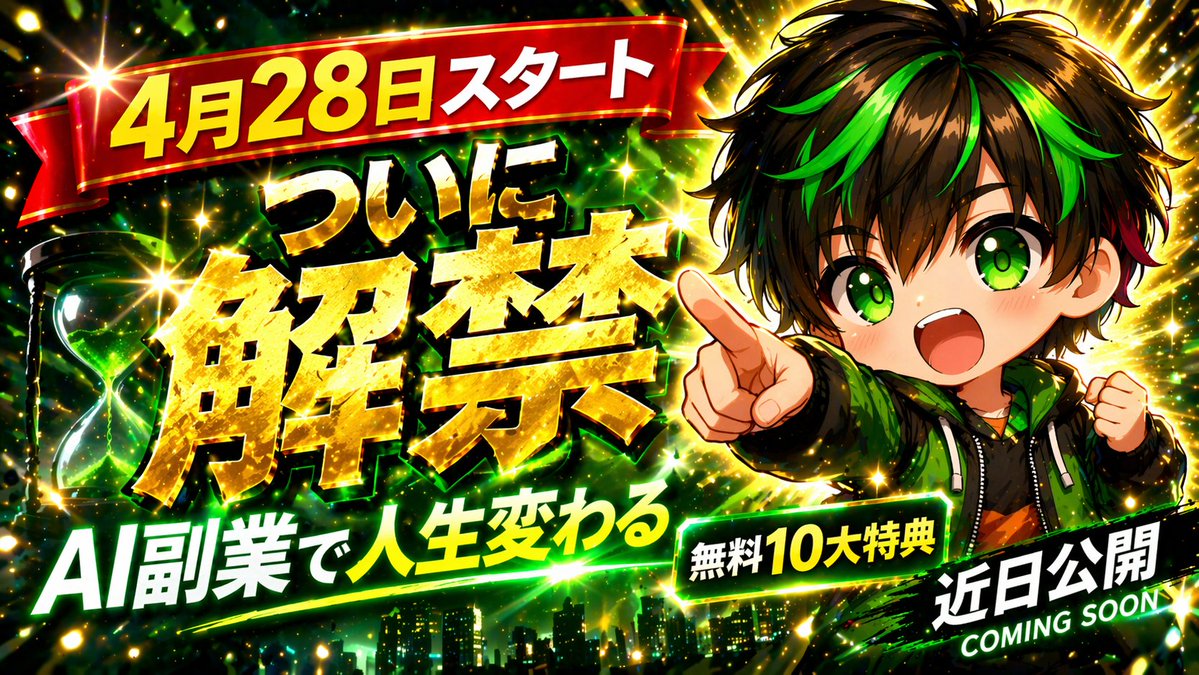
Explosive Anime Launch Thumbnail
A bold anime-style Japanese promotional thumbnail for launch announcements, online course ads, or AI business marketing visuals.
This is a GPT Image 2 prompt case for Anime & Game. Use the copy-ready prompt below to generate similar visuals, and review Awesome GPT Image 2 Prompts attribution plus commercial-use rights before reuse.
Free 1K preview
Generate one preview image instantly, no sign-up required.
Prompt
Copy-ready prompt
Create a flashy Japanese YouTube thumbnail in a high-impact anime promotional style with explosive lighting, dense spark effects, and dramatic contrast. The composition is a single unified scene with a dark black-and-neon-green background, gold glitter bursts, and a subtle city skyline silhouette along the bottom edge. On the right side, show a cute chibi anime boy from the waist up with messy dark brown to black hair accented by vivid neon green streaks and a small red accent near one side, huge bright green eyes, an open excited smile, and an energetic pose pointing directly toward the viewer with one hand while the other fist is raised. He wears a black hoodie layered under a green jacket with glossy highlights. On the left side, place 1 glowing green hourglass with swirling green energy inside. Fill the image with intense starbursts, lens flares, golden particles, and speed-line energy for a viral thumbnail look. Add 5 bold Japanese text elements in oversized display typography: a red ribbon banner across the upper left reading {argument name="top banner text" default="4月28日スタート"} in thick yellow letters with white edging; the main central headline in massive metallic gold kanji reading {argument name="main headline" default="ついに解禁"} with heavy black shadow and bright gold texture; a large white-and-green subheadline across the lower left reading {argument name="subheadline" default="AI副業で人生変わる"}; 1 green rounded badge near the lower center-right reading {argument name="bonus badge text" default="Free 10 Great Benefits"} in bold white and yellow text; and 1 black slanted banner in the lower right reading {argument name="corner banner text" default="Recently released"} with smaller white English text beneath it saying COMING SOON. Make everything feel urgent, celebratory, and attention-grabbing, like a high-CTR launch announcement thumbnail, with thick outlines, glowing edges, metallic text, and layered depth.Prompt variables
Editable argument placeholders found in the prompt, with their default values.
Best for
- - Anime & Game visual exploration
- - Image generation and reference-image edits
- - Reusable briefs that keep source attribution visible
Change these parts
- - Subject, product, character, or scene
- - Aspect ratio, camera, lighting, and background
- - Brand, text, color, and output constraints
Recommended model and settings
- - Model: gpt-image-2
- - Input mode: Text to Image
- - Aspect ratio: source
- - Commercial status: review original source
How to use this prompt
- 1. Copy the prompt and preserve its structure for the first test.
- 2. Replace the subject, context, and publishing channel.
- 3. Change one camera, lighting, or style variable per iteration.
- 4. Inspect the output, source, text, and rights before reuse.
Limitations, source, and reuse cautions
- - Generated output is an editable draft, not factual, legal, or rights evidence.
- - Review the linked source, people, brands, logos, text, and third-party media before commercial use.
More cases in this category
Prioritized by category, input mode compatibility, quality, and lower risk.



Reuse and source notes
Use this prompt safely after previewing the case.
- 1.Copy the prompt or open it directly in Dovoo with the generation button.
- 2.Adjust variables, aspect ratio, and reference images for your own use case.
- 3.Before publishing or paid usage, verify source rights, attribution requirements, and brand or likeness risks.
Can I use this prompt commercially?
Commercial-use status is allowed. Review the original source, license, brand constraints, and legal requirements before paid usage.
Where does this case come from?
This case is imported from Awesome GPT Image 2 Prompts; keep attribution visible and check the source URL before reuse.