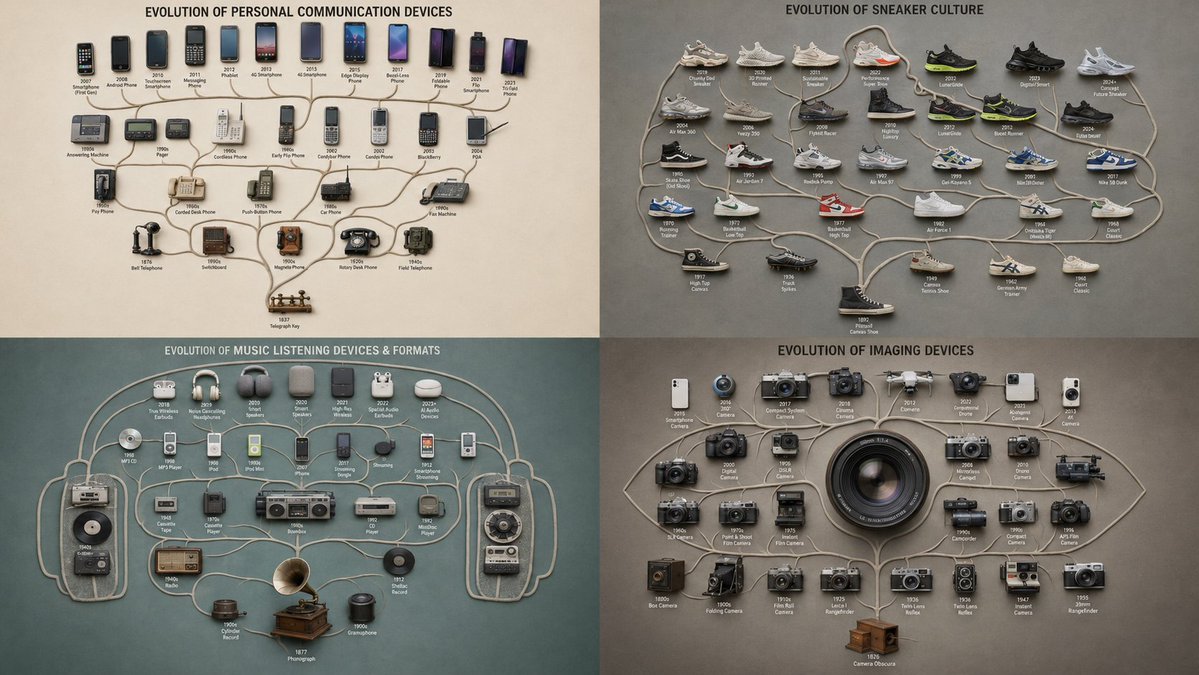
Evolutionary Branching Tree Visualization
A structured prompt for visualizing the evolution of objects using a branching lineage layout with phylogenetic flat-lay aesthetics.
This is a GPT Image 2 prompt case for Graphic & Poster. Use the copy-ready prompt below to generate similar visuals, and review Awesome GPT Image 2 Prompts attribution plus commercial-use rights before reuse.
Free 1K preview
Generate one preview image instantly, no sign-up required.
Prompt
Copy-ready prompt
A top-down branching tree where {argument name="theme" default="THEME"} objects are arranged along forking limbs spreading from a single root, ancestral at the base and most-evolved at the tips, the spreading canopy forming the silhouette of {argument name="silhouette shape" default="SHAPE"} ::5 Branching Logic: AI_INFER 25–45 themed objects placed as a genealogy — one origin at the root, each fork a divergence, related forms on shared branches — the lineage reading clearly from base to outermost tips ::5 Composition: Clean dendritic branching, non-crossing limbs, even canopy spread, clean silhouette edge, generous margin ::3 Material Physics: Real themed objects, accurate materials and age per branch, consistent matte finish, soft shadows, faint connecting limbs ::2 Illumination: Flat overhead softbox, no glare ::2 Typography: Tiny node labels at each branch tip ::2 Render Stack: Phylogenetic flat-lay, family-tree arrangement, branching-lineage collection, 8k ::1 Negative: [tangled crossing branches, broken hierarchy, disconnected nodes, broken canopy silhouette, tilt, 3d perspective, hands] ::-1Prompt variables
Editable argument placeholders found in the prompt, with their default values.
Best for
- - Graphic & Poster visual exploration
- - Image generation and reference-image edits
- - Reusable briefs that keep source attribution visible
Change these parts
- - Subject, product, character, or scene
- - Aspect ratio, camera, lighting, and background
- - Brand, text, color, and output constraints
Recommended model and settings
- - Model: gpt-image-2
- - Input mode: Text to Image
- - Aspect ratio: source
- - Commercial status: review original source
How to use this prompt
- 1. Copy the prompt and preserve its structure for the first test.
- 2. Replace the subject, context, and publishing channel.
- 3. Change one camera, lighting, or style variable per iteration.
- 4. Inspect the output, source, text, and rights before reuse.
Limitations, source, and reuse cautions
- - Generated output is an editable draft, not factual, legal, or rights evidence.
- - Review the linked source, people, brands, logos, text, and third-party media before commercial use.
More cases in this category
Prioritized by category, input mode compatibility, quality, and lower risk.





Reuse and source notes
Use this prompt safely after previewing the case.
- 1.Copy the prompt or open it directly in Dovoo with the generation button.
- 2.Adjust variables, aspect ratio, and reference images for your own use case.
- 3.Before publishing or paid usage, verify source rights, attribution requirements, and brand or likeness risks.
Can I use this prompt commercially?
Commercial-use status is allowed. Review the original source, license, brand constraints, and legal requirements before paid usage.
Where does this case come from?
This case is imported from Awesome GPT Image 2 Prompts; keep attribution visible and check the source URL before reuse.