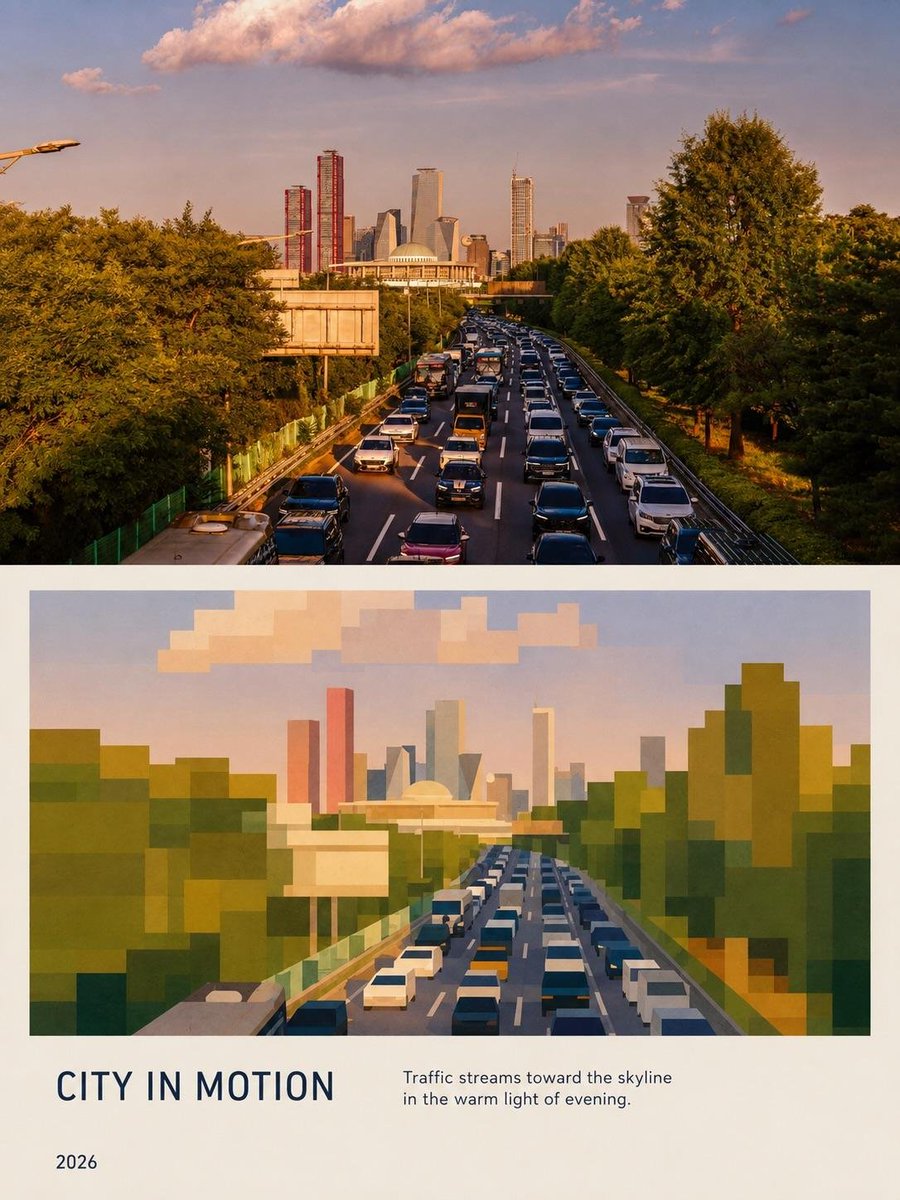
Editorial City Poster Transformation
A prompt that converts a reference photo into a two-part editorial poster featuring realistic photography and a geometric pixel-art reinterpretation.
This is a GPT Image 2 prompt case for Graphic & Poster. Use the copy-ready prompt below to generate similar visuals, and review Awesome GPT Image 2 Prompts attribution plus commercial-use rights before reuse.
Free 1K preview
Generate one preview image instantly, no sign-up required.
Free text preview doesn’t preserve reference-image consistency.
Prompt
Copy-ready prompt
Recreate the uploaded reference image as a premium editorial city poster, preserving the overall composition, framing, perspective, colors, and visual hierarchy. Create a tall portrait-format layout divided into two main sections. The upper section is a highly realistic golden-hour photograph of a busy multilane highway filled with dense traffic, viewed from an elevated position. Lush mature green trees line both sides of the road, while the traffic leads toward a modern city skyline in the distance. Include the distinctive large domed building at the center and a cluster of contemporary skyscrapers behind it, including tall narrow red towers, glass towers, and modern geometric buildings. Warm sunset light, soft atmospheric haze, realistic vehicles, detailed foliage, natural shadows, cinematic photography, subtle film grain.

Directly below, recreate the same scene as a simplified geometric/pixel-art interpretation. Convert the trees, cars, highway, domed building, skyline, and clouds into large clean rectangular and polygonal blocks while maintaining the same perspective and recognizable silhouettes. Use a sophisticated muted palette of forest green, olive, teal, dusty blue, cream, ochre, terracotta, warm orange, muted pink, and pale sky blue. The geometric illustration should feel intentionally designed rather than crude pixel art: crisp edges, layered blocks, subtle tonal variation, elegant contemporary art-book aesthetic.

Use a warm ivory/off-white background and generous margins around the composition. At the bottom, add a refined editorial typography section with the large uppercase title “{argument name="city title" default="CITY IN MOTION"}” on the left, the subtitle “{argument name="subtitle" default="Traffic streams toward the skyline in the warm light of evening."}” on the right, and “{argument name="year" default="2026"}” below on the left. Use clean modern sans-serif typography in dark navy/charcoal, with careful spacing and alignment. Premium architecture-and-travel magazine aesthetic, sophisticated minimalist graphic design, cohesive relationship between the photograph and its geometric reinterpretation, realistic and polished, high resolution, sharp details, portrait poster composition. Do not add any extra text, logos, watermarks, or unrelated objects.
Prompt variables
Editable argument placeholders found in the prompt, with their default values.
Best for
- - Graphic & Poster visual exploration
- - Image generation and reference-image edits
- - Reusable briefs that keep source attribution visible
Change these parts
- - Subject, product, character, or scene
- - Aspect ratio, camera, lighting, and background
- - Brand, text, color, and output constraints
Recommended model and settings
- - Model: gpt-image-2
- - Input mode: Image to Image
- - Aspect ratio: source
- - Commercial status: review original source
How to use this prompt
- 1. Copy the prompt and preserve its structure for the first test.
- 2. Replace the subject, context, and publishing channel.
- 3. Change one camera, lighting, or style variable per iteration.
- 4. Inspect the output, source, text, and rights before reuse.
Limitations, source, and reuse cautions
- - Generated output is an editable draft, not factual, legal, or rights evidence.
- - Review the linked source, people, brands, logos, text, and third-party media before commercial use.
More cases in this category
Prioritized by category, input mode compatibility, quality, and lower risk.
Reuse and source notes
Use this prompt safely after previewing the case.
- 1.Copy the prompt or open it directly in Dovoo with the generation button.
- 2.Adjust variables, aspect ratio, and reference images for your own use case.
- 3.Before publishing or paid usage, verify source rights, attribution requirements, and brand or likeness risks.
Can I use this prompt commercially?
Commercial-use status is allowed. Review the original source, license, brand constraints, and legal requirements before paid usage.
Where does this case come from?
This case is imported from Awesome GPT Image 2 Prompts; keep attribution visible and check the source URL before reuse.