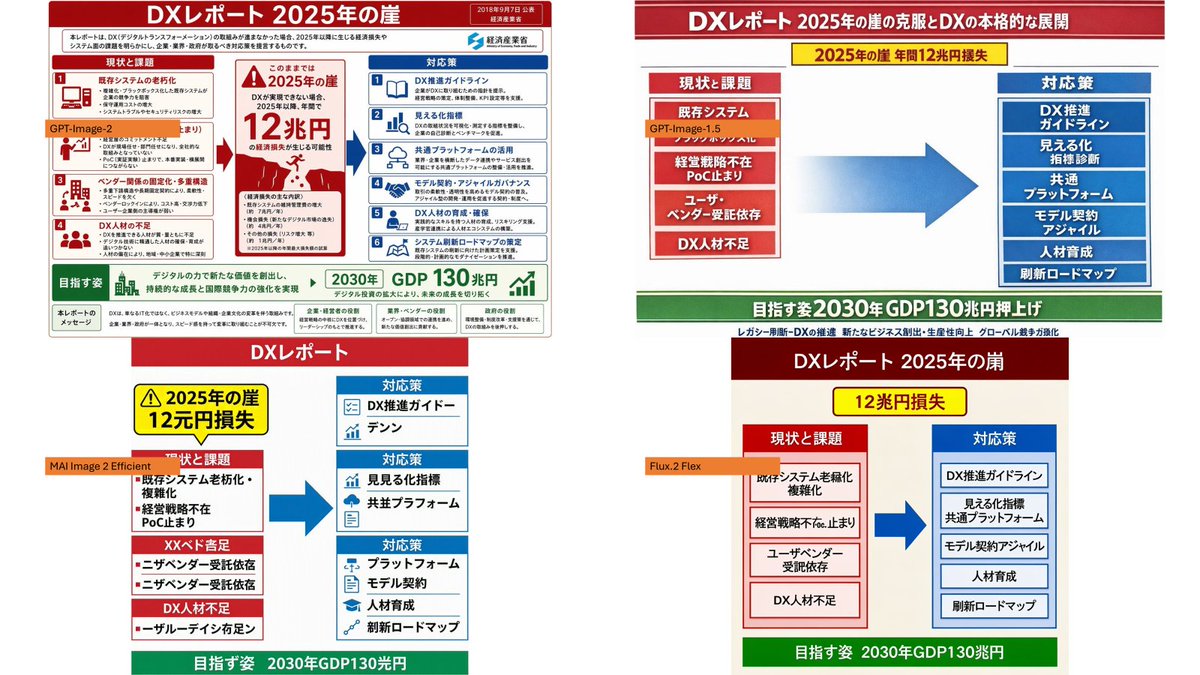
Four-Panel DX Report Model Comparison
Creates a PowerPoint-style comparison slide showing four AI-generated versions of a Japanese DX report infographic from a reference image.
This is a GPT Image 2 prompt case for 平面海报. Use the copy-ready prompt below to generate similar visuals, and review Awesome GPT Image 2 Prompts attribution plus commercial-use rights before reuse.
Prompt
Copy-ready prompt
Using the provided reference image as the source slides, create a 16:9 white contrast canvas showcasing four different reconstructed versions of the same Japanese government-style DX report slides. Layout: Arrange the four panels precisely in a 2x2 grid, leaving ample white margins. The top-left panel should remain largely unchanged from the provided reference slides but scaled. The remaining three panels should be simplified reconstructions of the same content, each following the same overall logic: a red title bar, a red "Current Situation and Issues" block on the left, a blue "Response Strategies" block on the right, a large blue arrow pointing from left to right in the center, and a green target bar at the bottom. Panel Labels: Add four small orange model labels above the panels:{argument name="top left model label" default="GPT-Image-2"} ,{argument name="top right model label" default="GPT-Image-1.5"} ,{argument name="bottom left model label" default="MAI Image 2 Efficient"} as well as{argument name="bottom right model label" default="Flux.2 Flex"} Text and content to be retained: Keep the main title as {argument name="main headline" default="DX Report: The 2025 Cliff"} Retain readable Japanese key phrases such as "the cliff of 2025", "a loss of 12 trillion yen", "the current situation and the challenges", "countermeasures", "existing system", "the lack of economic strategy", "DX talent shortage", "DX promotion guideline", "visible indicators", "common platform", "model contract/agency", "talent development", "refresh roadmap", and the green target information regarding "130 trillion yen GDP by 2030". Panel differences: The version in the upper right corner should present a concise PowerPoint infographic with a long red title bar, a yellow warning banner near the top, stacked red question boxes on the left, stacked blue solution boxes on the right, and a large gradient blue arrow in the center. The bottom left panel should look more compact and slightly imperfect, with multiple red issue sections on the left and three blue response sections on the right. The bottom right panel should present a clean, minimalist slideshow with a dark red title bar, a yellow loss badge, two bordered columns, and a green target bar at the bottom. Style constraints: Make the overall image look like a screenshot of PowerPoint slides comparing the output quality of different image models. Keep all four panels clear, flat, and infographic-like. Do not add photorealistic elements, people, watermarks, or extra panels.Prompt variables
Editable argument placeholders found in the prompt, with their default values.
More cases in this category
Prioritized by category, input mode compatibility, quality, and lower risk.


Reuse and source notes
Use this prompt safely after previewing the case.
- 1.Copy the prompt or open it directly in Dovoo with the generation button.
- 2.Adjust variables, aspect ratio, and reference images for your own use case.
- 3.Before publishing or paid usage, verify source rights, attribution requirements, and brand or likeness risks.
Can I use this prompt commercially?
Commercial-use status is allowed. Review the original source, license, brand constraints, and legal requirements before paid usage.
Where does this case come from?
This case is imported from Awesome GPT Image 2 Prompts; keep attribution visible and check the source URL before reuse.