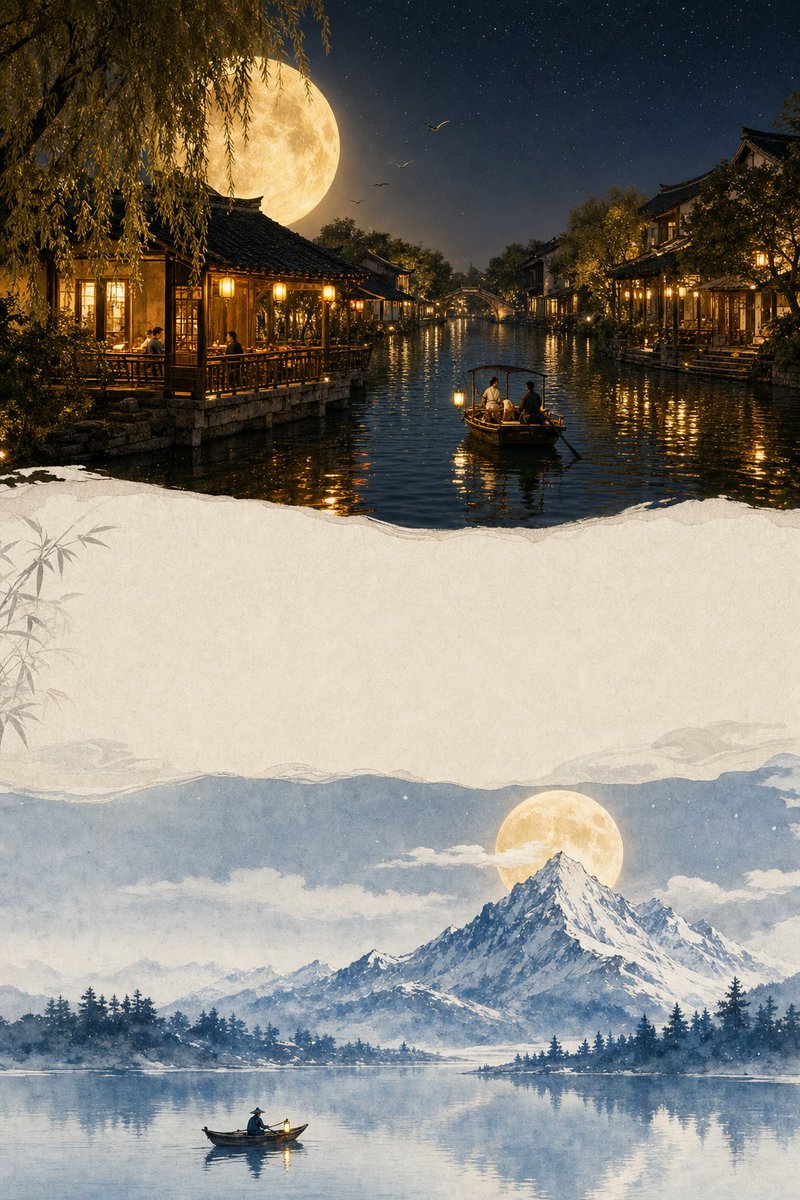
Dual Section Moonlit Poster Prompt
A detailed prompt for generating a vertical cinematic artwork featuring a Jiangnan water town night scene on top and a snowy mountain watercolor illustration on the bottom.
This is a GPT Image 2 prompt case for Graphic & Poster. Use the copy-ready prompt below to generate similar visuals, and review Awesome GPT Image 2 Prompts attribution plus commercial-use rights before reuse.
This prompt is designed for multiple reference images. We will open Dovoo with the prompt and the available preview image; add the remaining references in Dovoo before generating.
Free 1K preview
Generate one preview image instantly, no sign-up required.
Free text preview doesn’t preserve reference-image consistency.
Prompt
Copy-ready prompt
Create a vertical 2:3 cinematic artwork inspired by the two reference images. Divide the composition into two elegant sections: the top section shows a realistic dreamy Jiangnan water-town night, with a huge glowing golden full moon behind willow trees and black-tile roofs, a small warm wooden waterside teahouse with glowing lights, calm canal water reflecting the moonlight, a small wooden boat with two people, distant birds, and peaceful starry sky; the bottom section shows a beautiful hand-painted watercolor/ink illustration of a snowy mountain beside a calm lake, a golden full moon behind the mountain, a tiny boat with one person on the lake, and soft reflections in the water. Keep the composition balanced, peaceful, magical and artistic, with warm golden tones in the top scene and cool blue-white tones in the bottom scene, subtle paper texture, elegant minimal typography area, premium poster design, highly detailed, cinematic lighting, dreamy moonlight atmosphere, clean composition, realistic top scene + delicate watercolor illustration bottom scene, no logos, no watermark.
Best for
- - Graphic & Poster visual exploration
- - Image generation and reference-image edits
- - Reusable briefs that keep source attribution visible
Change these parts
- - Subject, product, character, or scene
- - Aspect ratio, camera, lighting, and background
- - Brand, text, color, and output constraints
Recommended model and settings
- - Model: gpt-image-2
- - Input mode: Multi Image to Image
- - Aspect ratio: source
- - Commercial status: review original source
How to use this prompt
- 1. Copy the prompt and preserve its structure for the first test.
- 2. Replace the subject, context, and publishing channel.
- 3. Change one camera, lighting, or style variable per iteration.
- 4. Inspect the output, source, text, and rights before reuse.
Limitations, source, and reuse cautions
- - Generated output is an editable draft, not factual, legal, or rights evidence.
- - Review the linked source, people, brands, logos, text, and third-party media before commercial use.
More cases in this category
Prioritized by category, input mode compatibility, quality, and lower risk.

Reuse and source notes
Use this prompt safely after previewing the case.
- 1.Copy the prompt or open it directly in Dovoo with the generation button.
- 2.Adjust variables, aspect ratio, and reference images for your own use case.
- 3.Before publishing or paid usage, verify source rights, attribution requirements, and brand or likeness risks.
Can I use this prompt commercially?
Commercial-use status is allowed. Review the original source, license, brand constraints, and legal requirements before paid usage.
Where does this case come from?
This case is imported from Awesome GPT Image 2 Prompts; keep attribution visible and check the source URL before reuse.