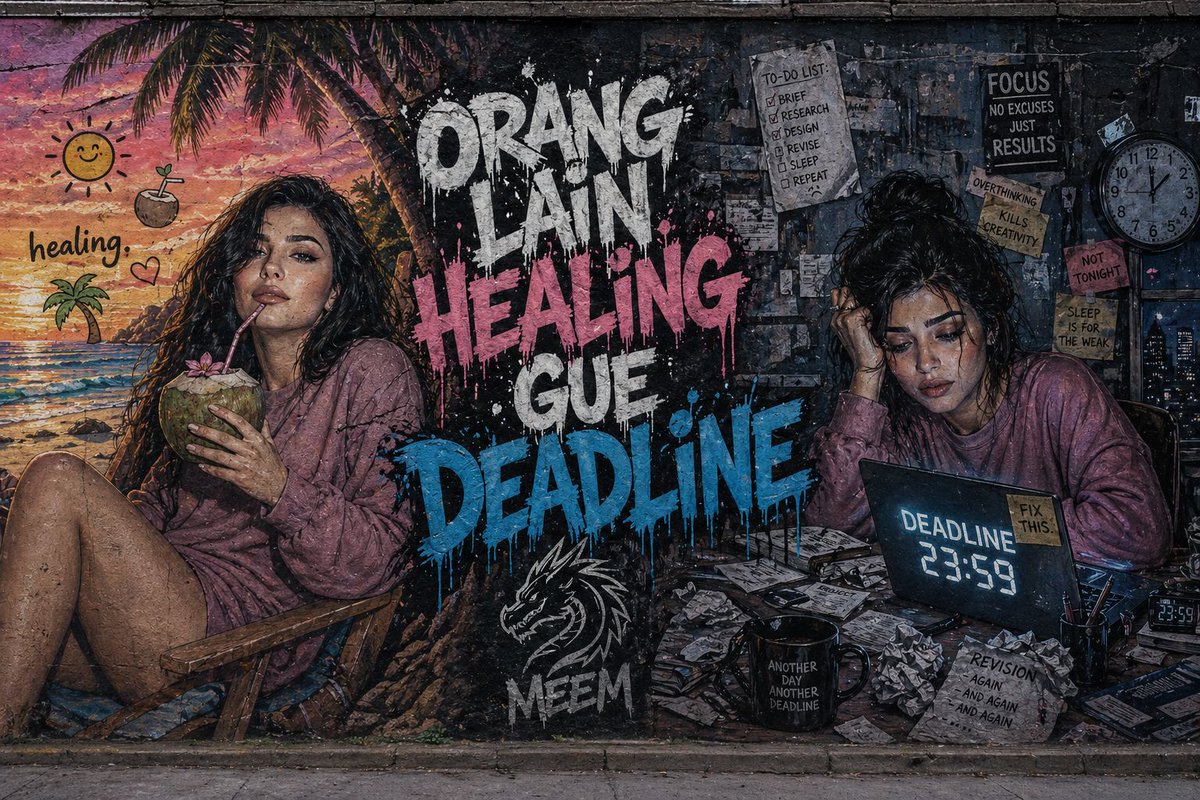
Dual-Concept Street Art Mural
A complex split-composition prompt for a city wall mural contrasting a relaxing tropical healing theme with a stressful work deadline.
This is a GPT Image 2 prompt case for Illustration & Art. Use the copy-ready prompt below to generate similar visuals, and review Awesome GPT Image 2 Prompts attribution plus commercial-use rights before reuse.
Free 1K preview
Generate one preview image instantly, no sign-up required.
Prompt
Copy-ready prompt
Ultra-detailed wide street art mural painted on a rough concrete city wall with a split composition. On the {argument name="left side" default="left side, a vibrant tropical beach scene in warm pastel tones shows a young woman (same face as reference) relaxing on a chair, sipping a coconut under a sunset sky"}, with playful tropical emojis and the caption “healing.” On the {argument name="right side" default="right side, a dark and messy workspace in cold bluish-gray tones shows the same woman stressed at a desk surrounded by scattered papers, a coffee mug, and a glowing laptop displaying “DEADLINE 23:59”"}. In the center, {argument name="main text" default="bold graffiti text reads “ORANG LAIN HEALING” and “GUE DEADLINE”"} in a dripping paint style with high contrast colors. Include a “MEEM” tag with a stylized dragon logo beneath. Cinematic lighting, gritty textures, hyper-realistic style, strong emotional contrast, 8K detail.Prompt variables
Editable argument placeholders found in the prompt, with their default values.
Best for
- - Illustration & Art visual exploration
- - Image generation and reference-image edits
- - Reusable briefs that keep source attribution visible
Change these parts
- - Subject, product, character, or scene
- - Aspect ratio, camera, lighting, and background
- - Brand, text, color, and output constraints
Recommended model and settings
- - Model: gpt-image-2
- - Input mode: Text to Image
- - Aspect ratio: source
- - Commercial status: review original source
How to use this prompt
- 1. Copy the prompt and preserve its structure for the first test.
- 2. Replace the subject, context, and publishing channel.
- 3. Change one camera, lighting, or style variable per iteration.
- 4. Inspect the output, source, text, and rights before reuse.
Limitations, source, and reuse cautions
- - Generated output is an editable draft, not factual, legal, or rights evidence.
- - Review the linked source, people, brands, logos, text, and third-party media before commercial use.
More cases in this category
Prioritized by category, input mode compatibility, quality, and lower risk.




Reuse and source notes
Use this prompt safely after previewing the case.
- 1.Copy the prompt or open it directly in Dovoo with the generation button.
- 2.Adjust variables, aspect ratio, and reference images for your own use case.
- 3.Before publishing or paid usage, verify source rights, attribution requirements, and brand or likeness risks.
Can I use this prompt commercially?
Commercial-use status is allowed. Review the original source, license, brand constraints, and legal requirements before paid usage.
Where does this case come from?
This case is imported from Awesome GPT Image 2 Prompts; keep attribution visible and check the source URL before reuse.