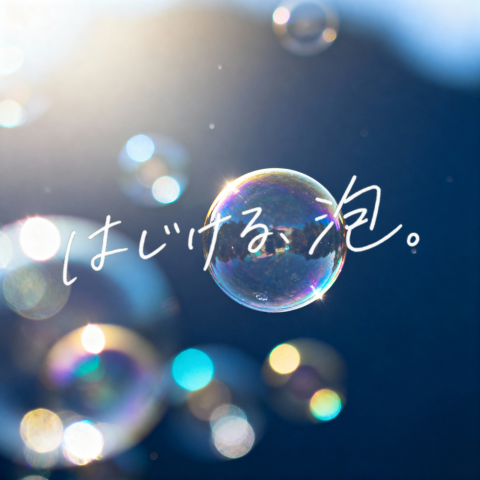
Dreamy Bubble with Handwritten Japanese Text
This prompt generates a poetic bubble photograph with glowing bokeh and expressive handwritten Japanese text, suitable for emotional social media visuals or atmospheric cover art.
This is a GPT Image 2 prompt case for Other Inspiration. Use the copy-ready prompt below to generate similar visuals, and review Awesome GPT Image 2 Prompts attribution plus commercial-use rights before reuse.
Free 1K preview
Generate one preview image instantly, no sign-up required.
Prompt
Copy-ready prompt
A dreamy minimalist square image of a single iridescent soap bubble floating in the center against a deep blue soft-focus background, with bright natural sunlight pouring from the upper left and creating delicate lens flare, circular bokeh, and glowing highlights. The main bubble is sharply rendered with rainbow reflections and a tiny star-like sparkle on its lower right edge, while 6 additional out-of-focus bubbles appear around the frame: 1 large partial bubble at the lower left corner, 1 small bubble near the upper center, 1 faint bubble at the left middle, and 3 soft glowing bubbles clustered along the lower middle to lower right area. Across the center, overlay large handwritten Japanese brush-style text in white that reads {argument name="headline text" default="はじける泡。"}, with an emotional hand-drawn ink feel, slightly uneven strokes, and natural organic spacing. The overall mood is poetic, airy, luminous, and nostalgic, with shallow depth of field, premium photography aesthetics, clean composition, and strong contrast between the crisp central bubble and the blurred dreamy background.Prompt variables
Editable argument placeholders found in the prompt, with their default values.
Best for
- - Other Inspiration visual exploration
- - Image generation and reference-image edits
- - Reusable briefs that keep source attribution visible
Change these parts
- - Subject, product, character, or scene
- - Aspect ratio, camera, lighting, and background
- - Brand, text, color, and output constraints
Recommended model and settings
- - Model: gpt-image-2
- - Input mode: Text to Image
- - Aspect ratio: source
- - Commercial status: review original source
How to use this prompt
- 1. Copy the prompt and preserve its structure for the first test.
- 2. Replace the subject, context, and publishing channel.
- 3. Change one camera, lighting, or style variable per iteration.
- 4. Inspect the output, source, text, and rights before reuse.
Limitations, source, and reuse cautions
- - Generated output is an editable draft, not factual, legal, or rights evidence.
- - Review the linked source, people, brands, logos, text, and third-party media before commercial use.
More cases in this category
Prioritized by category, input mode compatibility, quality, and lower risk.

Reuse and source notes
Use this prompt safely after previewing the case.
- 1.Copy the prompt or open it directly in Dovoo with the generation button.
- 2.Adjust variables, aspect ratio, and reference images for your own use case.
- 3.Before publishing or paid usage, verify source rights, attribution requirements, and brand or likeness risks.
Can I use this prompt commercially?
Commercial-use status is allowed. Review the original source, license, brand constraints, and legal requirements before paid usage.
Where does this case come from?
This case is imported from Awesome GPT Image 2 Prompts; keep attribution visible and check the source URL before reuse.