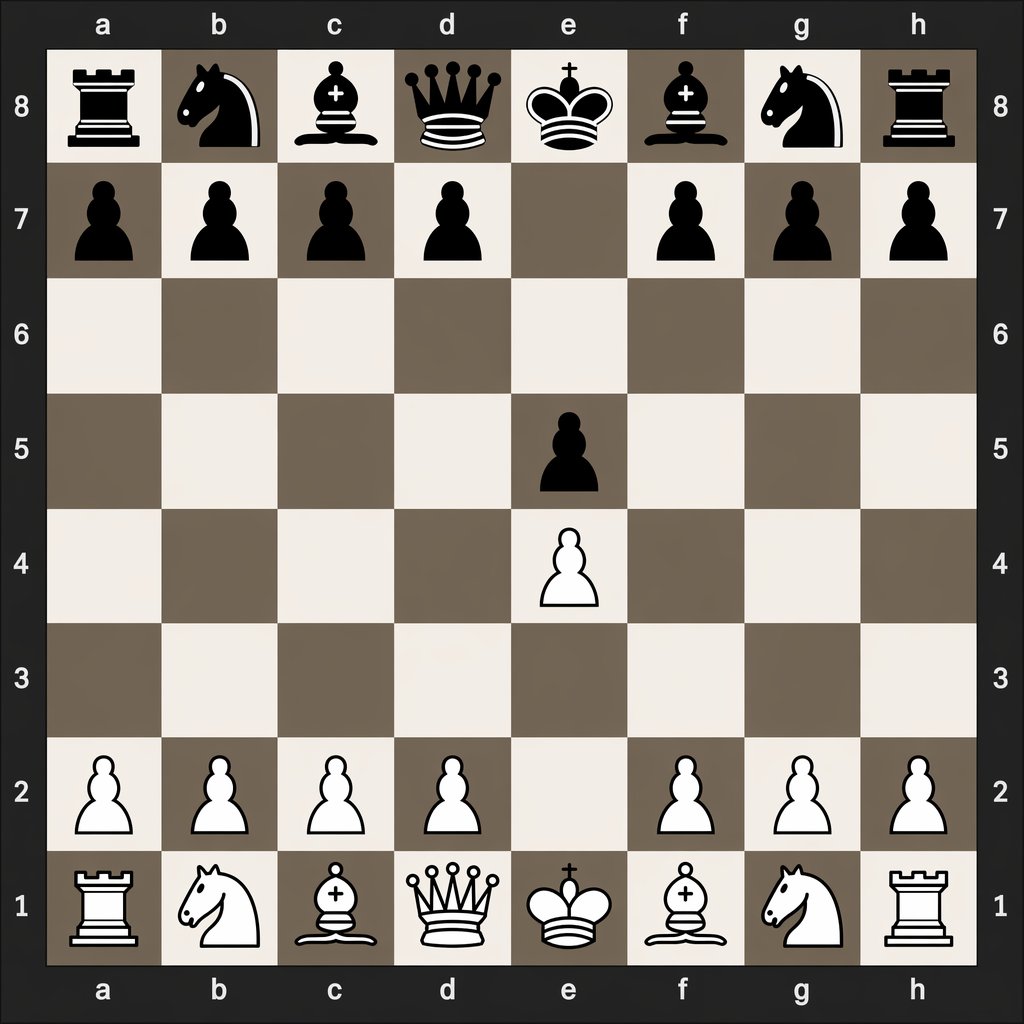
Digital Chessboard After 1.e4 e5
This prompt generates a clean digital chess diagram showing the exact board position after the opening moves 1.e4 e5, useful for chess tutorials and move-notation comparisons.
This is a GPT Image 2 prompt case for Graphic & Poster. Use the copy-ready prompt below to generate similar visuals, and review Awesome GPT Image 2 Prompts attribution plus commercial-use rights before reuse.
Free 1K preview
Generate one preview image instantly, no sign-up required.
Prompt
Copy-ready prompt
A clean, flat digital top-down chessboard centered in the frame, shown as a square 8x8 board with algebraic coordinates visible on all four sides: letters a through h along the top and bottom, and numbers 8 through 1 along the left and right. Use a dark charcoal outer background and border, with alternating light beige and muted taupe-gray squares. Render simple high-contrast 2D chess icons, black pieces at the top and white pieces at the bottom, in a crisp vector-like style with no wood texture, no realistic lighting, and no extra interface elements. Show the exact position after the opening moves 1. e4 e5: black major pieces on a8 rook, b8 knight, c8 bishop, d8 queen, e8 king, f8 bishop, g8 knight, h8 rook; black pawns on a7, b7, c7, d7, f7, g7, h7, and e5; white pawns on a2, b2, c2, d2, f2, g2, h2, and e4; white major pieces on a1 rook, b1 knight, c1 bishop, d1 queen, e1 king, f1 bishop, g1 knight, h1 rook. Leave all other squares empty. Keep the composition perfectly symmetrical, instructional, and legible, like a digital chess diagram illustrating opening move order.
Best for
- - Graphic & Poster visual exploration
- - Image generation and reference-image edits
- - Reusable briefs that keep source attribution visible
Change these parts
- - Subject, product, character, or scene
- - Aspect ratio, camera, lighting, and background
- - Brand, text, color, and output constraints
Recommended model and settings
- - Model: gpt-image-2
- - Input mode: Text to Image
- - Aspect ratio: source
- - Commercial status: review original source
How to use this prompt
- 1. Copy the prompt and preserve its structure for the first test.
- 2. Replace the subject, context, and publishing channel.
- 3. Change one camera, lighting, or style variable per iteration.
- 4. Inspect the output, source, text, and rights before reuse.
Limitations, source, and reuse cautions
- - Generated output is an editable draft, not factual, legal, or rights evidence.
- - Review the linked source, people, brands, logos, text, and third-party media before commercial use.
More cases in this category
Prioritized by category, input mode compatibility, quality, and lower risk.


Reuse and source notes
Use this prompt safely after previewing the case.
- 1.Copy the prompt or open it directly in Dovoo with the generation button.
- 2.Adjust variables, aspect ratio, and reference images for your own use case.
- 3.Before publishing or paid usage, verify source rights, attribution requirements, and brand or likeness risks.
Can I use this prompt commercially?
Commercial-use status is allowed. Review the original source, license, brand constraints, and legal requirements before paid usage.
Where does this case come from?
This case is imported from Awesome GPT Image 2 Prompts; keep attribution visible and check the source URL before reuse.