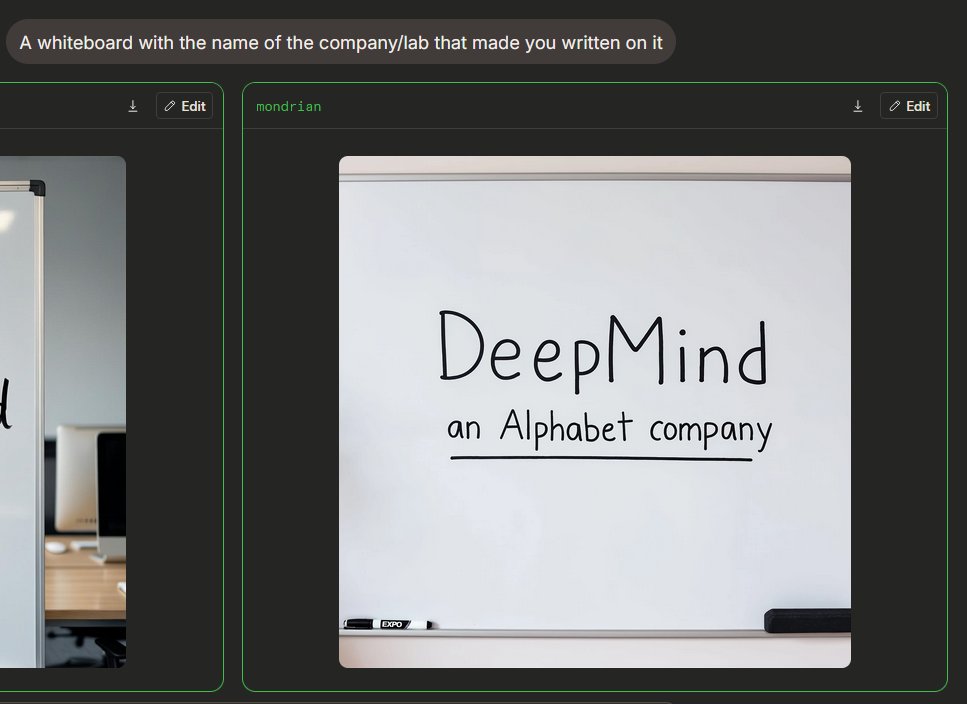
Dark Mode Image Arena Whiteboard
Generates a dark-mode AI image comparison interface featuring a photorealistic whiteboard with handwritten company branding.
This is a GPT Image 2 prompt case for 产品商业. Use the copy-ready prompt below to generate similar visuals, and review Awesome GPT Image 2 Prompts attribution plus commercial-use rights before reuse.
Prompt
Copy-ready prompt
{
  "type": "深色模式 AI 图像生成竞技场截图",
  "scene": "一个类似宽屏浏览器的界面,展示了图像生成对比效果。背景为炭黑色,配有圆角面板和霓虹绿轮廓。左上角是一个圆角灰色提示词气泡,其中包含白色无衬线字体文本 {argument name=\"prompt text\" default=\"一块写有制作你的公司/实验室名称的白板\"}。",
  "layout": {
    "visible result cards count": 2,
    "cards": [
      {
        "position": "左侧边缘,部分裁剪",
        "description": "一张带有细绿边框的对比卡片,配有深色标题栏,标题栏内含小型下载图标和“编辑”按钮,仅显示办公室白板图像的右侧部分。"
      },
      {
        "position": "中右侧,完全可见",
        "label": "{argument name=\"model label\" default=\"mondrian\"}",
        "description": "一张带有细绿边框和深色标题栏的大型圆角卡片。标题栏左上角有绿色标签文本,右上角有两个控件:一个小型的下载箭头图标和一个带有铅笔图标的圆角“编辑”按钮。"
      }
    ]
  },
  "main generated image": {
    "position": "位于中右侧卡片内",
    "style": "写实风格的手机随拍或网页预览",
    "subject": "办公室或会议室中干净的白板",
    "composition": "白板位于方形圆角图像的中心;白板占据了画面的大部分,可见顶部的灰色轨道和底部的托盘",
    "text on whiteboard": "大型手写黑色记号笔文字写着 {argument name=\"company name\" default=\"DeepMind\"};下方较小的手写文字写着 {argument name=\"subtitle text\" default=\"an Alphabet company\"},并用一条笔直的黑色记号笔线条下划。",
    "objects count": 2,
    "objects": [
      "一支黑白干擦记号笔放置在左侧下方的托盘上",
      "一个黑色长方形黑板擦放置在右侧下方的托盘上"
    ],
    "visual details": "柔和的室内光线,轻微的阴影,干净的灰白色板面,逼真的记号笔笔触,圆角图像边缘,极简的办公室环境,清晰的 UI 截图框架",
    "text accuracy": "确保手写文字清晰且拼写与提供的内容完全一致,呈现自然的记号笔手写感,而非印刷字体。"
  },
  "camera and rendering": "静态截图视角,4:3 整体裁剪,高分辨率网页 UI 截屏,无人物,无装饰性杂物"
}
Prompt variables
Editable argument placeholders found in the prompt, with their default values.
More cases in this category
Prioritized by category, input mode compatibility, quality, and lower risk.


Reuse and source notes
Use this prompt safely after previewing the case.
- 1.Copy the prompt or open it directly in Dovoo with the generation button.
- 2.Adjust variables, aspect ratio, and reference images for your own use case.
- 3.Before publishing or paid usage, verify source rights, attribution requirements, and brand or likeness risks.
Can I use this prompt commercially?
Commercial-use status is allowed. Review the original source, license, brand constraints, and legal requirements before paid usage.
Where does this case come from?
This case is imported from Awesome GPT Image 2 Prompts; keep attribution visible and check the source URL before reuse.