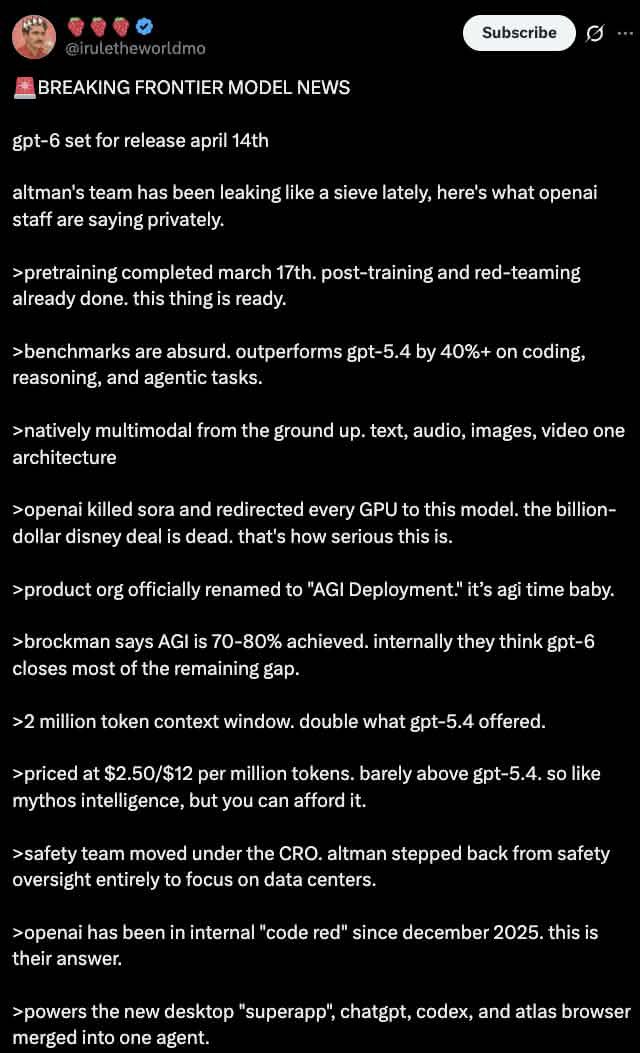
Dark Mode X Post Mockup
Generates a realistic dark mode Twitter/X post screenshot featuring a long list of greentext-style bullet points.
This is a GPT Image 2 prompt case for Graphic & Poster. Use the copy-ready prompt below to generate similar visuals, and review Awesome GPT Image 2 Prompts attribution plus commercial-use rights before reuse.
Free 1K preview
Generate one preview image instantly, no sign-up required.
Prompt
Copy-ready prompt
A dark mode screenshot of an X post. The profile features a man with a mustache in a red shirt and crown, username {argument name="username" default="@iruletheworldmo"} with three strawberry emojis and a blue checkmark. Top right has a "Subscribe" button. The tweet text begins with {argument name="headline" default="🚨 BREAKING FRONTIER MODEL NEWS"} followed by {argument name="subheadline" default="gpt-6 set for release april 14th"} and a short intro about OpenAI leaks. Below are exactly 11 bullet points, each starting with a `>` symbol, detailing {argument name="bullet point topic" default="fictional AI model specs"} such as pretraining dates, outperforming gpt-5.4, native multimodality, killing Sora, renaming to "AGI Deployment", 2 million token context, pricing, safety team changes, a 2025 code red, and a new desktop superapp. The text is white on a black background in a standard sans-serif UI font.Prompt variables
Editable argument placeholders found in the prompt, with their default values.
Best for
- - Graphic & Poster visual exploration
- - Image generation and reference-image edits
- - Reusable briefs that keep source attribution visible
Change these parts
- - Subject, product, character, or scene
- - Aspect ratio, camera, lighting, and background
- - Brand, text, color, and output constraints
Recommended model and settings
- - Model: gpt-image-2
- - Input mode: Text to Image
- - Aspect ratio: source
- - Commercial status: review original source
How to use this prompt
- 1. Copy the prompt and preserve its structure for the first test.
- 2. Replace the subject, context, and publishing channel.
- 3. Change one camera, lighting, or style variable per iteration.
- 4. Inspect the output, source, text, and rights before reuse.
Limitations, source, and reuse cautions
- - Generated output is an editable draft, not factual, legal, or rights evidence.
- - Review the linked source, people, brands, logos, text, and third-party media before commercial use.
More cases in this category
Prioritized by category, input mode compatibility, quality, and lower risk.




Reuse and source notes
Use this prompt safely after previewing the case.
- 1.Copy the prompt or open it directly in Dovoo with the generation button.
- 2.Adjust variables, aspect ratio, and reference images for your own use case.
- 3.Before publishing or paid usage, verify source rights, attribution requirements, and brand or likeness risks.
Can I use this prompt commercially?
Commercial-use status is allowed. Review the original source, license, brand constraints, and legal requirements before paid usage.
Where does this case come from?
This case is imported from Awesome GPT Image 2 Prompts; keep attribution visible and check the source URL before reuse.