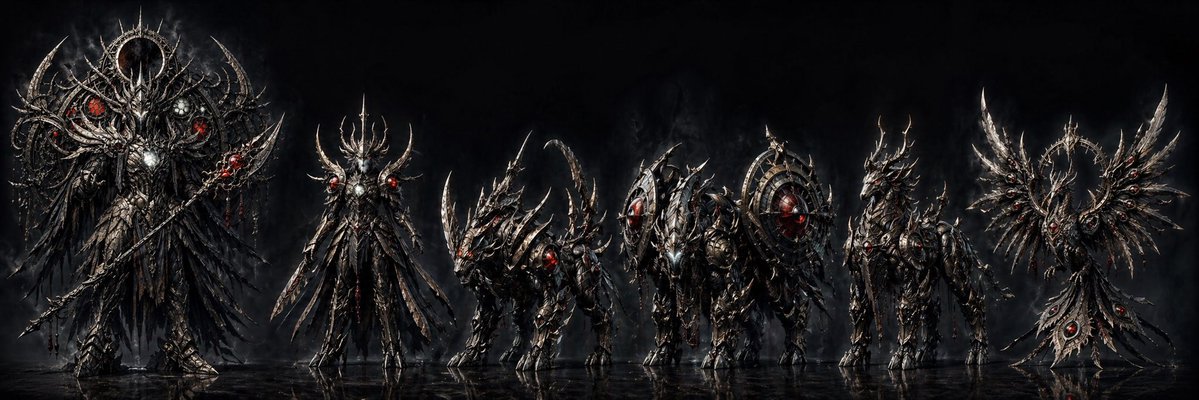
Dark Fantasy Combining Mecha Lineup
A wide concept-art lineup of six gothic biomechanical robot forms, ideal for generating a sinister combining mecha design sheet or key visual.
This is a GPT Image 2 prompt case for Anime & Game. Use the copy-ready prompt below to generate similar visuals, and review Awesome GPT Image 2 Prompts attribution plus commercial-use rights before reuse.
Free 1K preview
Generate one preview image instantly, no sign-up required.
Prompt
Copy-ready prompt
A dramatic dark fantasy mecha lineup on a black smoky studio-like background, rendered as ultra-detailed concept art with a wide cinematic composition. Show exactly 6 sinister biomechanical figures standing side by side on a glossy reflective floor, all designed as parts or forms of a combining robot set. The overall design language is gothic, infernal, and baroque: blackened steel, tarnished silver armor, serrated edges, thorn-like protrusions, skeletal filigree, red glowing cores and eyes, with subtle white-metal highlights and traces of crimson energy. The mood is ominous, majestic, and apocalyptic.

From left to right: first, a towering humanoid overlord mech, the largest figure in the lineup, with a crown-like halo ring behind the head, huge layered black feathered or blade-like wings draping downward, ornate chest armor with a bright central core, multiple red glowing orbs embedded asymmetrically, and a long staff or spear held diagonally. Second, a tall slender angelic-demonic humanoid mech with an elongated body, spiked antler-like crest, narrow waist, blade-like hanging armor panels, and red glowing shoulder nodes, posed upright and regal. Third, a beast unit on four legs, low and aggressive like a demonic wolf or draconic hound, covered in curved blade armor and long swept-back horns, with glowing red eyes and an arched tail or spine silhouette. Fourth, a heavy quadruped siege unit, bulkier and more armored, with a forward head assembly and two large circular shield-like wheel structures mounted on its sides, full of radial spikes and a glowing red core at the center of one wheel. Fifth, a centaur-like or upright beast warrior mech with long legs, layered armor, horned head, and a sharp avian-draconic profile, slimmer than the heavy unit but still imposing, with red lights in the chest and head. Sixth, a symmetrical winged emblem-like unit resembling a mechanical phoenix crest rather than a humanoid body, with two broad metallic wings spread outward around a central halo ring and a tapered hanging tail piece set with 3 visible red gem-like cores.

Keep the palette nearly monochrome except for the glowing reds. Emphasize razor-sharp silhouettes, intricate engravings, layered armor plates, cables and skeletal mechanical details, smoke drifting behind the figures, and faint reflections beneath their feet. The image should feel like a premium concept sheet for a {argument name="theme" default="dark combining robot"} in the style of hyper-detailed dark fantasy sci-fi illustration. Use a panoramic aspect ratio, front-facing lineup presentation, and high contrast lighting that picks out metallic edges against the deep black background.
Prompt variables
Editable argument placeholders found in the prompt, with their default values.
Best for
- - Anime & Game visual exploration
- - Image generation and reference-image edits
- - Reusable briefs that keep source attribution visible
Change these parts
- - Subject, product, character, or scene
- - Aspect ratio, camera, lighting, and background
- - Brand, text, color, and output constraints
Recommended model and settings
- - Model: gpt-image-2
- - Input mode: Text to Image
- - Aspect ratio: source
- - Commercial status: review original source
How to use this prompt
- 1. Copy the prompt and preserve its structure for the first test.
- 2. Replace the subject, context, and publishing channel.
- 3. Change one camera, lighting, or style variable per iteration.
- 4. Inspect the output, source, text, and rights before reuse.
Limitations, source, and reuse cautions
- - Generated output is an editable draft, not factual, legal, or rights evidence.
- - Review the linked source, people, brands, logos, text, and third-party media before commercial use.
More cases in this category
Prioritized by category, input mode compatibility, quality, and lower risk.

Reuse and source notes
Use this prompt safely after previewing the case.
- 1.Copy the prompt or open it directly in Dovoo with the generation button.
- 2.Adjust variables, aspect ratio, and reference images for your own use case.
- 3.Before publishing or paid usage, verify source rights, attribution requirements, and brand or likeness risks.
Can I use this prompt commercially?
Commercial-use status is allowed. Review the original source, license, brand constraints, and legal requirements before paid usage.
Where does this case come from?
This case is imported from Awesome GPT Image 2 Prompts; keep attribution visible and check the source URL before reuse.