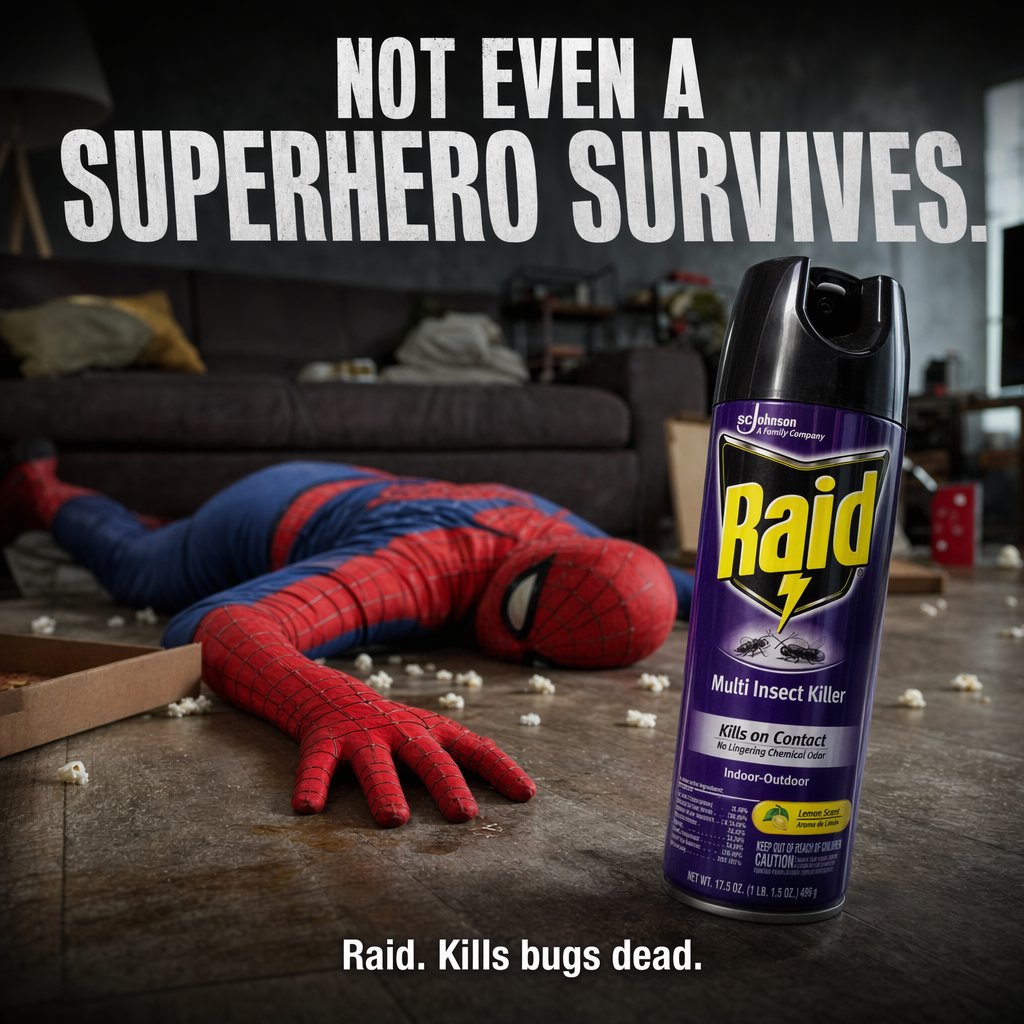
Dark Comedy Insect Spray Ad
This prompt generates a cinematic product advertisement featuring a dominant bug spray can and a fallen superhero parody in a messy living room, ideal for bold ecommerce or campaign creatives.
This is a GPT Image 2 prompt case for Product & Commercial. Use the copy-ready prompt below to generate similar visuals, and review Awesome GPT Image 2 Prompts attribution plus commercial-use rights before reuse.
Free 1K preview
Generate one preview image instantly, no sign-up required.
Prompt
Copy-ready prompt
A darkly comedic, cinematic product advertisement staged in a messy modern living room at night. In the background, a person in a full {argument name="superhero costume" default="Spider-Man-inspired red and blue suit"} lies face-down and motionless on a wooden floor, one arm stretched toward the camera, posed like a defeated superhero after a battle. The room is dim and moody with a gray couch in soft focus, pillows and blankets tossed around, and scattered white popcorn across the floor. In the left foreground, show 1 open pizza box cropped into frame. In the right foreground, place 1 large upright can of {argument name="product name" default="Raid"} insect spray as the hero object, sharply focused, oversized in perspective, with a black cap and a purple label facing camera. Make the product feel dominant, clean, and commercial, with dramatic rim lighting and glossy reflections. Add 2 lines of bold white uppercase ad copy: at the top, very large condensed sans-serif text reading {argument name="headline text" default="NOT EVEN A SUPERHERO SURVIVES."}; at the bottom center, smaller bold text reading {argument name="tagline text" default="Raid. Kills bugs dead."}. Include 2 visible insect illustrations on the can label, and keep the overall tone like a high-end shock-value commercial campaign: realistic photography, shallow depth of field, strong contrast, gritty floor texture, subdued gray-blue interior lighting, and a composition that makes the spray can the clear focal point while the fallen hero tells the joke in the background.Prompt variables
Editable argument placeholders found in the prompt, with their default values.
Best for
- - Product & Commercial visual exploration
- - Image generation and reference-image edits
- - Reusable briefs that keep source attribution visible
Change these parts
- - Subject, product, character, or scene
- - Aspect ratio, camera, lighting, and background
- - Brand, text, color, and output constraints
Recommended model and settings
- - Model: gpt-image-2
- - Input mode: Text to Image
- - Aspect ratio: source
- - Commercial status: review original source
How to use this prompt
- 1. Copy the prompt and preserve its structure for the first test.
- 2. Replace the subject, context, and publishing channel.
- 3. Change one camera, lighting, or style variable per iteration.
- 4. Inspect the output, source, text, and rights before reuse.
Limitations, source, and reuse cautions
- - Generated output is an editable draft, not factual, legal, or rights evidence.
- - Review the linked source, people, brands, logos, text, and third-party media before commercial use.
More cases in this category
Prioritized by category, input mode compatibility, quality, and lower risk.


Reuse and source notes
Use this prompt safely after previewing the case.
- 1.Copy the prompt or open it directly in Dovoo with the generation button.
- 2.Adjust variables, aspect ratio, and reference images for your own use case.
- 3.Before publishing or paid usage, verify source rights, attribution requirements, and brand or likeness risks.
Can I use this prompt commercially?
Commercial-use status is allowed. Review the original source, license, brand constraints, and legal requirements before paid usage.
Where does this case come from?
This case is imported from Awesome GPT Image 2 Prompts; keep attribution visible and check the source URL before reuse.