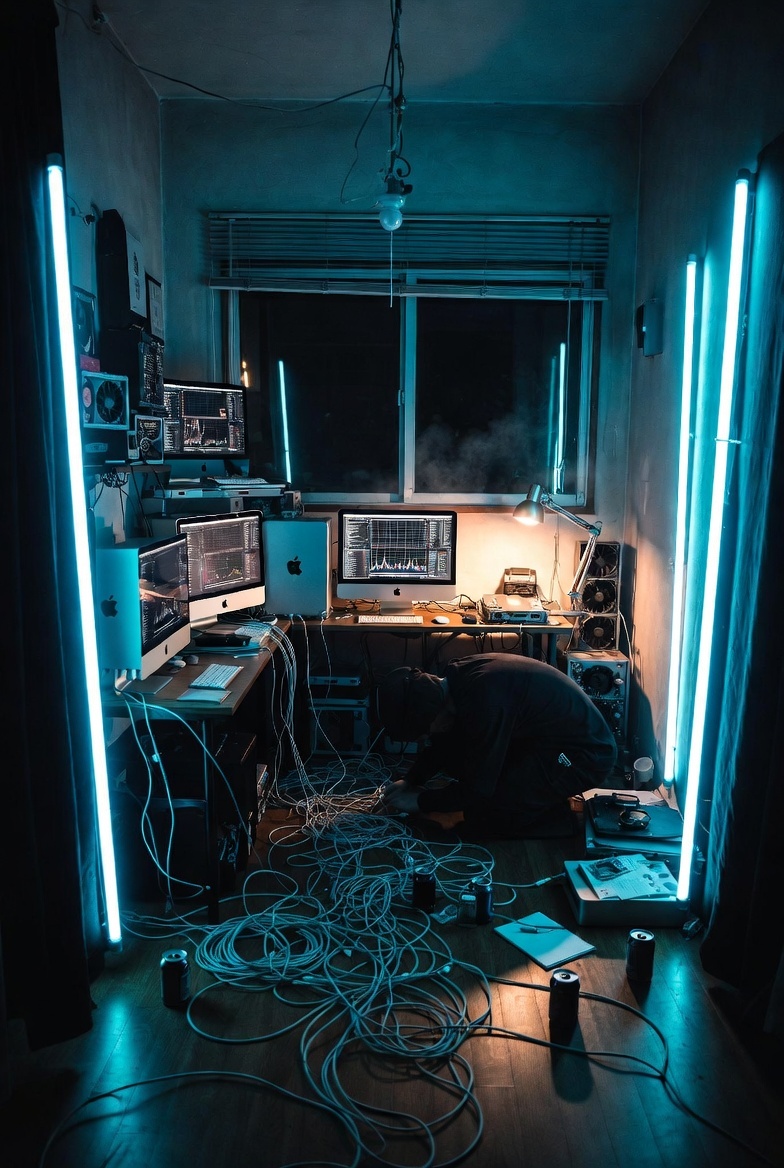
Cyberpunk AI Coding Room
A photorealistic cinematic scene of an exhausted programmer debugging cables in a cramped neon-lit apartment workstation.
This is a GPT Image 2 prompt case for Interior & Architecture. Use the copy-ready prompt below to generate similar visuals, and review Awesome GPT Image 2 Prompts attribution plus commercial-use rights before reuse.
Free 1K preview
Generate one preview image instantly, no sign-up required.
Prompt
Copy-ready prompt
Create a cinematic photorealistic vertical image of a cramped Japanese apartment room turned into an intense solo AI coding workstation at night. The room is narrow and messy, viewed from the doorway with a wide-angle lens, deep perspective, and moody teal-blue cyberpunk lighting. Place exactly 4 tall cyan fluorescent tube lights: one vertical tube near the left doorway, one vertical tube near the left side of the back window, one vertical tube near the right side of the back window, and one vertical tube near the right doorway. Show exactly 3 iMac-style desktop computers with glowing technical dashboards and code graphs: two on the left desk area and one centered on the back desk. Add a large window with horizontal blinds at the back, black night outside, visible humidity/steam or fog drifting near the window, a bare hanging ceiling bulb and exposed ceiling wires. The desks should be cluttered with keyboards, mice, small devices, cooling fans, stacked electronics, and cables. On the floor, create a chaotic nest of many long white and gray cables spreading from the desks toward the foreground. Include one exhausted programmer in a black hoodie crouching low near the floor on the right-center, head down, untangling or plugging cables, conveying burnout and late-night debugging. Add exactly 4 black drink cans on the floor, plus scattered papers, a notebook, a pen, and a small open equipment case on the right. Use glossy dark wooden flooring reflecting cyan light, concrete or gray walls, black curtains framing both sides, high contrast shadows, realistic lens distortion, gritty documentary detail, no readable text, no watermark. Atmosphere: overheated room, humid air, productivity chaos, one-person tech team energy. Style should be photorealistic, cinematic, ultra-detailed, teal and amber color contrast, 35mm wide-angle, vertical 2:3 composition. Optional customizations: make the workstation centered around {argument name="main task" default="AI coding and 3D model generation"}, set the dominant light color to {argument name="light color" default="cyan blue"}, set the room location to {argument name="room location" default="small Japanese apartment"}, set the person’s mood to {argument name="programmer mood" default="exhausted and overwhelmed"}, and set the time of day to {argument name="time of day" default="late night"}.Prompt variables
Editable argument placeholders found in the prompt, with their default values.
Best for
- - Interior & Architecture visual exploration
- - Image generation and reference-image edits
- - Reusable briefs that keep source attribution visible
Change these parts
- - Subject, product, character, or scene
- - Aspect ratio, camera, lighting, and background
- - Brand, text, color, and output constraints
Recommended model and settings
- - Model: gpt-image-2
- - Input mode: Text to Image
- - Aspect ratio: source
- - Commercial status: review original source
How to use this prompt
- 1. Copy the prompt and preserve its structure for the first test.
- 2. Replace the subject, context, and publishing channel.
- 3. Change one camera, lighting, or style variable per iteration.
- 4. Inspect the output, source, text, and rights before reuse.
Limitations, source, and reuse cautions
- - Generated output is an editable draft, not factual, legal, or rights evidence.
- - Review the linked source, people, brands, logos, text, and third-party media before commercial use.
More cases in this category
Prioritized by category, input mode compatibility, quality, and lower risk.
Reuse and source notes
Use this prompt safely after previewing the case.
- 1.Copy the prompt or open it directly in Dovoo with the generation button.
- 2.Adjust variables, aspect ratio, and reference images for your own use case.
- 3.Before publishing or paid usage, verify source rights, attribution requirements, and brand or likeness risks.
Can I use this prompt commercially?
Commercial-use status is allowed. Review the original source, license, brand constraints, and legal requirements before paid usage.
Where does this case come from?
This case is imported from Awesome GPT Image 2 Prompts; keep attribution visible and check the source URL before reuse.