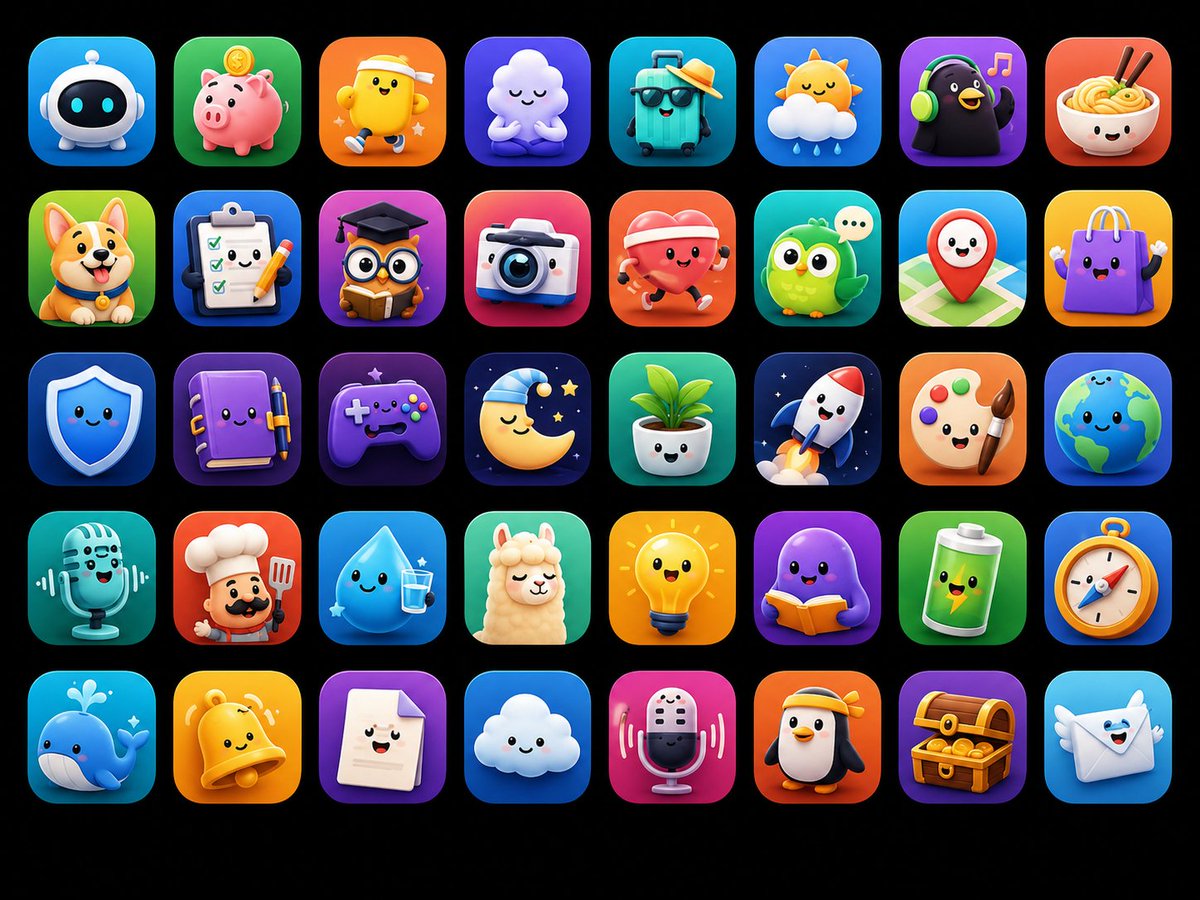
Cute 3D App Mascot Icon Grid
A colorful 5-by-8 showcase of ASO-friendly kawaii 3D mascot app icons for mobile app branding inspiration.
This is a GPT Image 2 prompt case for Product & Commercial. Use the copy-ready prompt below to generate similar visuals, and review Awesome GPT Image 2 Prompts attribution plus commercial-use rights before reuse.
This prompt is designed for multiple reference images. We will open Dovoo with the prompt and the available preview image; add the remaining references in Dovoo before generating.
Free 1K preview
Generate one preview image instantly, no sign-up required.
Free text preview doesn’t preserve reference-image consistency.
Prompt
Copy-ready prompt
Goal: Create a polished app-store mascot icon showcase featuring {argument name="icon count" default="40"} unique cute 3D mascot icons, designed as ASO-friendly mobile app icon concepts.

Canvas: Horizontal 4:3 image on a pure black background, with a neat grid of rounded-square app icons. Use exactly 5 rows and 8 columns, evenly spaced with consistent margins. Each tile is a glossy rounded square with a soft gradient background, subtle inner glow, and soft drop shadow. No text, no labels, no watermark.

Visual style: High-end 3D clay/toy mascot style, kawaii expressions, big friendly eyes, tiny smiles, smooth rounded shapes, vibrant saturated colors, app icon lighting, soft studio shadows, crisp edges, premium iOS icon aesthetic. Every icon should feel like a distinct standalone app mascot.

Icon grid details: Include exactly 40 discrete icons, arranged left to right, top to bottom:
1. white robot head mascot on blue gradient
2. pink piggy bank with coin on green gradient
3. smiling yellow character wearing a sun visor on orange gradient
4. sleepy white cloud hugging itself on purple gradient
5. turquoise travel suitcase wearing sunglasses and a straw hat on teal gradient
6. cute sun partly behind a cloud with raindrops on blue gradient
7. black penguin or bird wearing green headphones with music notes on purple gradient
8. smiling bowl of noodles with chopsticks on red-orange gradient
9. happy corgi dog on green gradient
10. checklist clipboard with pencil on blue gradient
11. graduation cap over a document/card silhouette on purple-pink gradient
12. cute instant camera on pink-red gradient
13. red heart character running with headphones on orange-red gradient
14. green owl with chat bubble on teal gradient
15. red map pin mascot on map background on cyan gradient
16. purple shopping bag mascot on yellow gradient
17. blue shield mascot on deep blue gradient
18. purple notebook mascot with pen on violet gradient
19. purple game controller mascot on dark purple gradient
20. sleeping crescent moon with nightcap, stars, and dark night background
21. smiling potted plant in white pot on green gradient
22. white rocket launching on navy starry gradient
23. painter palette mascot with paintbrush on orange gradient
24. smiling Earth globe on blue gradient
25. vintage microphone mascot on teal gradient
26. chef mascot with white chef hat and spatula on red-orange gradient
27. smiling water droplet holding a glass of water on cyan gradient
28. fluffy llama or alpaca mascot on green gradient
29. glowing yellow lightbulb mascot on yellow-orange gradient
30. purple octopus or blob reading an orange book on violet gradient
31. green battery mascot with lightning symbol on green gradient
32. compass mascot on blue-orange gradient
33. blue whale mascot with water splash on cyan gradient
34. yellow bell mascot on orange gradient
35. smiling white document/page mascot on purple gradient
36. happy white cloud mascot on blue gradient
37. pink microphone mascot with sound waves on magenta gradient
38. penguin mascot wearing a yellow visor on orange gradient
39. treasure chest full of gold coins on purple gradient
40. smiling envelope mascot with wings on light blue gradient

Constraints: Keep all icons consistent in size and visual quality; use charming rounded toy-like geometry; ensure each mascot has a simple cute face where appropriate; preserve the exact 5-by-8 layout and exactly 40 icons.
Prompt variables
Editable argument placeholders found in the prompt, with their default values.
Best for
- - Product & Commercial visual exploration
- - Image generation and reference-image edits
- - Reusable briefs that keep source attribution visible
Change these parts
- - Subject, product, character, or scene
- - Aspect ratio, camera, lighting, and background
- - Brand, text, color, and output constraints
Recommended model and settings
- - Model: gpt-image-2
- - Input mode: Multi Image to Image
- - Aspect ratio: source
- - Commercial status: review original source
How to use this prompt
- 1. Copy the prompt and preserve its structure for the first test.
- 2. Replace the subject, context, and publishing channel.
- 3. Change one camera, lighting, or style variable per iteration.
- 4. Inspect the output, source, text, and rights before reuse.
Limitations, source, and reuse cautions
- - Generated output is an editable draft, not factual, legal, or rights evidence.
- - Review the linked source, people, brands, logos, text, and third-party media before commercial use.
Related prompt packs
More cases in this category
Prioritized by category, input mode compatibility, quality, and lower risk.

Reuse and source notes
Use this prompt safely after previewing the case.
- 1.Copy the prompt or open it directly in Dovoo with the generation button.
- 2.Adjust variables, aspect ratio, and reference images for your own use case.
- 3.Before publishing or paid usage, verify source rights, attribution requirements, and brand or likeness risks.
Can I use this prompt commercially?
Commercial-use status is allowed. Review the original source, license, brand constraints, and legal requirements before paid usage.
Where does this case come from?
This case is imported from Awesome GPT Image 2 Prompts; keep attribution visible and check the source URL before reuse.