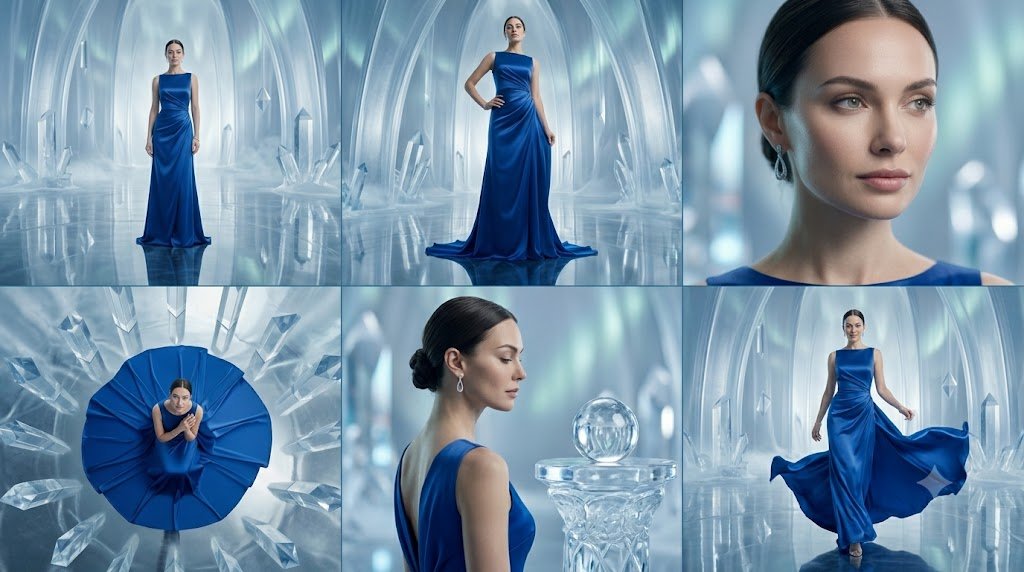
Crystal Palace Blue Gown Contact Sheet
A six-panel luxury fashion editorial collage featuring a model in a sapphire gown inside an icy crystal palace.
This is a GPT Image 2 prompt case for Fashion & Beauty. Use the copy-ready prompt below to generate similar visuals, and review Awesome GPT Image 2 Prompts attribution plus commercial-use rights before reuse.
Free 1K preview
Generate one preview image instantly, no sign-up required.
Prompt
Copy-ready prompt
Objective: Create a cinematic, high-fashion editorial collage featuring {argument name="model description" default="deep sapphire blue"} wearing {argument name="dress color and style" default="A sapphire blue satin floor-length evening gown with a draped one-shoulder neckline and flowing skirt."} set in {argument name="setting" default="An ethereal ice crystal palace with translucent blue arches, massive quartz structures, mist, and highly reflective floors."}.

Canvas: A widescreen 16:9 horizontal image arranged as a clean 2x3 contact sheet, with thin dark dividers between panels. Use cool blues, silvers, and cyans for lighting, creating bright reflections, a soft atmospheric haze, and the realism of luxury fashion photography.

Layout: Consists of 6 distinct panels:
1. Top Left: A full-body front view of the model standing in the center of the crystal hall, with the dress flowing to the floor and symmetrical ice arches behind her.
2. Top Middle: A full-body fashion pose, with one hand on her hip, the blue dress slightly pooled on the reflective floor, framed by towering ice arches.
3. Top Right: A close-up portrait from the shoulders up, showcasing swept-back dark hair, the blue neckline, and dangling earrings, Show every face clearly with natural, detailed facial features.
4. Bottom Left: An overhead shot of the model sitting or crouching in the center of a circular spread of the blue dress, surrounded by radiating crystal shards; Show every face clearly with natural, detailed facial features.
5. Bottom Middle: A three-quarter back/side close-up of the model’s shoulders, updo, and dangling earrings, with a transparent glass orb resting on a crystal pedestal; Show every face clearly with natural, detailed facial features.
6. Bottom Right: A full-body dynamic walking pose, with the model lifting or sweeping the flowing skirt for a dramatic effect, with the ice palace and reflective floor visible in the background.

Subject Details: The model should have a refined runway look, minimal jewelry beyond delicate dangling earrings, elegant posture, and a composed demeanor. The dress must maintain a consistent sapphire blue color across all six panels, with a satin sheen, deep drapes, and realistic fabric texture.

Visual Style: Photorealistic, luxurious fashion advertising campaign, high-end magazine editorial style, cinematic lighting, shallow depth of field for close-ups, crisp fabric textures, translucent ice architecture, glowing blue ambiance, floor reflections, soft bokeh highlights.

Constraints: Strictly maintain the 6-panel collage structure. Show every face clearly with natural, detailed facial features. Do not add any text, logos, titles, watermarks, additional figures, or extra panels.
Prompt variables
Editable argument placeholders found in the prompt, with their default values.
Best for
- - Fashion & Beauty visual exploration
- - Image generation and reference-image edits
- - Reusable briefs that keep source attribution visible
Change these parts
- - Subject, product, character, or scene
- - Aspect ratio, camera, lighting, and background
- - Brand, text, color, and output constraints
Recommended model and settings
- - Model: gpt-image-2
- - Input mode: Text to Image
- - Aspect ratio: source
- - Commercial status: review original source
How to use this prompt
- 1. Copy the prompt and preserve its structure for the first test.
- 2. Replace the subject, context, and publishing channel.
- 3. Change one camera, lighting, or style variable per iteration.
- 4. Inspect the output, source, text, and rights before reuse.
Limitations, source, and reuse cautions
- - Generated output is an editable draft, not factual, legal, or rights evidence.
- - Review the linked source, people, brands, logos, text, and third-party media before commercial use.
More cases in this category
Prioritized by category, input mode compatibility, quality, and lower risk.
Reuse and source notes
Use this prompt safely after previewing the case.
- 1.Copy the prompt or open it directly in Dovoo with the generation button.
- 2.Adjust variables, aspect ratio, and reference images for your own use case.
- 3.Before publishing or paid usage, verify source rights, attribution requirements, and brand or likeness risks.
Can I use this prompt commercially?
Commercial-use status is allowed. Review the original source, license, brand constraints, and legal requirements before paid usage.
Where does this case come from?
This case is imported from Awesome GPT Image 2 Prompts; keep attribution visible and check the source URL before reuse.