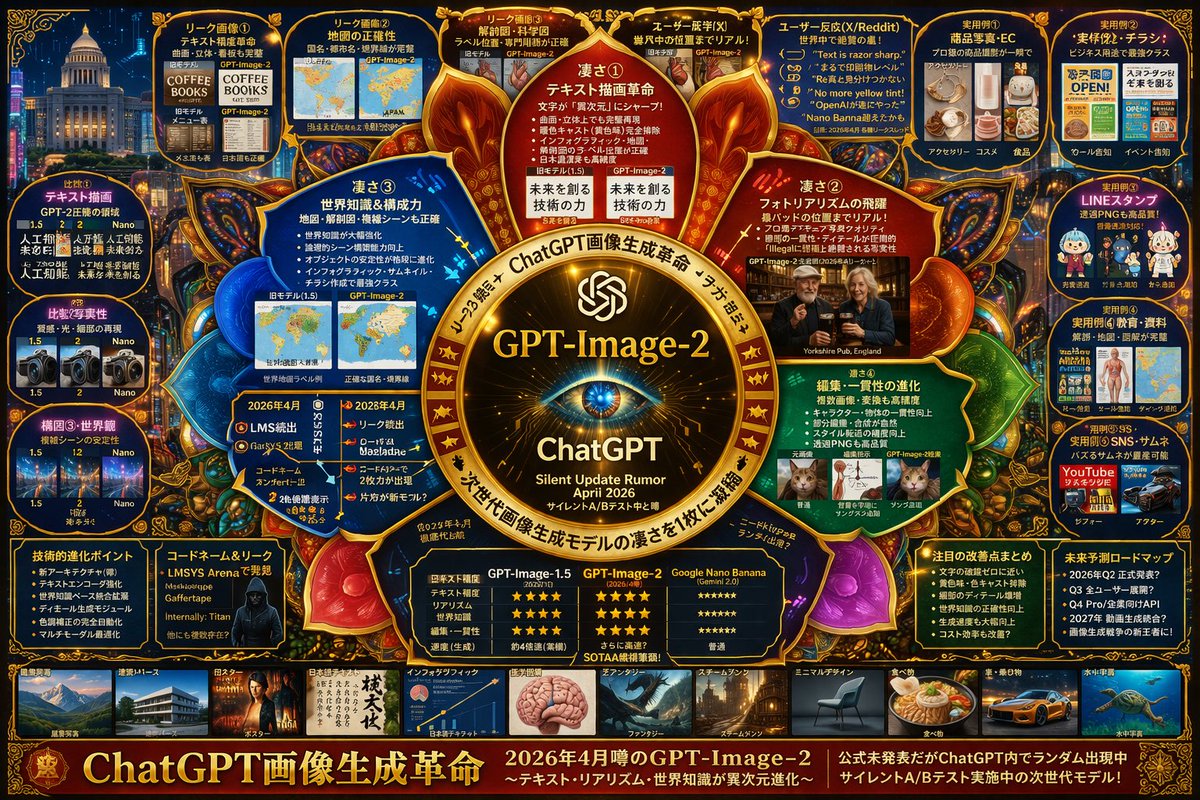
Complex AI Model Infographic Board
Generates a highly dense, futuristic infographic board detailing the features, comparisons, and rumors of a next-generation AI model.
This is a GPT Image 2 prompt case for 平面海报. Use the copy-ready prompt below to generate similar visuals, and review Awesome GPT Image 2 Prompts attribution plus commercial-use rights before reuse.
Prompt
Copy-ready prompt
{
  "type": "High-density futuristic infographic project",
  "theme": {
    "colors": "{argument name=\"theme color\" default=\"Gold and dark blue\"}",
    "style": "Dark mode, glowing neon borders, complex mind map layout, cyberpunk aesthetics"
  },
  "centerpiece": {
    "description": "A glowing gold circular logo, resembling an eye or camera lens.",
    "text": [
      "{argument name=\"main title\" default=\"GPT-Image-2\"}",
      "ChatGPT",
      "Silent updates to rumors{argument name=\"release date\" default=\"April 2026\"}"
    ]
  },
  "layout": {
    "top_left": {
      "title": "Leaked images",
      "count": 4,
      "items": [
        "Text rendering coffee menu",
        "World map",
        "Anatomical diagram",
        "Photorealistic Bar"
      ]
    },
    "top_right": {
      "title": "Use Cases and Feedback",
      "count": 5,
      "items": [
        "e-commerce products",
        "Business flyers",
        "Chat stickers",
        "Educational materials",
        "YouTube thumbnails"
      ]
    },
    "left_side": {
      "title": "Version Comparison",
      "count": 3,
      "items": [
        "Text rendering comparison",
        "Photo Realism Comparison",
        "Comparison of compositional stability"
      ]
    },
    "inner_ring": {
      "title": "Core Functions",
      "count": 4,
      "items": [
        "Text rendering revolution",
        "The realism of the photos has increased dramatically.",
        "World Knowledge",
        "Edit consistency"
      ]
    },
    "bottom_left": {
      "title": "Technical Specifications",
      "count": 2,
      "items": [
        "Key points of technological evolution",
        "A silhouette of a hacker with a codename"
      ]
    },
    "bottom_center": {
      "title": "Model Comparison Table",
      "columns": 3,
      "headers": [
        "GPT-Image-1.5",
        "{argument name=\"main title\" default=\"GPT-Image-2\"}",
        "{argument name=\"competitor model\" default=\"Google Nano Banana\"}"
      ],
      "rows": [
        "Text accuracy",
        "Realism",
        "World Knowledge",
        "Editing ability",
        "speed"
      ]
    },
    "bottom_right": {
      "title": "Future Outlook",
      "count": 2,
      "items": [
        "List of significant improvements",
        "Future Roadmap Timeline"
      ]
    },
    "bottom_edge": {
      "title": "Style Gallery",
      "count": 10,
      "items": [
        "architecture",
        "poster",
        "Japanese text",
        "Infographic",
        "Fantasy",
        "Steampunk",
        "Minimalist design",
        "food",
        "car",
        "underwater"
      ]
    },
    "footer": {
      "title": "Main width",
      "text": [
        "{argument name=\"subtitle\" default=\"ChatGPT: A Revolution in Image Generation\"}",
        "Next-generation model in silent A/B testing"
      ]
    }
  }
}
Prompt variables
Editable argument placeholders found in the prompt, with their default values.
More cases in this category
Prioritized by category, input mode compatibility, quality, and lower risk.


Reuse and source notes
Use this prompt safely after previewing the case.
- 1.Copy the prompt or open it directly in Dovoo with the generation button.
- 2.Adjust variables, aspect ratio, and reference images for your own use case.
- 3.Before publishing or paid usage, verify source rights, attribution requirements, and brand or likeness risks.
Can I use this prompt commercially?
Commercial-use status is allowed. Review the original source, license, brand constraints, and legal requirements before paid usage.
Where does this case come from?
This case is imported from Awesome GPT Image 2 Prompts; keep attribution visible and check the source URL before reuse.