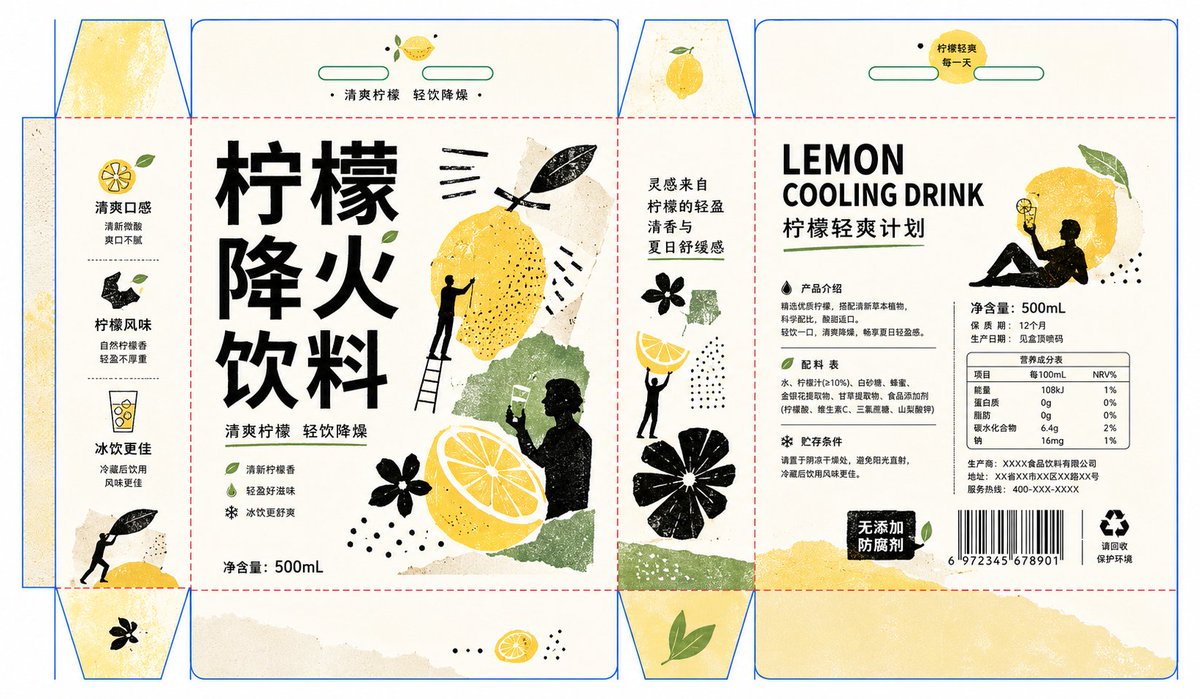
Handmade Collage Packaging Design
A creative prompt for generating packaging designs with a handmade collage aesthetic, featuring bold typography, silhouettes, and artistic textures based on a dieline reference.
This is a GPT Image 2 prompt case for Product & Commercial. Use the copy-ready prompt below to generate similar visuals, and review Awesome GPT Image 2 Prompts attribution plus commercial-use rights before reuse.
Free 1K preview
Generate one preview image instantly, no sign-up required.
Prompt
Copy-ready prompt
This is my dieline image, my product is: {argument name="product name" default="Lemon cooling drink"}

I want you to refer to the following prompt style to generate packaging: Generate an information visual with a handmade collage feel around any subject. The viewer should first see a strong and quiet central text axis, with fonts using thick, simple, block-like arrangements with ample white space, like white structures precisely embedded in the background; the theme content is translated into several groups of rough black-and-white silhouettes and theme-derived color blocks, with silhouettes distributed on both sides of the text in relationships of touching, holding, hovering, and blocking, forming a visual ritual like moving, placing, and observing the theme. The main graphics use edges like rubbing, woodcut, dry brush, and paper cutting. The black structure bears weight and direction, and the white structure creates breath and contrast. A small amount of theme color blocks with lines or textures serve as the core symbols being held up, scattered in size with clear gaps between each other. The background maintains a large area of bright, transparent, and clean high-brightness field, with colors extracted from the theme's own material, emotion, and context: {argument name="color scheme" default="the base color is responsible for the light and airy feeling, the dark color for the skeleton and tension, and the medium saturation theme color for the emotion"}. A very small number of small dots or short lines serve as beats and visual pauses; the overall color relationship is bright and refreshing, restrained but full of vitality, avoiding muddiness, staleness, and gloom. The information hierarchy should be as clear as an exhibition visual system, with the main title being the largest and most orderly, and secondary information like date, description, and signature narrowed into edge vertical arrangements or small font modules, forming a rhythm where images and text hold each other back; the final effect should be like a modern art promotional visual organized from silhouettes, paper pieces, rubbing textures, and geometric white space, with both handmade traces and maintaining a clean, clear, and readable look.
Prompt variables
Editable argument placeholders found in the prompt, with their default values.
Best for
- - Product & Commercial visual exploration
- - Image generation and reference-image edits
- - Reusable briefs that keep source attribution visible
Change these parts
- - Subject, product, character, or scene
- - Aspect ratio, camera, lighting, and background
- - Brand, text, color, and output constraints
Recommended model and settings
- - Model: gpt-image-2
- - Input mode: Text to Image
- - Aspect ratio: source
- - Commercial status: review original source
How to use this prompt
- 1. Copy the prompt and preserve its structure for the first test.
- 2. Replace the subject, context, and publishing channel.
- 3. Change one camera, lighting, or style variable per iteration.
- 4. Inspect the output, source, text, and rights before reuse.
Limitations, source, and reuse cautions
- - Generated output is an editable draft, not factual, legal, or rights evidence.
- - Review the linked source, people, brands, logos, text, and third-party media before commercial use.
More cases in this category
Prioritized by category, input mode compatibility, quality, and lower risk.

Reuse and source notes
Use this prompt safely after previewing the case.
- 1.Copy the prompt or open it directly in Dovoo with the generation button.
- 2.Adjust variables, aspect ratio, and reference images for your own use case.
- 3.Before publishing or paid usage, verify source rights, attribution requirements, and brand or likeness risks.
Can I use this prompt commercially?
Commercial-use status is allowed. Review the original source, license, brand constraints, and legal requirements before paid usage.
Where does this case come from?
This case is imported from Awesome GPT Image 2 Prompts; keep attribution visible and check the source URL before reuse.