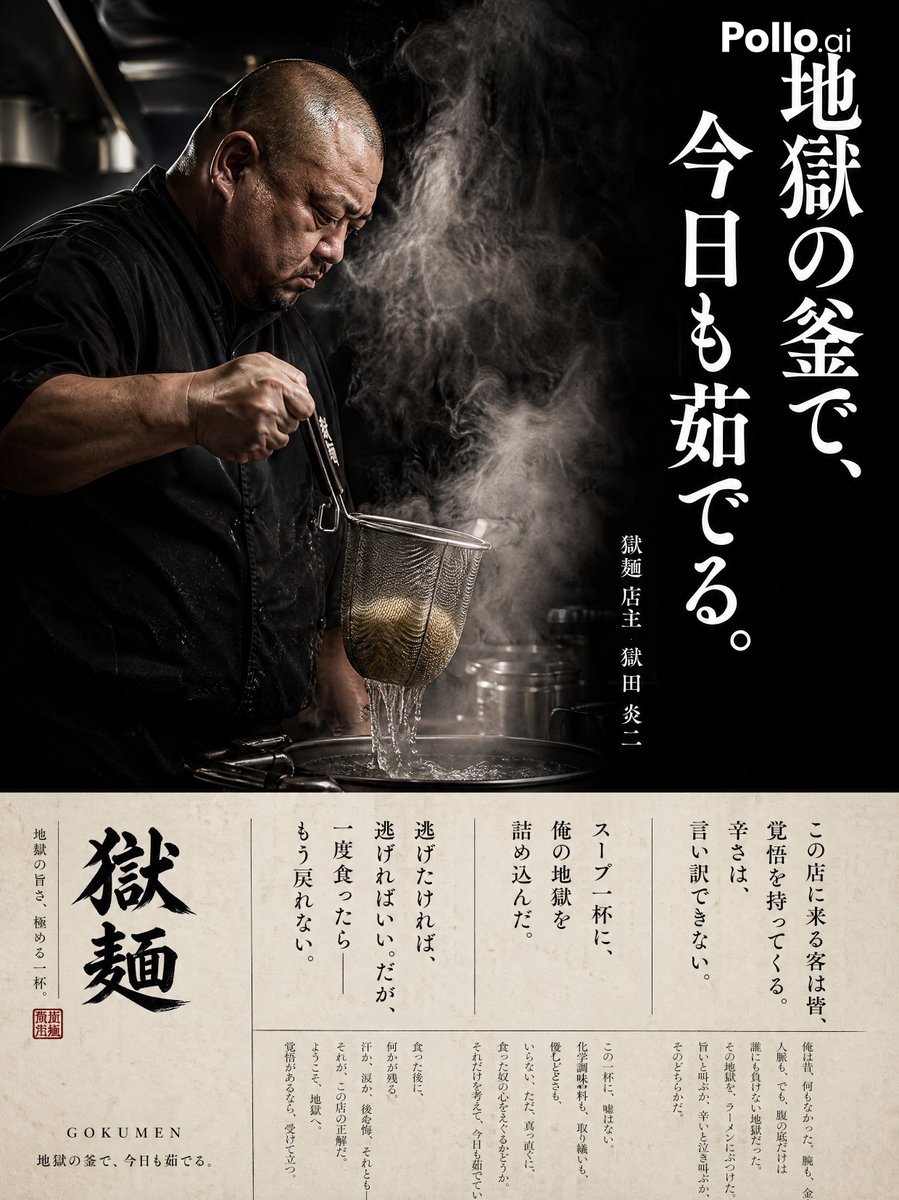
Cinematic Ramen Shop Commercial Poster
A complex, multi-part prompt for a vertical commercial poster featuring a chef in action, dramatic steam, and a professional layout with interview text.
This is a GPT Image 2 prompt case for Graphic & Poster. Use the copy-ready prompt below to generate similar visuals, and review Awesome GPT Image 2 Prompts attribution plus commercial-use rights before reuse.
Free 1K preview
Generate one preview image instantly, no sign-up required.
Prompt
Copy-ready prompt
A vertical commercial poster for a ramen specialty shop called "{argument name="shop name" default="Gokumen"}". Left side: A profile of a middle-aged Japanese male chef with a sturdy build, shaved head, and black cooking attire. He is in the middle of the 'Yugiri' action, lifting noodles with a strainer. Dramatic steam billows around him. Dark kitchen setting with cinematic lighting. Texture like a professional documentary photograph. Right side: A large vertical catchphrase in white text: "{argument name="catchphrase" default="In the cauldron of hell, I boil again today."}" Below that in small text: {argument name="shop name" default="Gokumen"} Owner {argument name="owner name" default="Enji Gokuda"}. Background: Almost black with a misty atmosphere. Bottom 30% area: An off-white cream-colored section. Small vertical interview text in a newspaper or magazine-style column layout: "All customers who come to this shop come with resolve. There are no excuses for the spiciness. I have packed my hell into every bowl of soup. If you want to run away, go ahead. But once you eat it—there's no going back." Small elegant Mincho font in multiple columns. Overall: A premium dark editorial poster for a ramen shop.Prompt variables
Editable argument placeholders found in the prompt, with their default values.
Best for
- - Graphic & Poster visual exploration
- - Image generation and reference-image edits
- - Reusable briefs that keep source attribution visible
Change these parts
- - Subject, product, character, or scene
- - Aspect ratio, camera, lighting, and background
- - Brand, text, color, and output constraints
Recommended model and settings
- - Model: gpt-image-2
- - Input mode: Text to Image
- - Aspect ratio: source
- - Commercial status: review original source
How to use this prompt
- 1. Copy the prompt and preserve its structure for the first test.
- 2. Replace the subject, context, and publishing channel.
- 3. Change one camera, lighting, or style variable per iteration.
- 4. Inspect the output, source, text, and rights before reuse.
Limitations, source, and reuse cautions
- - Generated output is an editable draft, not factual, legal, or rights evidence.
- - Review the linked source, people, brands, logos, text, and third-party media before commercial use.
More cases in this category
Prioritized by category, input mode compatibility, quality, and lower risk.






Reuse and source notes
Use this prompt safely after previewing the case.
- 1.Copy the prompt or open it directly in Dovoo with the generation button.
- 2.Adjust variables, aspect ratio, and reference images for your own use case.
- 3.Before publishing or paid usage, verify source rights, attribution requirements, and brand or likeness risks.
Can I use this prompt commercially?
Commercial-use status is allowed. Review the original source, license, brand constraints, and legal requirements before paid usage.
Where does this case come from?
This case is imported from Awesome GPT Image 2 Prompts; keep attribution visible and check the source URL before reuse.