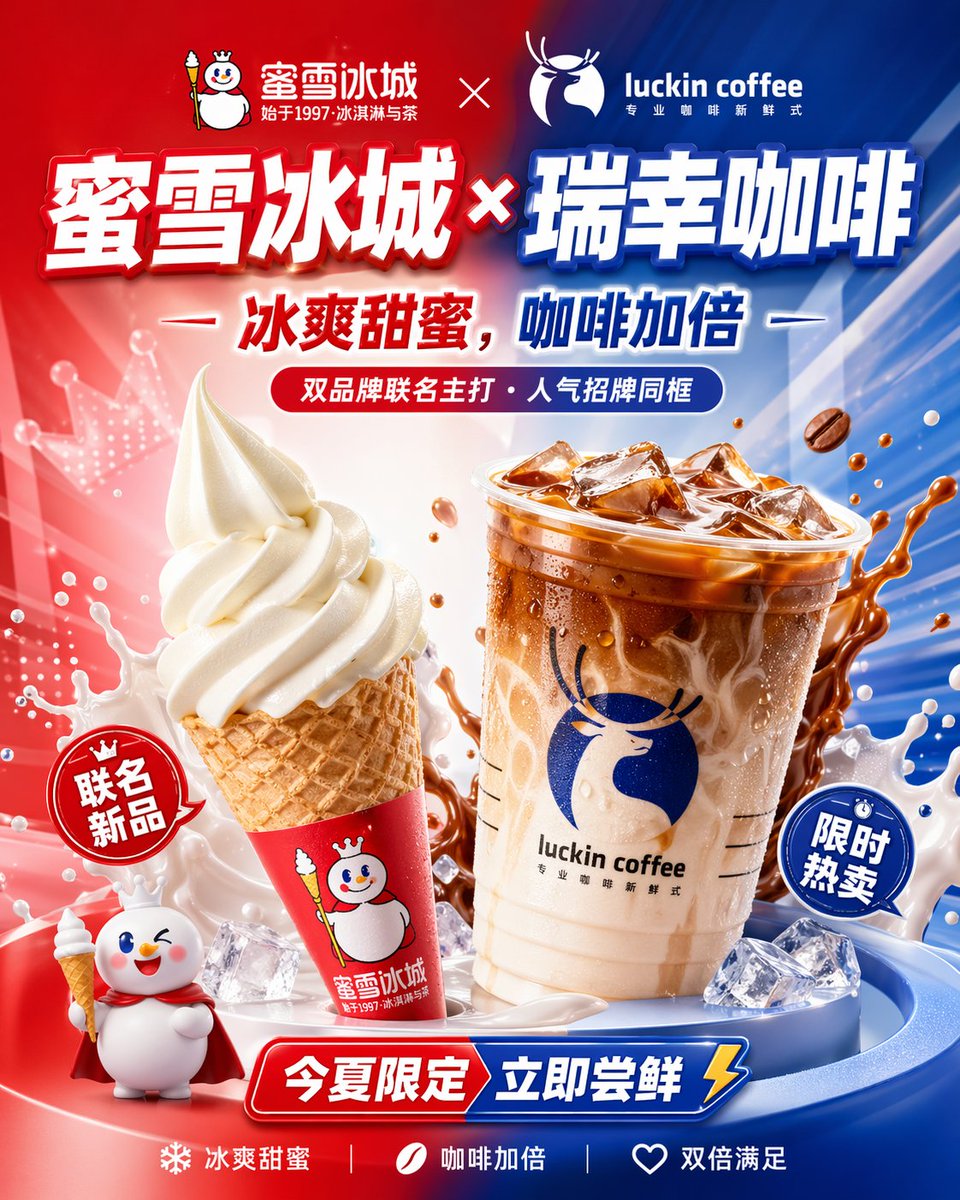
Chinese Co-Branded Summer Drink Poster
A high-impact vertical Chinese advertising poster for a limited-time ice cream and coffee collaboration, suitable for brand campaigns, social ads, and product launch visuals.
This is a GPT Image 2 prompt case for Graphic & Poster. Use the copy-ready prompt below to generate similar visuals, and review Awesome GPT Image 2 Prompts attribution plus commercial-use rights before reuse.
Free 1K preview
Generate one preview image instantly, no sign-up required.
Prompt
Copy-ready prompt
Create a glossy Chinese co-branded beverage poster advertisement in a bold commercial style, vertical 4:5 composition, with a dramatic split-color background: bright saturated red on the left and vivid royal blue on the right, blended at the center with radiant streaks, motion lines, glow effects, and high-energy product-launch lighting. At the top, place 2 brand logo areas separated by a white multiplication sign: on the upper left, a snowman mascot logo with Chinese text {argument name="left brand name" default="Mixue Bingcheng"} and smaller subtitle text "始于1997冰淇淋与茶"; on the upper right, the deer logo and wordmark {argument name="right brand name" default="luckin coffee"} with smaller Chinese subtitle "专业咖啡新鲜式". Centered beneath the logos, add a huge Chinese headline in thick 3D extruded display typography with white faces, colored edging, heavy shadows, and a glossy embossed look, reading {argument name="headline text" default="Mixue Ice Cream & Coffee × Luckin Coffee"}, with the left half accented red and the right half accented blue. Below it, add a second slogan line in bold Chinese text, split by brand color, reading "冰爽甜蜜,咖啡加倍", flanked by short horizontal white dashes. Under that, place a rounded capsule banner in red-to-blue gradient containing the Chinese text "双品牌联名主打・人气招牌同框". In the center foreground, show 2 hero products: on the left, 1 vanilla soft-serve ice cream in a waffle cone, tall swirl, creamy white, slightly glossy, wrapped in a bright red cone sleeve printed with the snowman mascot and Chinese branding; on the right, 1 large clear plastic cup of iced latte or coffee with visible ice cubes, caramel-brown liquid marbling into milk, condensation droplets on the cup, a transparent lid, the blue deer logo, the wordmark "luckin coffee", and small Chinese subtitle text. Surround the cup with dynamic coffee splash arcs and exactly 3 flying coffee beans. Around the lower foreground, add scattered translucent ice cubes and white milk splashes to emphasize cold freshness. Include exactly 2 comic-style promotional burst badges: a red circular badge on the left reading "联名新品" and a blue circular badge on the right reading "限时热卖". In the bottom left corner, add 1 cute 3D snowman mascot character wearing a red cape and holding a tiny ice cream cone, smiling and winking. At the bottom center, place a large red-and-blue beveled ribbon banner with bold white Chinese text reading "今夏限定 立即尝鲜", ending with a yellow lightning bolt icon on the right. Along the very bottom edge, place 3 small selling-point items separated by vertical dividers: a snowflake icon with "冰爽甜蜜", a coffee bean icon with "咖啡加倍", and a heart icon with "双倍满足". Use premium e-commerce poster rendering, ultra-clean product retouching, glossy highlights, rich contrast, crisp Chinese typography, depth, reflections, splash effects, and an energetic summer limited-edition campaign aesthetic.Prompt variables
Editable argument placeholders found in the prompt, with their default values.
Best for
- - Graphic & Poster visual exploration
- - Image generation and reference-image edits
- - Reusable briefs that keep source attribution visible
Change these parts
- - Subject, product, character, or scene
- - Aspect ratio, camera, lighting, and background
- - Brand, text, color, and output constraints
Recommended model and settings
- - Model: gpt-image-2
- - Input mode: Text to Image
- - Aspect ratio: source
- - Commercial status: review original source
How to use this prompt
- 1. Copy the prompt and preserve its structure for the first test.
- 2. Replace the subject, context, and publishing channel.
- 3. Change one camera, lighting, or style variable per iteration.
- 4. Inspect the output, source, text, and rights before reuse.
Limitations, source, and reuse cautions
- - Generated output is an editable draft, not factual, legal, or rights evidence.
- - Review the linked source, people, brands, logos, text, and third-party media before commercial use.
More cases in this category
Prioritized by category, input mode compatibility, quality, and lower risk.





Reuse and source notes
Use this prompt safely after previewing the case.
- 1.Copy the prompt or open it directly in Dovoo with the generation button.
- 2.Adjust variables, aspect ratio, and reference images for your own use case.
- 3.Before publishing or paid usage, verify source rights, attribution requirements, and brand or likeness risks.
Can I use this prompt commercially?
Commercial-use status is allowed. Review the original source, license, brand constraints, and legal requirements before paid usage.
Where does this case come from?
This case is imported from Awesome GPT Image 2 Prompts; keep attribution visible and check the source URL before reuse.