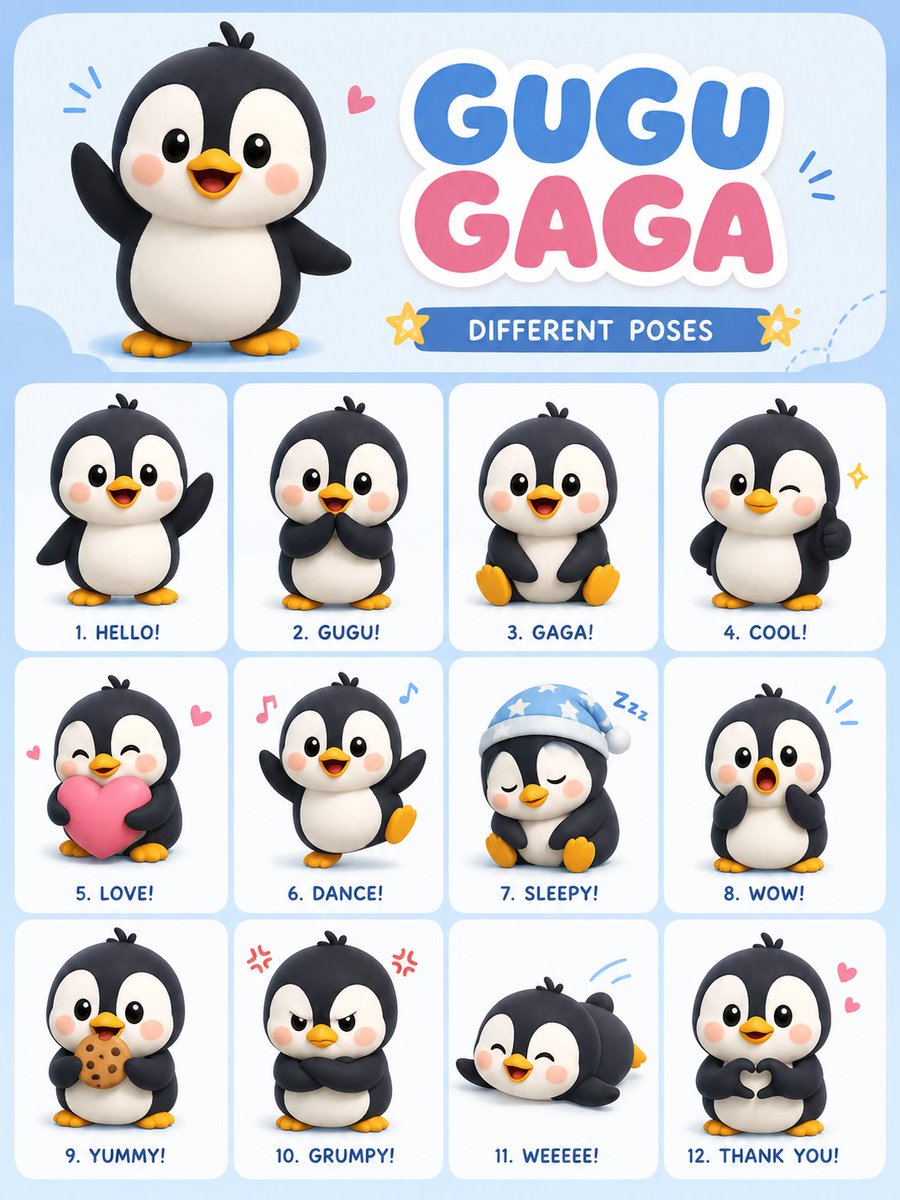
Chibi Penguin Expression Grid
Generates a 12-pose character sheet for a cute penguin named Gugu Gaga in a soft 3D chibi style with pastel colors.
This is a GPT Image 2 prompt case for 人像角色. Use the copy-ready prompt below to generate similar visuals, and review Awesome GPT Image 2 Prompts attribution plus commercial-use rights before reuse.
Need the full prompt set? Use the 人像角色 topic hub for more related examples, or open the GPT Image 2 prompt library for the full example index, reusable structures, and source attribution.
Prompt
Copy-ready prompt
创建一个可爱的病毒式卡通 {argument name="character" default="penguin"} 角色,名字叫“{argument name="name" default="Gugu Gaga"}”,采用柔和的 3D Q 版风格。设计一个 3:4 的竖向海报布局,展示同一只企鹅角色的多种不同姿势和表情。使用 {argument name="aesthetic" default="马卡龙美学"},搭配柔和的灯光、平滑的阴影、圆润的形状以及简洁的卡哇伊设计。企鹅应拥有黑白相间的身体、小巧的黄色脚掌、红润的脸颊、明亮的大眼睛,并展现出顽皮的婴儿般个性。

在整齐的网格布局中包含 12 种不同的姿势/情绪:

1. 挥手打招呼

2. 害羞姿势

3. 开心地坐着

4. 眨眼点赞

5. 手持粉色爱心

6. 跳舞

7. 戴着睡帽打瞌睡

8. 惊讶的表情

9. 吃饼干

10. 气呼呼的表情

11. 肚皮滑行

12. 手比爱心

在顶部添加一个可爱的大标题,写着“GUGU GAGA – DIFFERENT POSES”。使用马卡龙蓝、粉和白色调,并在角色周围点缀星星、爱心、闪光和音符等小涂鸦。使其看起来像社交媒体上流行的贴纸包海报。高细节、超干净、柔和阴影、玩具般的 3D 渲染、所有姿势中表情的一致性、专业构图,3:4 纵横比。
Prompt variables
Editable argument placeholders found in the prompt, with their default values.
Variable
character
Default
penguin
Variable
name
Default
Gugu Gaga
Variable
aesthetic
Default
Macaron Aesthetics
More cases in this category
Prioritized by category, input mode compatibility, quality, and lower risk.


Reuse and source notes
Use this prompt safely after previewing the case.
- 1.Copy the prompt or open it directly in Dovoo with the generation button.
- 2.Adjust variables, aspect ratio, and reference images for your own use case.
- 3.Before publishing or paid usage, verify source rights, attribution requirements, and brand or likeness risks.
Can I use this prompt commercially?
Commercial-use status is allowed. Review the original source, license, brand constraints, and legal requirements before paid usage.
Where does this case come from?
This case is imported from Awesome GPT Image 2 Prompts; keep attribution visible and check the source URL before reuse.