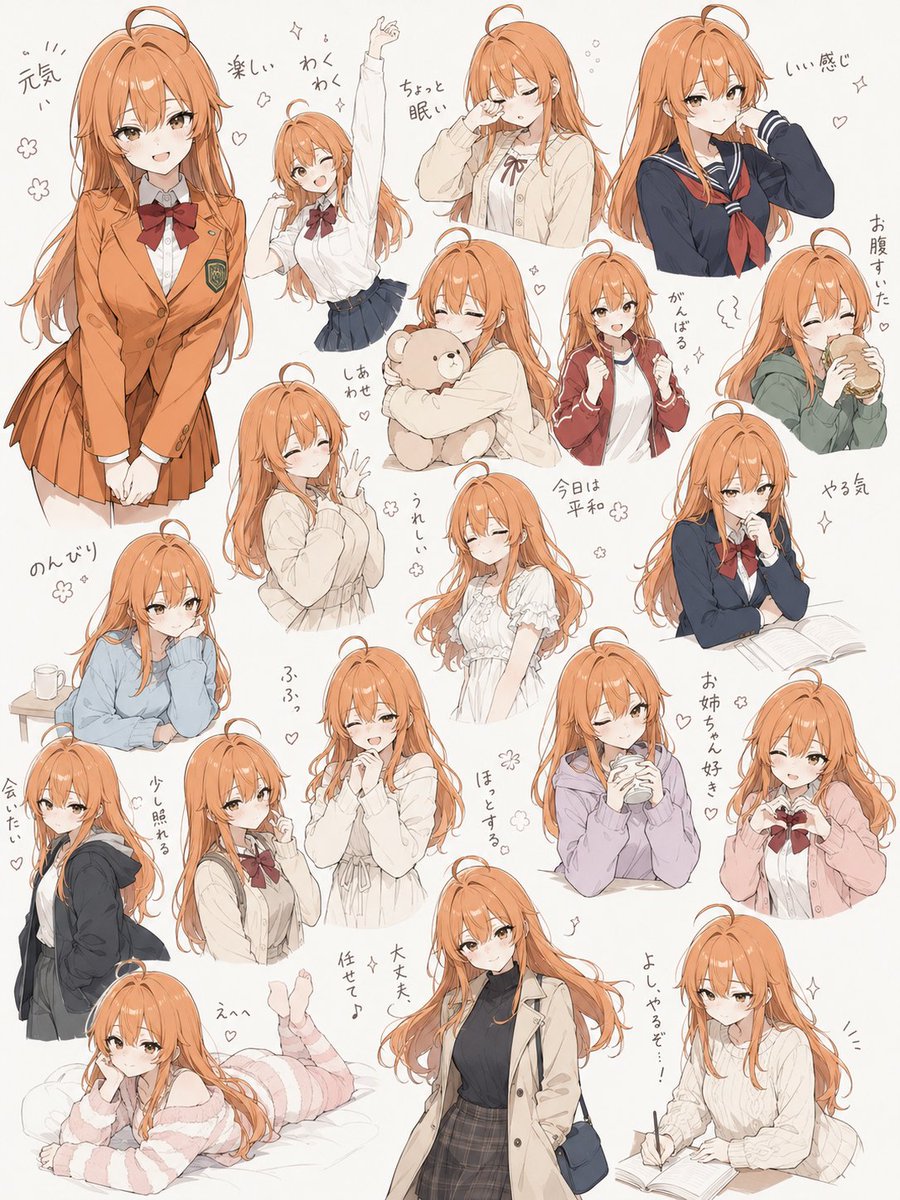
Hand-Drawn Character Sticker Sheet Prompt
A delightful prompt for generating collections of cute characters in a clean ink line-art style with soft, customizable colors and handwritten text.
This is a GPT Image 2 prompt case for 人像角色. Use the copy-ready prompt below to generate similar visuals, and review Awesome GPT Image 2 Prompts attribution plus commercial-use rights before reuse.
Free 1K preview
Generate one preview image instantly, no sign-up required.
2 free previews per device every 30 days
Prompt
Copy-ready prompt
简单的线条插画风格,扁平且轻盈的形状,细腻且均匀的墨水风格线条,安静平和的氛围。以黑、灰、白为主的单色调,在眼睛处添加少许 {argument name="eye color" default="参考图中的眼睛颜色"} 作为微妙的点缀。将角色以各种姿势和动作随机排列,如同插画合集。无文字。不过,将服装颜色设置为 {argument name="clothing colors" default="藏青色、红色和绿色"} 或其他多种颜色。为图像添加表达情感的线条。不要使用对话气泡,而是使用柔和的手写字体。在画面中散布大量线条。自由地构思这些线条。Prompt variables
Editable argument placeholders found in the prompt, with their default values.
Best for
- - 人像角色 visual exploration
- - Image generation and reference-image edits
- - Reusable briefs that keep source attribution visible
Change these parts
- - Subject, product, character, or scene
- - Aspect ratio, camera, lighting, and background
- - Brand, text, color, and output constraints
Recommended model and settings
- - Model: gpt-image-2
- - Input mode: Text to Image
- - Aspect ratio: source
- - Commercial status: review original source
How to use this prompt
- 1. Copy the prompt and preserve its structure for the first test.
- 2. Replace the subject, context, and publishing channel.
- 3. Change one camera, lighting, or style variable per iteration.
- 4. Inspect the output, source, text, and rights before reuse.
Limitations, source, and reuse cautions
- - Generated output is an editable draft, not factual, legal, or rights evidence.
- - Review the linked source, people, brands, logos, text, and third-party media before commercial use.
More cases in this category
Prioritized by category, input mode compatibility, quality, and lower risk.
Reuse and source notes
Use this prompt safely after previewing the case.
- 1.Copy the prompt or open it directly in Dovoo with the generation button.
- 2.Adjust variables, aspect ratio, and reference images for your own use case.
- 3.Before publishing or paid usage, verify source rights, attribution requirements, and brand or likeness risks.
Can I use this prompt commercially?
Commercial-use status is allowed. Review the original source, license, brand constraints, and legal requirements before paid usage.
Where does this case come from?
This case is imported from Awesome GPT Image 2 Prompts; keep attribution visible and check the source URL before reuse.