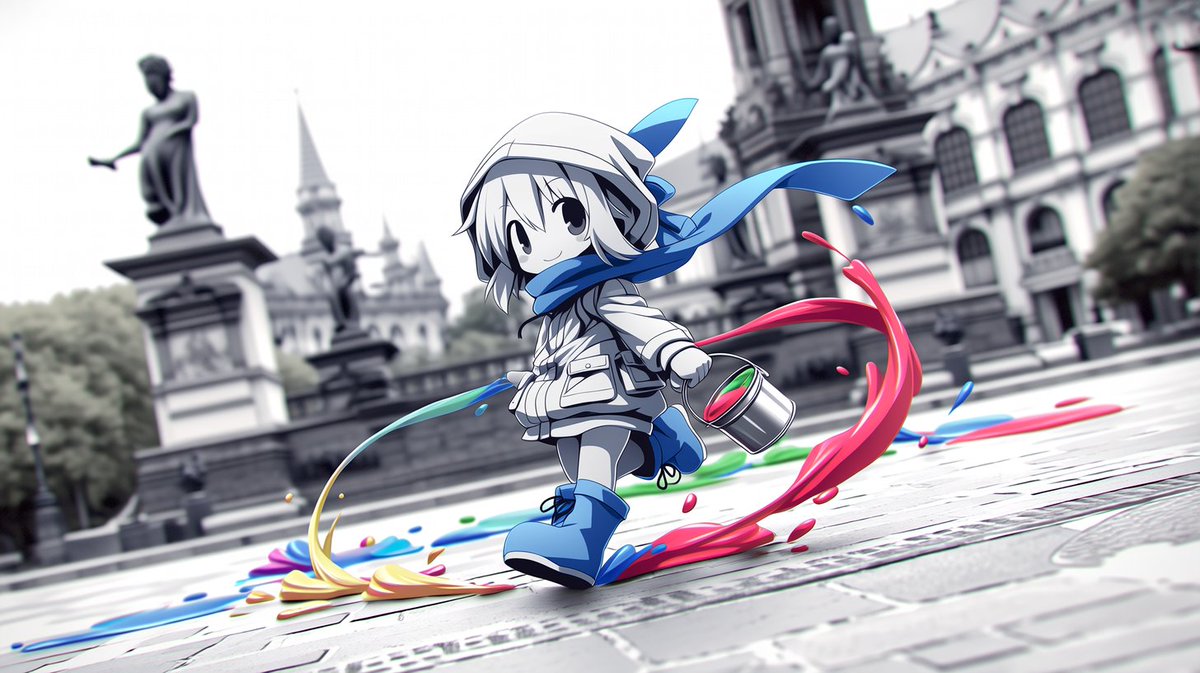
Chibi Painter in Monochrome Plaza
A dynamic anime scene of a cute chibi painter splashing colorful paint through a grayscale European city square.
This is a GPT Image 2 prompt case for Anime & Game. Use the copy-ready prompt below to generate similar visuals, and review Awesome GPT Image 2 Prompts attribution plus commercial-use rights before reuse.
Free 1K preview
Generate one preview image instantly, no sign-up required.
Prompt
Copy-ready prompt
Create a cinematic anime illustration of a small chibi street painter running through a European-style city plaza, splashing bright paint across an otherwise monochrome scene. The character is centered slightly left, full body, with oversized cute proportions, pale skin, short {argument name="hair color" default="white"} hair, large black oval eyes, and a cheerful subtle smile. They wear a white hooded jacket, a white cap or hood, shorts, a long flowing {argument name="scarf color" default="bright blue"} scarf whipping dramatically to the right, matching blue boots, and a small backpack. In the character’s right hand is one metal paint bucket with visible red and green paint inside, tilted as if swinging while running. Show exactly four main paint trails: a large vivid red arc curling around the character on the right, a blue splash path under the feet and trailing to the right, a yellow-orange sweep across the foreground left, and a green streak behind the bucket near the ground; add small scattered droplets in red, blue, green, and yellow around these trails. The background is a blurred grayscale historic square with stone paving, an old ornate European building on the right, a statue on a pedestal on the left, distant spires, trees, and soft overcast daylight. Use shallow depth of field, low ground-level perspective, dynamic diagonal composition, motion blur in the background, crisp detailed anime linework on the character, glossy liquid paint highlights, high contrast between the black-and-white architecture and saturated paint colors. No text, no watermark, no extra characters.Prompt variables
Editable argument placeholders found in the prompt, with their default values.
Best for
- - Anime & Game visual exploration
- - Image generation and reference-image edits
- - Reusable briefs that keep source attribution visible
Change these parts
- - Subject, product, character, or scene
- - Aspect ratio, camera, lighting, and background
- - Brand, text, color, and output constraints
Recommended model and settings
- - Model: gpt-image-2
- - Input mode: Text to Image
- - Aspect ratio: source
- - Commercial status: review original source
How to use this prompt
- 1. Copy the prompt and preserve its structure for the first test.
- 2. Replace the subject, context, and publishing channel.
- 3. Change one camera, lighting, or style variable per iteration.
- 4. Inspect the output, source, text, and rights before reuse.
Limitations, source, and reuse cautions
- - Generated output is an editable draft, not factual, legal, or rights evidence.
- - Review the linked source, people, brands, logos, text, and third-party media before commercial use.
More cases in this category
Prioritized by category, input mode compatibility, quality, and lower risk.
Reuse and source notes
Use this prompt safely after previewing the case.
- 1.Copy the prompt or open it directly in Dovoo with the generation button.
- 2.Adjust variables, aspect ratio, and reference images for your own use case.
- 3.Before publishing or paid usage, verify source rights, attribution requirements, and brand or likeness risks.
Can I use this prompt commercially?
Commercial-use status is allowed. Review the original source, license, brand constraints, and legal requirements before paid usage.
Where does this case come from?
This case is imported from Awesome GPT Image 2 Prompts; keep attribution visible and check the source URL before reuse.