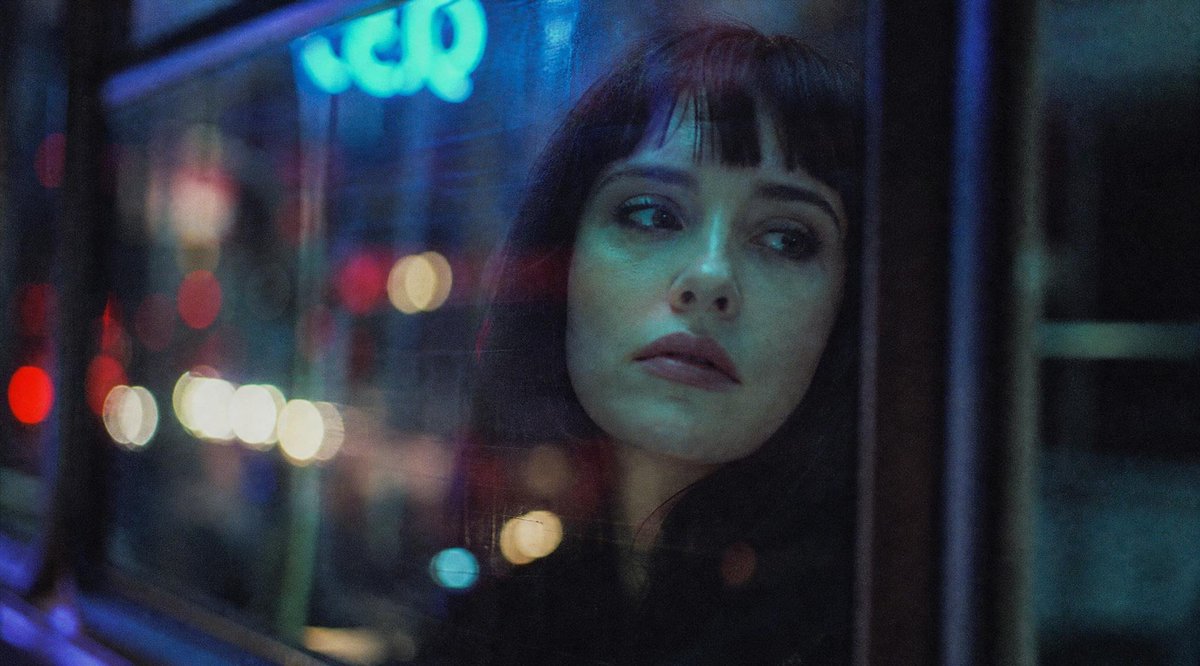
Censored Night Bus Window Scene
A cinematic rainy-night urban bus window scene with blurred neon lights and a silhouetted person whose face is hidden by a square censor block.
This is a GPT Image 2 prompt case for Landscape & Nature. Use the copy-ready prompt below to generate similar visuals, and review Awesome GPT Image 2 Prompts attribution plus commercial-use rights before reuse.
Free 1K preview
Generate one preview image instantly, no sign-up required.
Prompt
Copy-ready prompt
Create a moody cinematic night photograph in a wide 16:9 frame, shot from inside or beside a bus or tram window in a rainy urban setting. The scene should be dark and atmospheric, with heavy glass reflections, soft film grain, shallow depth of field, and out-of-focus city bokeh lights in red, white, yellow, cyan, and blue. On the right half of the image, show the partial silhouette of {argument name="subject" default="a person seated by the window"}, mostly obscured by darkness and reflections, with only hair and shoulder shape faintly visible. Cover the subject's face with one large opaque square censor block, centered over the head and upper torso area, colored deep charcoal blue-gray, with sharp clean edges and no text. In the background, include a glowing blurry cyan-blue neon sign near the upper left that vaguely resembles letters but remains unreadable, plus vertical window frames and dark bus interior structure. Use a gritty analog film look, low contrast shadows, cool blue-green color grading, dim exposure, and soft motion-blurred street lights; no readable text, no watermark, no extra subjects.Prompt variables
Editable argument placeholders found in the prompt, with their default values.
Best for
- - Landscape & Nature visual exploration
- - Image generation and reference-image edits
- - Reusable briefs that keep source attribution visible
Change these parts
- - Subject, product, character, or scene
- - Aspect ratio, camera, lighting, and background
- - Brand, text, color, and output constraints
Recommended model and settings
- - Model: gpt-image-2
- - Input mode: Text to Image
- - Aspect ratio: source
- - Commercial status: review original source
How to use this prompt
- 1. Copy the prompt and preserve its structure for the first test.
- 2. Replace the subject, context, and publishing channel.
- 3. Change one camera, lighting, or style variable per iteration.
- 4. Inspect the output, source, text, and rights before reuse.
Limitations, source, and reuse cautions
- - Generated output is an editable draft, not factual, legal, or rights evidence.
- - Review the linked source, people, brands, logos, text, and third-party media before commercial use.
More cases in this category
Prioritized by category, input mode compatibility, quality, and lower risk.

Reuse and source notes
Use this prompt safely after previewing the case.
- 1.Copy the prompt or open it directly in Dovoo with the generation button.
- 2.Adjust variables, aspect ratio, and reference images for your own use case.
- 3.Before publishing or paid usage, verify source rights, attribution requirements, and brand or likeness risks.
Can I use this prompt commercially?
Commercial-use status is allowed. Review the original source, license, brand constraints, and legal requirements before paid usage.
Where does this case come from?
This case is imported from Awesome GPT Image 2 Prompts; keep attribution visible and check the source URL before reuse.