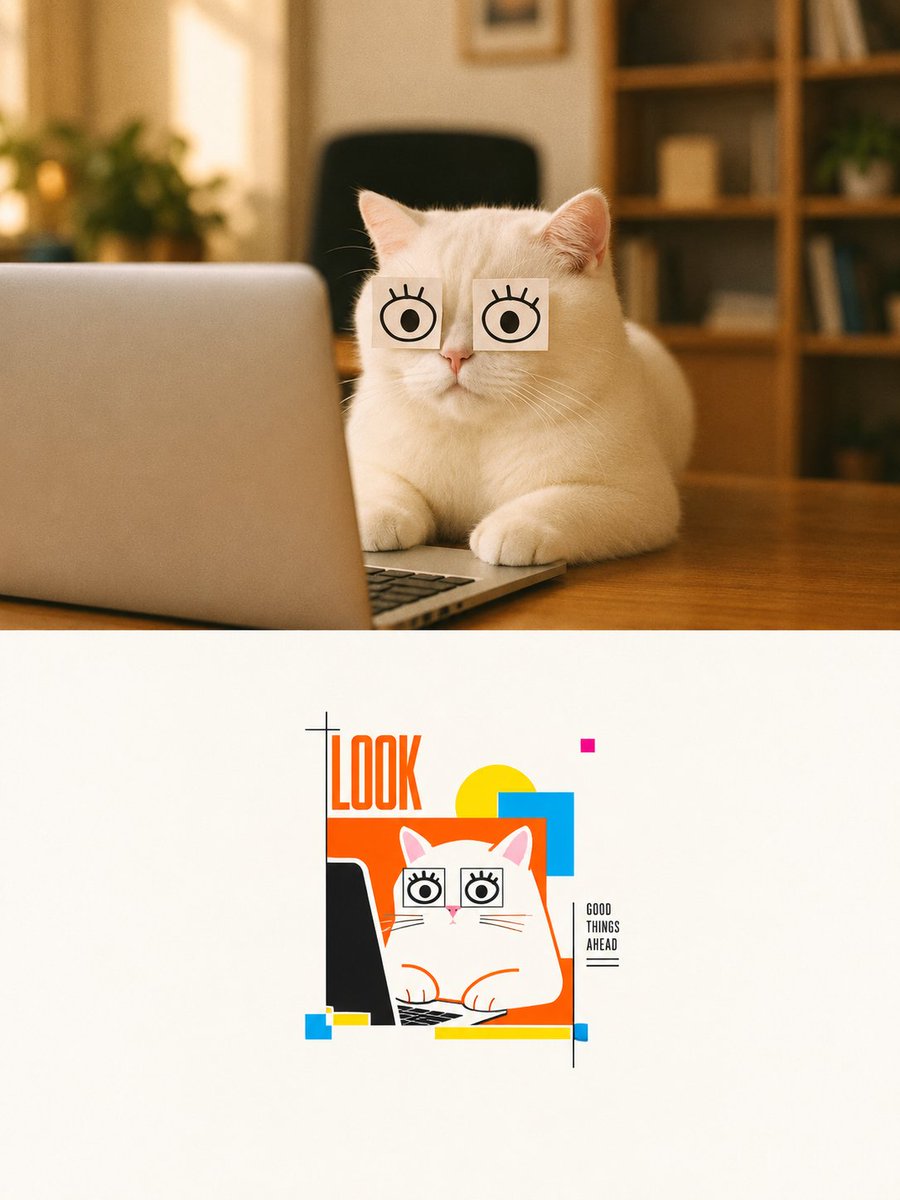
Cat Photo to Geometric Poster
Creates a split composition with a realistic funny cat-at-laptop photo above and a clean Bauhaus-style geometric poster version below.
This is a GPT Image 2 prompt case for Graphic & Poster. Use the copy-ready prompt below to generate similar visuals, and review Awesome GPT Image 2 Prompts attribution plus commercial-use rights before reuse.
Free 1K preview
Generate one preview image instantly, no sign-up required.
Prompt
Copy-ready prompt
Goal: Create a vertical two-panel design that transforms a cozy realistic cat photo into a minimalist geometric poster illustration.

Canvas: Portrait 3:4 composition, 900 x 1200 style, split horizontally into exactly 2 panels. The top panel occupies about 52% of the height and is a warm realistic photograph; the bottom panel occupies about 48% and is an off-white gallery-poster illustration area.

Top panel: Show one fluffy white cat sitting at a wooden desk in a warm home office. The cat faces forward behind one open silver laptop positioned on the left foreground, with the keyboard barely visible at the bottom edge. The cat has exactly 2 square white paper notes taped over its eyes, each note drawn with one simple black cartoon eye and short eyelashes, giving a funny wide-eyed look. Background is softly blurred with exactly 1 black office chair centered behind the cat, 1 leafy plant on the left, and 1 wooden bookshelf on the right with indistinct books and decor. Lighting is golden, soft, shallow depth of field, cozy indoor ambience, realistic fur detail.

Bottom panel: On a clean off-white background, place a small centered vector poster illustration inspired by the top photo. The illustration contains exactly 1 white cartoon cat, exactly 1 black laptop silhouette on the left, exactly 2 square cartoon-eye notes over the cat's eyes, and the cat's paws on the keyboard. Use crisp orange outlines and flat graphic shapes. Add the large vertical headline text {argument name="headline text" default="LOOK"} in tall condensed orange letters at the upper left of the illustration. Add a small stacked caption on the right reading {argument name="side caption" default="GOOD THINGS AHEAD"}, with a thin black vertical line beside it and a short underline beneath it.

Geometric elements in the bottom poster: Include exactly 8 abstract color-block accents: 1 large orange rectangle behind the cat, 1 yellow circle behind the top right of the cat, 1 cyan-blue square overlapping the yellow circle, 1 tiny magenta square above, 1 small cyan square at the lower left, 1 small yellow horizontal rectangle beside it, 1 long yellow horizontal bar along the bottom, and 1 tiny blue rectangle at the lower right end of that bar. Add a minimal black plus-sign registration mark near the headline.

Visual style: Top panel should be realistic warm photography; bottom panel should be clean Bauhaus-inspired geometric poster art with orange, yellow, cyan, magenta, black, and white. Keep generous negative space in the bottom panel, sharp vector edges, playful editorial design, no extra animals, no extra text, no watermark.
Prompt variables
Editable argument placeholders found in the prompt, with their default values.
Best for
- - Graphic & Poster visual exploration
- - Image generation and reference-image edits
- - Reusable briefs that keep source attribution visible
Change these parts
- - Subject, product, character, or scene
- - Aspect ratio, camera, lighting, and background
- - Brand, text, color, and output constraints
Recommended model and settings
- - Model: gpt-image-2
- - Input mode: Text to Image
- - Aspect ratio: source
- - Commercial status: review original source
How to use this prompt
- 1. Copy the prompt and preserve its structure for the first test.
- 2. Replace the subject, context, and publishing channel.
- 3. Change one camera, lighting, or style variable per iteration.
- 4. Inspect the output, source, text, and rights before reuse.
Limitations, source, and reuse cautions
- - Generated output is an editable draft, not factual, legal, or rights evidence.
- - Review the linked source, people, brands, logos, text, and third-party media before commercial use.
More cases in this category
Prioritized by category, input mode compatibility, quality, and lower risk.

Reuse and source notes
Use this prompt safely after previewing the case.
- 1.Copy the prompt or open it directly in Dovoo with the generation button.
- 2.Adjust variables, aspect ratio, and reference images for your own use case.
- 3.Before publishing or paid usage, verify source rights, attribution requirements, and brand or likeness risks.
Can I use this prompt commercially?
Commercial-use status is allowed. Review the original source, license, brand constraints, and legal requirements before paid usage.
Where does this case come from?
This case is imported from Awesome GPT Image 2 Prompts; keep attribution visible and check the source URL before reuse.