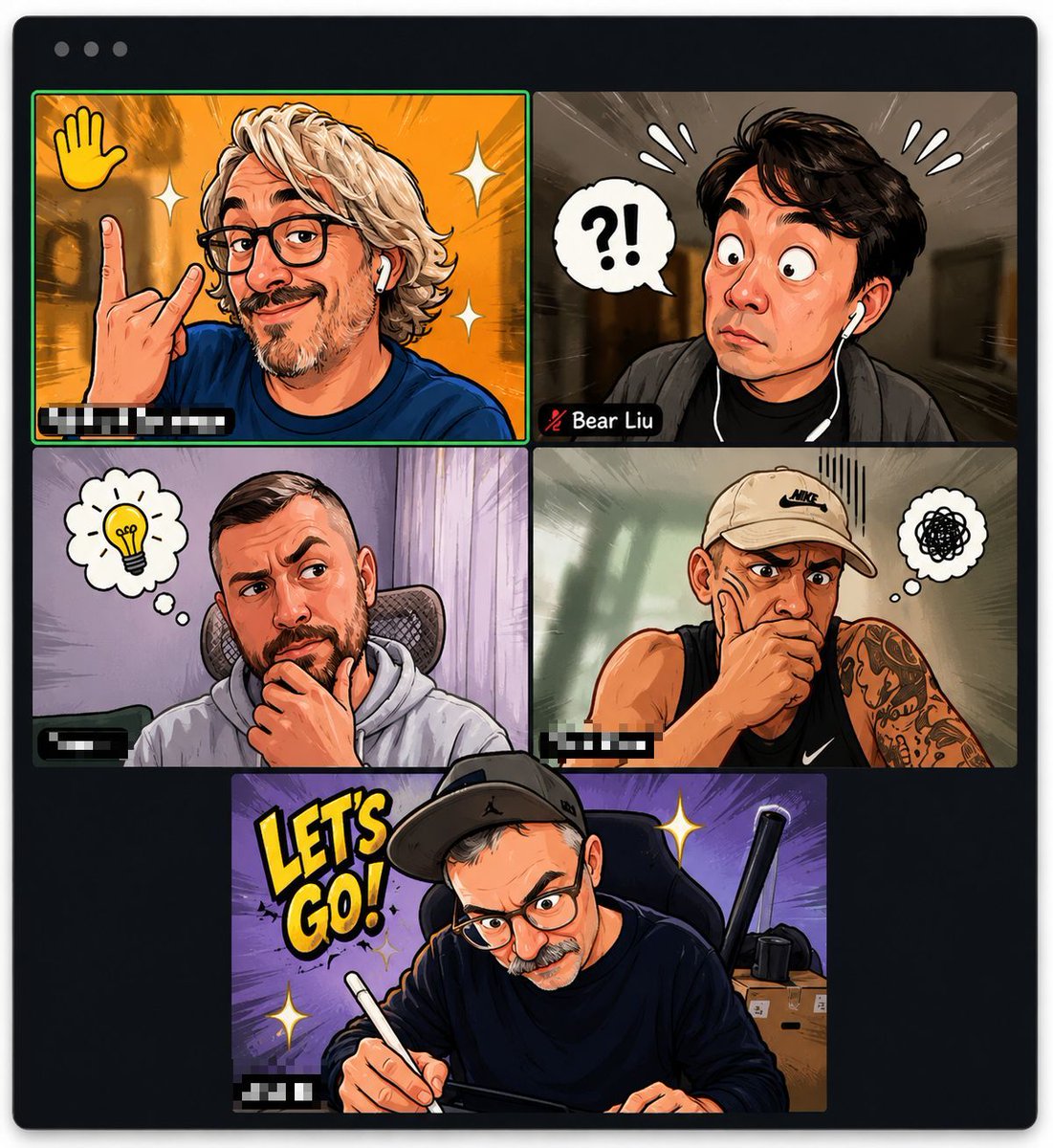
Comic Cartoon Video Call
Generates a comic-book style cartoon video meeting screenshot with five anonymized participants and exaggerated reaction icons.
This is a GPT Image 2 prompt case for 插画艺术. Use the copy-ready prompt below to generate similar visuals, and review Awesome GPT Image 2 Prompts attribution plus commercial-use rights before reuse.
Prompt
Copy-ready prompt
Objective: Create a stylized cartoon version of a video conference screenshot, resembling a comic book version of a Zoom call with exaggerated expressions and blurred privacy identities. Canvas: A square image with a video call application window on a light background and dark rounded corners. Add three small gray window control points in the top left corner. Inside the window, precisely arrange five participant video tiles: four tiles in a 2x2 grid at the top, and one wider tile centered at the bottom. Separate the tiles with thin black lines. The tile in the top left corner has a bright green speaker border. Visual Style: High-energy digital cartoon illustrations, bold ink outlines, semi-realistic cartoon portraits, saturated colors, cartoon speed lines, sticker-like reaction icons, glossy highlights, and dramatic lighting. Faces must be obscured with large rectangular blur blocks to protect privacy while preserving hair, poses, clothing, and backgrounds. Add blurred name tags in the bottom left corner of most tiles, with one tag clearly visible:{argument name="visible participant name" default="Bear Liu"} Layout and Main Details: Includes 5 cartoon characters. Tile 1 (Top Left): A blond, curly-haired person in a blue shirt, making a rock-and-roll gesture with one hand against an orange background. There's a yellow waving icon in the top left corner, two white flashing icons, a green speaker border, and a blurred name tag in the bottom left corner. Tile 2 (Top Right): A dark-haired person wearing earplugs and a dark jacket, showing surprise against a brown, motion-blurred corridor background. There's a white speech bubble displaying a "?!" on the left, three white pressure symbols on either side of the head, and a name tag in the bottom left corner containing a mute microphone icon and a clearly visible name.{argument name="visible participant name" default="Bear Liu"} Tile 3 (Middle Left): A person sitting in an office chair wearing a light gray hoodie, chin resting on their hand in thought, against a pale purple curtain background. A thought bubble contains a yellow light bulb, and there is a blurred name tag in the lower left corner. Tile 4 (Middle Right): A muscular person wearing a black sleeveless sweatshirt and a beige Nike hat, revealing tattooed arms, chin resting on their hand, against a soft green studio background. A thought bubble contains black graffiti, and there is a vertical anxiety line above their head. There is a blurred name tag in the lower left corner. Tile 5 (Bottom Center): A person wearing a black hoodie and a black hat is writing on a tablet with a white stylus, against a purple burst background. There is large yellow cartoon text on the left side.{argument name="comic slogan" default="LET'S GO!"} Two white flashing icons, a desk box and a black object in the background on the right, and a blurred name tag in the lower left corner. Number of text and icons: Display 5 video tiles, 5 blurred face rectangles, 4 visible name tags in the lower left corner, 1 clearly visible participant name tag, 1 large cartoon banner, 3 mind/dialogue bubbles or icons with symbols or text: waving, "?!", light bulb, and a doodle mind bubble. All personal names, except for designated names, should be blurred or pixelated. Constraints: Do not display real, unblurred faces. Do not add extra tiles, extra people, watermarks, titles outside the meeting window, or interface controls other than the three control points in the upper left corner and the tiled name tag. The overall look should maintain a fun AI-generated cartoon avatar transformation style for video conference screenshots.Prompt variables
Editable argument placeholders found in the prompt, with their default values.
More cases in this category
Prioritized by category, input mode compatibility, quality, and lower risk.

Reuse and source notes
Use this prompt safely after previewing the case.
- 1.Copy the prompt or open it directly in Dovoo with the generation button.
- 2.Adjust variables, aspect ratio, and reference images for your own use case.
- 3.Before publishing or paid usage, verify source rights, attribution requirements, and brand or likeness risks.
Can I use this prompt commercially?
Commercial-use status is allowed. Review the original source, license, brand constraints, and legal requirements before paid usage.
Where does this case come from?
This case is imported from Awesome GPT Image 2 Prompts; keep attribution visible and check the source URL before reuse.