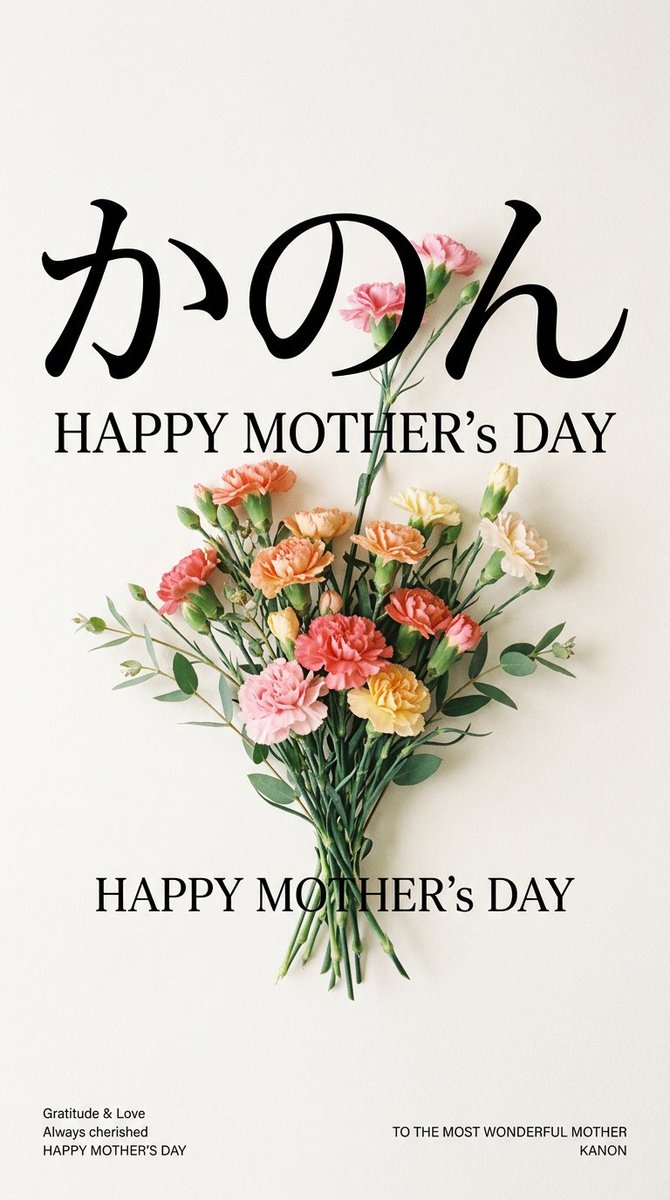
Minimal Carnation Mother's Day Wallpaper
A refined vertical Mother’s Day wallpaper featuring Japanese calligraphy, elegant serif greetings, and a realistic carnation bouquet.
This is a GPT Image 2 prompt case for 平面海报. Use the copy-ready prompt below to generate similar visuals, and review Awesome GPT Image 2 Prompts attribution plus commercial-use rights before reuse.
Prompt
Copy-ready prompt
Create a minimalist vertical Mother's Day mobile wallpaper with a warm off-white paper texture background, centered composition, and ample white space. At the top, place oversized, elegant black Japanese calligraphy with the following text:{argument name="character name" default="かのん"} It features a soft, handwritten stroke. Below it, add a capital serif greeting.{argument name="main greeting" default="HAPPY MOTHER’S DAY"} The layout uses classic black and white. At the center is a realistic bouquet of pressed carnations and eucalyptus leaves, with stems visually overlapping and tapering downwards. It includes 14 clearly visible carnations in shades of pink, coral, peach, orange, cream, pale yellow, and red, along with 8 small green buds, slender dark green stems, and rounded eucalyptus leaves that gently spread to the left and right. Below the bouquet is a second line of centered, large serif capital greetings.{argument name="lower greeting" default="HAPPY MOTHER’S DAY"} In the bottom left corner, there are three lines of small black sans-serif text: "Gratitude & Love," "Always cherished," and "HAPPY MOTHER'S DAY." In the bottom right corner, there are two lines of small black sans-serif text: "TO THE MOST WONDERFUL MOTHER" and{argument name="signature name" default="KANON"} Employing refined Japanese greeting card aesthetics, the design features natural light illumination, delicate shadows around the flowers, and realistic botanical details. The layout is as clean as a high-end magazine, with no borders and no superfluous elements.Prompt variables
Editable argument placeholders found in the prompt, with their default values.
More cases in this category
Prioritized by category, input mode compatibility, quality, and lower risk.
Reuse and source notes
Use this prompt safely after previewing the case.
- 1.Copy the prompt or open it directly in Dovoo with the generation button.
- 2.Adjust variables, aspect ratio, and reference images for your own use case.
- 3.Before publishing or paid usage, verify source rights, attribution requirements, and brand or likeness risks.
Can I use this prompt commercially?
Commercial-use status is allowed. Review the original source, license, brand constraints, and legal requirements before paid usage.
Where does this case come from?
This case is imported from Awesome GPT Image 2 Prompts; keep attribution visible and check the source URL before reuse.