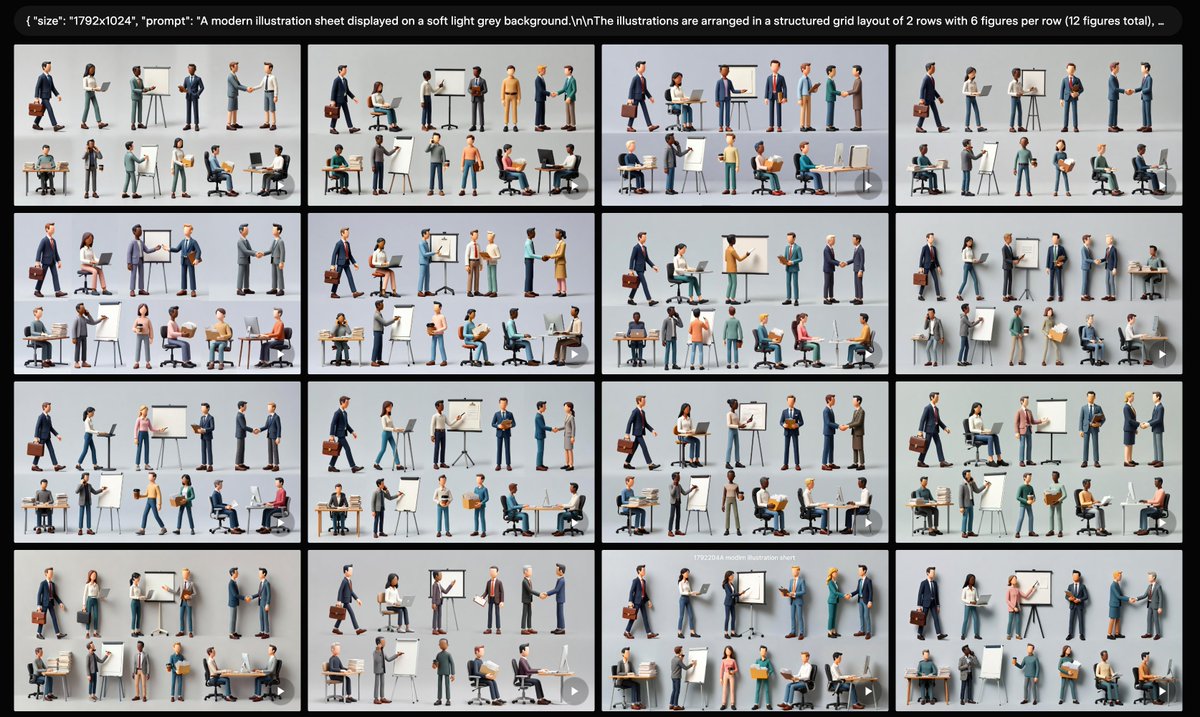
Business Character Sheet Gallery
Creates a wide AI-gallery screenshot filled with 16 thumbnail variations of modern 3D business character sheets for presentation or UI mockup use.
This is a GPT Image 2 prompt case for 人像角色. Use the copy-ready prompt below to generate similar visuals, and review Awesome GPT Image 2 Prompts attribution plus commercial-use rights before reuse.
Prompt
Copy-ready prompt
Objective: To create a widescreen, screenshot-style gallery view showcasing multiple generated variations of the same modern business illustration subject. Canvas: 16:9 widescreen image.{argument name="canvas size" default="1792x1024"} The background features a black app aesthetic, with images tiled with subtle spacing. At the top is a rounded black tooltip containing small, evenly spaced white text, beginning with a visible JSON-style code snippet:{argument name="visible prompt text" default="{\"size\": \"1792x1024\", \"prompt\": \"A modern illustration sheet displayed on a soft light grey background.\\nThe illustrations are arranged in a structured grid layout of 2 rows with 6 figures per row (12 figures total), ...\"} Layout: Sixteen rectangular thumbnails are displayed below the prompt bar, arranged in a 4x4 grid. Each tile has a soft light gray background and depicts a miniature illustration. The thumbnails are similar but not identical, like generated variations. Narrow black spacing is used between the tiles, and they feature slightly rounded corners. A small, semi-transparent circular play/arrow icon is added to the lower right corner of many tiles, making them resemble preview cards in the generated interface. Thumbnail Content: Each tile displays 12 stylized 3D business figures, arranged in two rows of six. Each character should be diverse in gender, skin color, age, and clothing, dressed in modern office attire such as dark blue suits, gray suit jackets, cyan trousers, skirts, shirts, sweaters, and business shoes. Include business props in the characters: laptops, desks, office chairs, briefcases, clipboards, cardboard boxes, easels, flip charts, whiteboards, markers, presentation projects, handshake postures, walking postures, seated office postures, and standing discussion postures. Keep each character independent, like a distinct character element, rather than a continuous scene. Visual style: Refined semi-realistic 3D illustrations, soft studio lighting, subtle shadows under each character, clean corporate presentation aesthetics, using soft colors such as dark blue, gray, white, cyan, and tan, with a few accent colors. The overall composition should look like a screenshot of an AI-generated image result page, not a single poster. Constraints: Keep the top cue bar clearly readable, but allow for truncation on the right. Use 16 gallery thumbnails, each containing 12 small images of business characters, arranged in 2 rows of 6. Do not add any logos, watermarks, extra interface panels, or irrelevant text except for the top prompt bar.Prompt variables
Editable argument placeholders found in the prompt, with their default values.
More cases in this category
Prioritized by category, input mode compatibility, quality, and lower risk.

Reuse and source notes
Use this prompt safely after previewing the case.
- 1.Copy the prompt or open it directly in Dovoo with the generation button.
- 2.Adjust variables, aspect ratio, and reference images for your own use case.
- 3.Before publishing or paid usage, verify source rights, attribution requirements, and brand or likeness risks.
Can I use this prompt commercially?
Commercial-use status is allowed. Review the original source, license, brand constraints, and legal requirements before paid usage.
Where does this case come from?
This case is imported from Awesome GPT Image 2 Prompts; keep attribution visible and check the source URL before reuse.