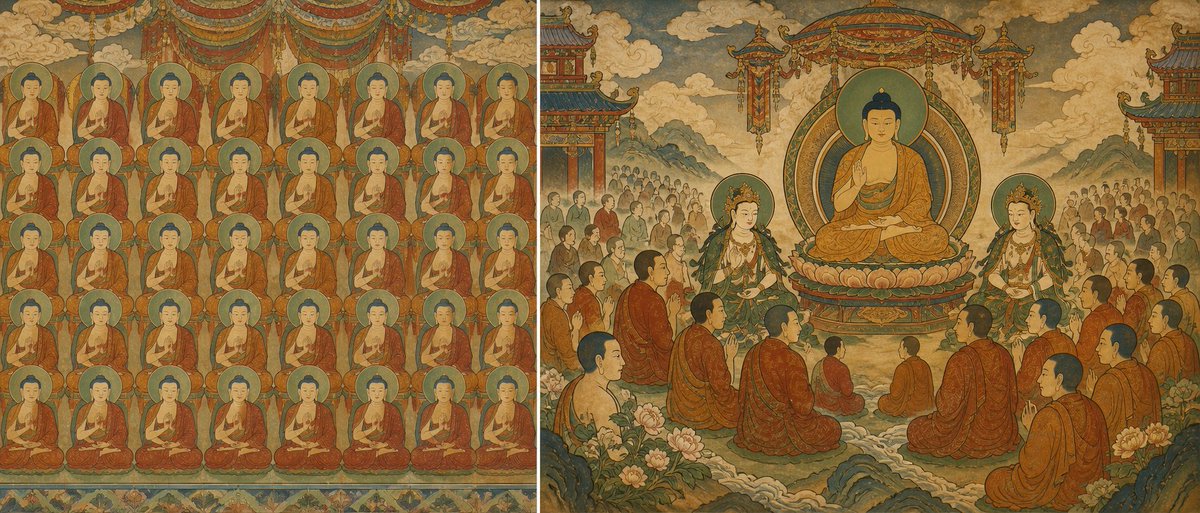
Buddhist Mural Composition Diptych
Generates a wide antique Buddhist fresco diptych contrasting a flat repeated Buddha grid with a layered sacred assembly for composition studies.
This is a GPT Image 2 prompt case for Illustration & Art. Use the copy-ready prompt below to generate similar visuals, and review Awesome GPT Image 2 Prompts attribution plus commercial-use rights before reuse.
Free 1K preview
Generate one preview image instantly, no sign-up required.
Prompt
Copy-ready prompt
Goal: Create a wide horizontal diptych comparing two Buddhist mural composition strategies in an aged Dunhuang / Chinese temple fresco style, showing the difference between a flat repetitive figure wall and a layered sacred assembly scene.

Canvas: Extra-wide panoramic image, about 2:1 aspect ratio, split vertically into two equal panels with no modern border, both panels painted on weathered tan plaster with faded mineral pigments, cracks, patina, and antique hand-painted texture.

Left panel: Depict a flat frontal mural filled with exactly 48 nearly identical seated Buddha figures arranged in a strict grid of 6 rows and 8 columns. Each Buddha has a round green-blue halo, dark blue hair, calm face, orange-red robe, and seated meditation pose. Keep the figures similar in size and spacing so the panel feels visually crowded and wall-like. Add decorative hanging canopy fabric at the top and a narrow floral border along the bottom. The background should be shallow, with almost no spatial depth.

Right panel: Depict a layered Pure Land / Buddhist court assembly with clear hierarchy, depth, and breathing space. Place exactly 1 large central Buddha seated on a lotus pedestal beneath an ornate circular mandorla and hanging canopy, making this the first visual focus. Flank the central Buddha with exactly 2 standing bodhisattvas, one on each side, wearing jeweled crowns, green and gold garments, and halos. Add exactly 14 larger foreground and midground monks seated or kneeling in orange-brown robes, arranged in curved rows that lead the eye toward the central Buddha. Behind them, include two distant crowd groups of many smaller worshippers on the left and right, intentionally reduced in scale and detail to create depth. Include layered mountains, cloud banks, temple pavilions at the far left and far right edges, lotus flowers, rocks, and soft misty pathways receding into the background.

Visual style: Ancient Chinese Buddhist mural, inspired by Dunhuang Pure Land paintings, Chaoyuan Tu-style hierarchical crowd composition, and Song/Yuan temple fresco aesthetics. Use muted mineral colors: ochre, sienna, cinnabar red, malachite green, teal blue, faded gold, ivory, and smoky gray. Lines should be delicate but aged, with hand-brushed outlines, flattened perspective, decorative symmetry, and subtle atmospheric depth on the right panel.

Composition intent: The left side must feel repetitive, dense, and spatially flat; the right side must feel organized, ceremonial, and deep, with hierarchy, foreground-middle-background separation, and intentional empty space around the central deity.

Text: No captions, no labels, no watermark, no modern typography.

Customizable subject: The central figure may be {argument name="central deity" default="Buddha"}; the mural tradition may be {argument name="mural tradition" default="Dunhuang Pure Land Buddhist fresco"}; the left grid count must remain {argument name="left panel figure count" default="48"}; the right main assembly should keep {argument name="foreground monk count" default="14"}; use an antique palette dominated by {argument name="primary color palette" default="ochre, cinnabar red, malachite green, teal blue, faded gold"}.
Prompt variables
Editable argument placeholders found in the prompt, with their default values.
Best for
- - Illustration & Art visual exploration
- - Image generation and reference-image edits
- - Reusable briefs that keep source attribution visible
Change these parts
- - Subject, product, character, or scene
- - Aspect ratio, camera, lighting, and background
- - Brand, text, color, and output constraints
Recommended model and settings
- - Model: gpt-image-2
- - Input mode: Text to Image
- - Aspect ratio: source
- - Commercial status: review original source
How to use this prompt
- 1. Copy the prompt and preserve its structure for the first test.
- 2. Replace the subject, context, and publishing channel.
- 3. Change one camera, lighting, or style variable per iteration.
- 4. Inspect the output, source, text, and rights before reuse.
Limitations, source, and reuse cautions
- - Generated output is an editable draft, not factual, legal, or rights evidence.
- - Review the linked source, people, brands, logos, text, and third-party media before commercial use.
More cases in this category
Prioritized by category, input mode compatibility, quality, and lower risk.
Reuse and source notes
Use this prompt safely after previewing the case.
- 1.Copy the prompt or open it directly in Dovoo with the generation button.
- 2.Adjust variables, aspect ratio, and reference images for your own use case.
- 3.Before publishing or paid usage, verify source rights, attribution requirements, and brand or likeness risks.
Can I use this prompt commercially?
Commercial-use status is allowed. Review the original source, license, brand constraints, and legal requirements before paid usage.
Where does this case come from?
This case is imported from Awesome GPT Image 2 Prompts; keep attribution visible and check the source URL before reuse.