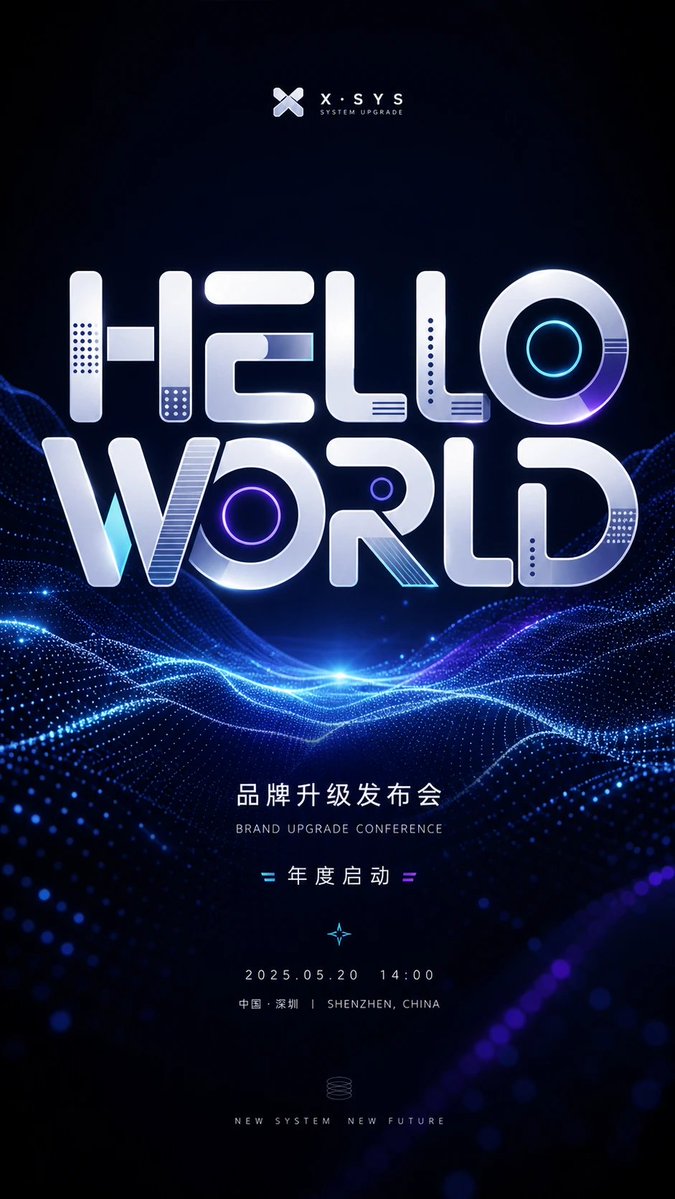
Futuristic Brand Upgrade Conference Poster
A vertical sci-fi event poster template for brand upgrade conferences, product launches, expos, and technology invitations.
This is a GPT Image 2 prompt case for Graphic & Poster. Use the copy-ready prompt below to generate similar visuals, and review Awesome GPT Image 2 Prompts attribution plus commercial-use rights before reuse.
Free 1K preview
Generate one preview image instantly, no sign-up required.
Prompt
Copy-ready prompt
Objective: Create a futuristic vertical conference poster for a technology brand upgrade event, centered around large, glossy 3D typography and abstract digital wave landscapes.

Canvas: 9:16 vertical poster, dark navy to black background, high contrast, high-end tech conference aesthetic. Ample black space at the top and bottom, with the main title positioned in the upper-middle of the poster.

Visual Style: Minimalist sci-fi event design, illuminated electric blue and violet accents, metallic white/silver typography, soft glow effects, subtle lens flares, realistic 3D beveled typography, clean business-tech atmosphere. The background should present a vast ocean of data composed of illuminated dot-matrix wave grids and flowing neon lines, brightest at the central horizon.

Top Brand Identification: Place a small abstract X-shaped logo centered at the top, followed by the brand text {argument name="brand name" default="X·SYS"}. Below that, add small-cap subtitle text: “SYSTEM UPGRADE”.

Main Title Typography: Create two lines of stacked, massive custom 3D display text reading {argument name="main title" default="HELLO WORLD"}. The letters should be rounded, blocky, and futuristic in style, rendered in glossy silver with bevels, shadows, and embedded tech details. Add 7 distinct decorative letter details: a dot-matrix vertical panel inside the H, a small rectangular crossbar inside the H, a dot-matrix panel at the bottom of the E/L areas, a cyan line panel inside the E, a concentric neon cyan ring inside the O of HELLO, a purple neon ring inside the O of WORLD, and a striped diagonal insert inside the R. Add additional subtle recesses and small dot-matrix perforations only if they don’t create visual clutter.

Mid and Bottom Text Content: Below the digital wave horizon, center clean, widely spaced sans-serif typography with event information. Use Chinese title text {argument name="Chinese event headline" default="Brand Upgrade Launch Conference"}, accompanied by a smaller English subtitle: “BRAND UPGRADE CONFERENCE”. Below that, display “= Annual Kickoff =”, flanked by small cyan and purple equal sign decorations. Below that, add a tiny glowing compass/star icon. Then display the date and time {argument name="date and time" default="2025.05.20  14:00"}. Below the date line, display “Shenzhen, China | SHENZHEN, CHINA”. Near the bottom, add a small, fine-line spiral system icon, and the slogan {argument name="bottom slogan" default="NEW SYSTEM  NEW FUTURE"} presented in small-cap letters.

Composition: All text must be strictly centered along the vertical axis. The massive “HELLO WORLD” title should occupy roughly half the height of the poster. Digital waves should pass through behind and below the title, forming an illuminated horizontal valley with blue and purple particle trails. The image should not contain people, photos of physical venues, additional logos, or watermarks.
Prompt variables
Editable argument placeholders found in the prompt, with their default values.
Best for
- - Graphic & Poster visual exploration
- - Image generation and reference-image edits
- - Reusable briefs that keep source attribution visible
Change these parts
- - Subject, product, character, or scene
- - Aspect ratio, camera, lighting, and background
- - Brand, text, color, and output constraints
Recommended model and settings
- - Model: gpt-image-2
- - Input mode: Text to Image
- - Aspect ratio: source
- - Commercial status: review original source
How to use this prompt
- 1. Copy the prompt and preserve its structure for the first test.
- 2. Replace the subject, context, and publishing channel.
- 3. Change one camera, lighting, or style variable per iteration.
- 4. Inspect the output, source, text, and rights before reuse.
Limitations, source, and reuse cautions
- - Generated output is an editable draft, not factual, legal, or rights evidence.
- - Review the linked source, people, brands, logos, text, and third-party media before commercial use.
More cases in this category
Prioritized by category, input mode compatibility, quality, and lower risk.






Reuse and source notes
Use this prompt safely after previewing the case.
- 1.Copy the prompt or open it directly in Dovoo with the generation button.
- 2.Adjust variables, aspect ratio, and reference images for your own use case.
- 3.Before publishing or paid usage, verify source rights, attribution requirements, and brand or likeness risks.
Can I use this prompt commercially?
Commercial-use status is allowed. Review the original source, license, brand constraints, and legal requirements before paid usage.
Where does this case come from?
This case is imported from Awesome GPT Image 2 Prompts; keep attribution visible and check the source URL before reuse.