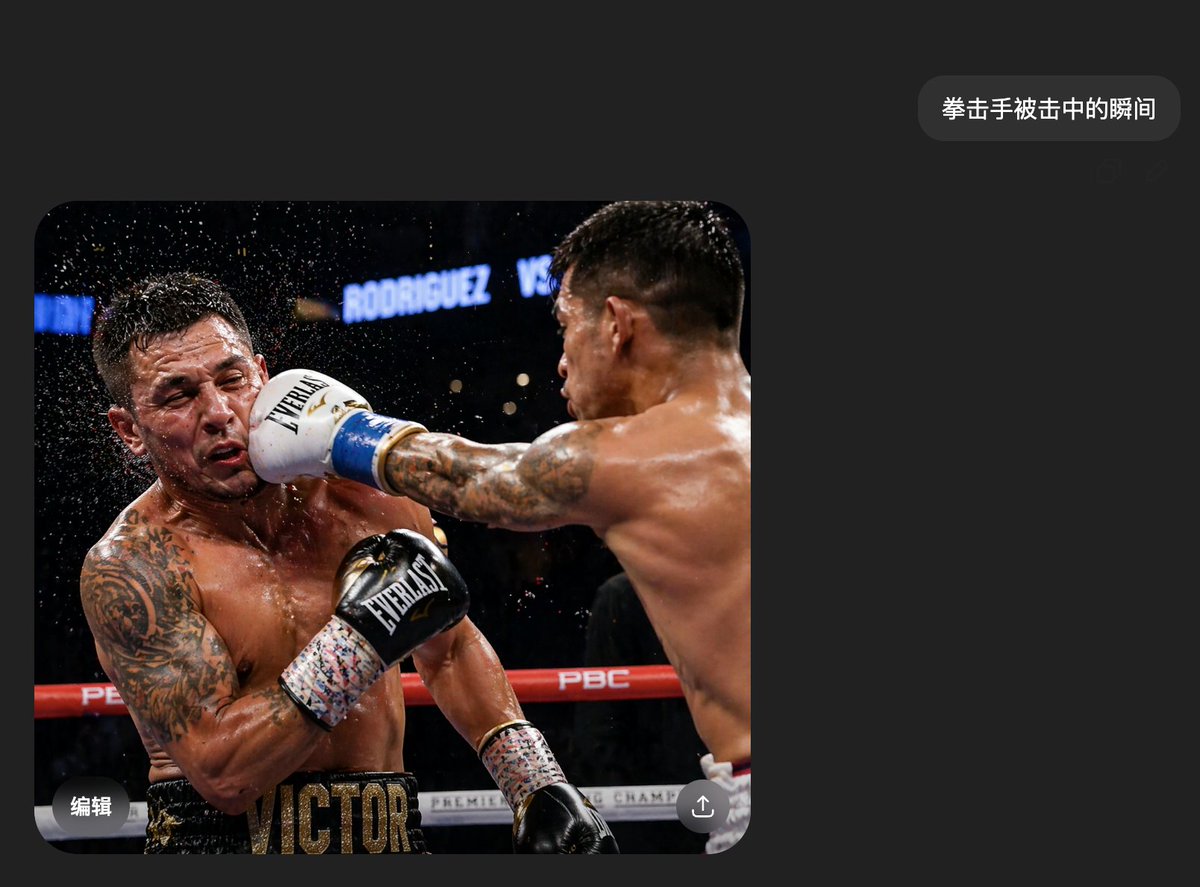
Boxing Impact Chat Screenshot
A photorealistic dark-mode chat screenshot featuring a dramatic boxing impact image, suitable for recreating viral social-media-style AI image demos.
This is a GPT Image 2 prompt case for Other Inspiration. Use the copy-ready prompt below to generate similar visuals, and review Awesome GPT Image 2 Prompts attribution plus commercial-use rights before reuse.
Free 1K preview
Generate one preview image instantly, no sign-up required.
Prompt
Copy-ready prompt
A realistic mobile phone screenshot of a Chinese dark mode chat interface, with a simple and modern style, using a charcoal black background with ample white space. Near the upper right corner, there is a rounded dark gray message bubble containing white Chinese characters {argument name="message text" default="The moment a boxer is hit."}. Below and to the left, there is a large image occupying the lower left half of the screen, with rounded corners. The embedded photo shows a moment in a professional boxing match where a boxer powerfully punches his opponent in the face. Two bare-chested male boxers, muscular and sweaty, are in a boxing ring under arena lights. The right boxer is shown mainly from the back, with his right arm fully extended across the frame; his back and shoulder muscles are clearly defined, with short dark hair and tattoos on his arm. He is wearing white boxing gloves with blue trim and is forcefully hitting the left boxer in the face. The left boxer is leaning back from the impact, his head thrown to the side, with sweat and water droplets flying around his head. He has large tattoos on his left arm and chest, a black glove raised near his torso, is wearing black shorts with a prominent gold letter VICTOR on the waistband. The ring ropes are red and white, with visible PBC branding, and the background is a blurred dark arena with a bright sign reading RODRIGUEZ VS. This action photo should present a sense of a frozen moment in high-speed motion photography, dramatic, clear, and highly realistic. Each boxer's face is covered with a rectangular mosaic blur block. Add subtle mobile UI overlay details: white Chinese characters “Edit” in the lower left corner of the photo, and a round share/upload icon in the lower right corner. The overall composition should look like an AI-generated image casually shared in an instant messaging app, simple, credible, and highly realistic.Prompt variables
Editable argument placeholders found in the prompt, with their default values.
Best for
- - Other Inspiration visual exploration
- - Image generation and reference-image edits
- - Reusable briefs that keep source attribution visible
Change these parts
- - Subject, product, character, or scene
- - Aspect ratio, camera, lighting, and background
- - Brand, text, color, and output constraints
Recommended model and settings
- - Model: gpt-image-2
- - Input mode: Text to Image
- - Aspect ratio: source
- - Commercial status: review original source
How to use this prompt
- 1. Copy the prompt and preserve its structure for the first test.
- 2. Replace the subject, context, and publishing channel.
- 3. Change one camera, lighting, or style variable per iteration.
- 4. Inspect the output, source, text, and rights before reuse.
Limitations, source, and reuse cautions
- - Generated output is an editable draft, not factual, legal, or rights evidence.
- - Review the linked source, people, brands, logos, text, and third-party media before commercial use.
More cases in this category
Prioritized by category, input mode compatibility, quality, and lower risk.

Reuse and source notes
Use this prompt safely after previewing the case.
- 1.Copy the prompt or open it directly in Dovoo with the generation button.
- 2.Adjust variables, aspect ratio, and reference images for your own use case.
- 3.Before publishing or paid usage, verify source rights, attribution requirements, and brand or likeness risks.
Can I use this prompt commercially?
Commercial-use status is allowed. Review the original source, license, brand constraints, and legal requirements before paid usage.
Where does this case come from?
This case is imported from Awesome GPT Image 2 Prompts; keep attribution visible and check the source URL before reuse.