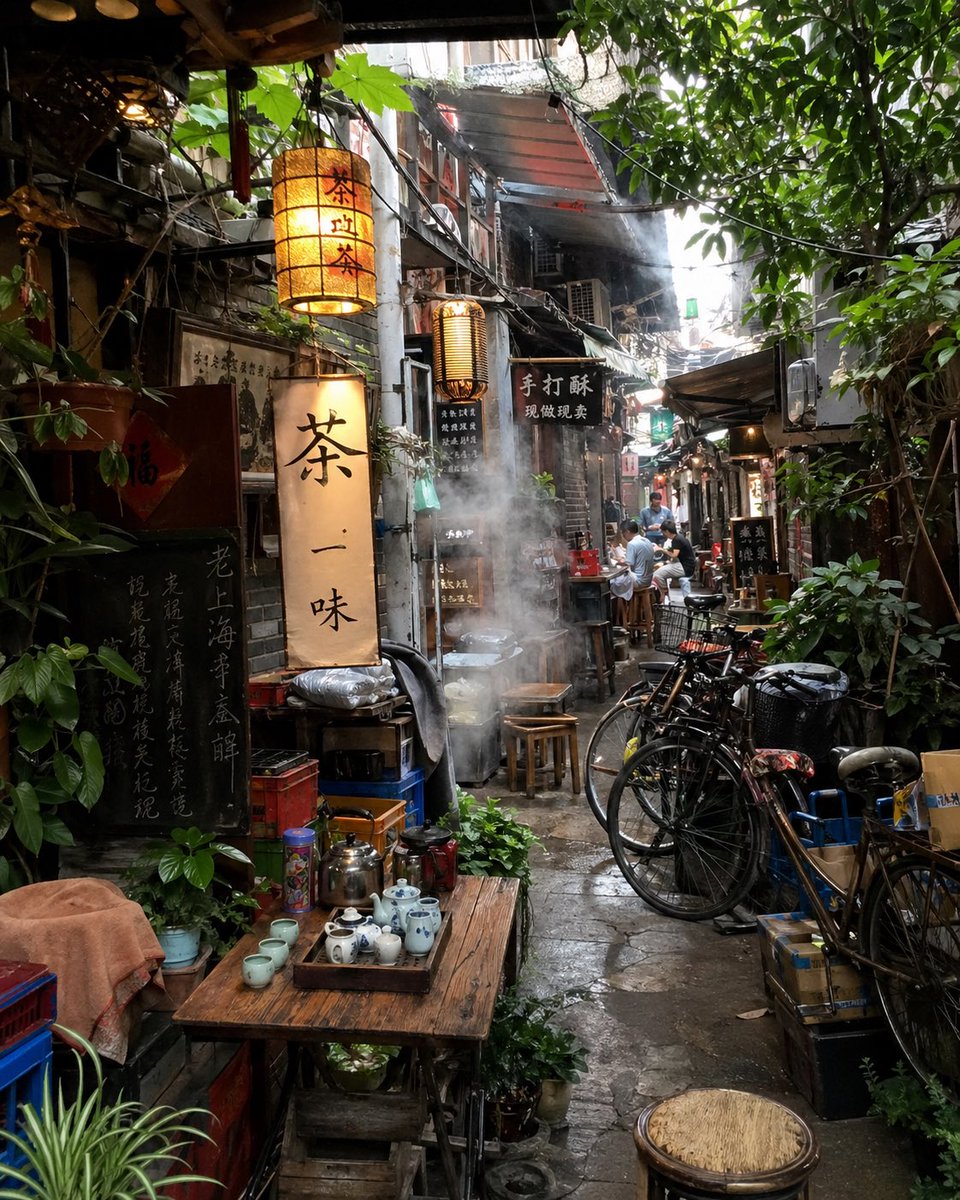
Atmospheric Tea Alley Street Scene
This prompt generates a richly detailed photorealistic hidden tea-lane alley scene, ideal for cinematic street photography, travel visuals, or mood-driven editorial art.
This is a GPT Image 2 prompt case for Landscape & Nature. Use the copy-ready prompt below to generate similar visuals, and review Awesome GPT Image 2 Prompts attribution plus commercial-use rights before reuse.
Free 1K preview
Generate one preview image instantly, no sign-up required.
Prompt
Copy-ready prompt
A photorealistic depiction of a narrow alleyway in an old East Asian town, featuring a tea house. The perspective is eye-level, combined with a slightly telephoto street photography composition. The alleyway is narrow and damp, filled with a rich sense of life: weathered storefronts, old concrete and brick walls, a complex network of overhead wires, metal awnings, exposed pipes, hanging signs, and lush greenery and branches extending from above and the sides. In the left foreground, place a rustic wooden table with tea sets, including 1 metal kettle, 1 teapot, 1 tray with several blue and white porcelain teacups and small utensils, and a few extra cups nearby; surrounded by potted plants and stacked containers. Above and behind the table, hang 3 illuminated, vertical lantern-style signs with black calligraphy on warm beige paper, the largest reading “Tea One Flavor,” with other signs in a similar style, as well as several dark wood signs with gold or light-colored lettering. In the center of the alleyway, show plumes of white smoke rising from a pot or food stall, partially obscuring stools and the passageway. On the right side, arrange 4 bicycles neatly against crates, baskets, and a black trash can. In the depths of the alleyway, arrange 4 people casually sitting or standing around small tables and stools, adding a sense of scale without being distracting. The stone pavement should appear wet and reflective, suggesting recent rain or humid weather. The lighting is soft, natural daylight streaming in from a bright exit at the end of the alleyway, interwoven with the warm glow of the lanterns, creating a cinematic contrast. Emphasize texture, realism, spatial depth, a slight haze, a documentary-style realism, and the cozy feeling of a hidden tea street in {argument name="city style" default="an old Chinese lane"}.Prompt variables
Editable argument placeholders found in the prompt, with their default values.
Best for
- - Landscape & Nature visual exploration
- - Image generation and reference-image edits
- - Reusable briefs that keep source attribution visible
Change these parts
- - Subject, product, character, or scene
- - Aspect ratio, camera, lighting, and background
- - Brand, text, color, and output constraints
Recommended model and settings
- - Model: gpt-image-2
- - Input mode: Text to Image
- - Aspect ratio: source
- - Commercial status: review original source
How to use this prompt
- 1. Copy the prompt and preserve its structure for the first test.
- 2. Replace the subject, context, and publishing channel.
- 3. Change one camera, lighting, or style variable per iteration.
- 4. Inspect the output, source, text, and rights before reuse.
Limitations, source, and reuse cautions
- - Generated output is an editable draft, not factual, legal, or rights evidence.
- - Review the linked source, people, brands, logos, text, and third-party media before commercial use.
More cases in this category
Prioritized by category, input mode compatibility, quality, and lower risk.
Reuse and source notes
Use this prompt safely after previewing the case.
- 1.Copy the prompt or open it directly in Dovoo with the generation button.
- 2.Adjust variables, aspect ratio, and reference images for your own use case.
- 3.Before publishing or paid usage, verify source rights, attribution requirements, and brand or likeness risks.
Can I use this prompt commercially?
Commercial-use status is allowed. Review the original source, license, brand constraints, and legal requirements before paid usage.
Where does this case come from?
This case is imported from Awesome GPT Image 2 Prompts; keep attribution visible and check the source URL before reuse.